


apostolakisl
Members
-
Joined
-
Last visited
Everything posted by apostolakisl
-
Can you set the temp interval or is it predefined? I could make this work just fine if I could set it to something like .5 degrees F. Anything that takes a replaceable battery can be "hot wired" to an external power supply, I have done this many times, sometimes more invasively with soldering and whatnot, but usually I just cut a piece of dowl wood ~1/8 inch shorter than the length of a AA or AAA battery and drive screws into the ends that I use as screw down terminals for wires. I run the wire out a small notch I make in the battery door and connect to an external power supply.. For example, is something uses 2 AA batteries in series, I just put one screw in the end of each of 2 dowls and arrange the dowels such that it provides the 3v across the two correct end points. Then I plug into a 3v power source. 3v power supplies aren't so common, but they exist. If it is a 3 battery setup I will usually use a 5v power supply.
-
. I have 10 wireless tags and have never had to physically reboot any of them. I must be on at least 10 years on the oldest ones. I have had to do a "reset states" a few times. Though it has been a long time since that has been needed. Not sure if wireless tag changed something or just random timing. 4 of these are inside walkin coolers which are substantial 6 walled metal boxes and the signal gets through. I have all of them set to 30 second updates which gives me the resolution needed to track compressor and evaporator behavior precisely. Dealing with the refrigerator repair guy trying to tell you he fixed something and being able to prove he didn't has been very valuable.
-
OK. I really don't have any issues with wireless tags, except not working with ISY anymore, at least the one hub. I think I am going to hold off. Changing batteries once per year is really something I am not interested in doing. I have lots of these in various locations and hooked them up to USB specifically because I had no interest in running that situation down. I have two other hubs in other locations that are still sync'd to ISY and, provided nothing happens to PG, they should stay that way. Hopefully this authorization issue will get worked out at some point.
-
Perhaps. I have all of my wirieless tags on usb power so that isn't an issue. I have on occasion had issues where I had to reset the wireless tags for whatever reason which was annoying. I haven't had one of those issues in quite a while, though, so perhaps they fixed something in the firrmware. EDIT: I have the wireless tags set to 30 second updates which with it on usb power is no issue. I really like having the 30 second updates as I use these to monitor walkin fridges and freezers and having that smooth non-skipping temp graph has been very helpful in diagnosing issues. Will yo-link do resolution like that? And if so, will that kill the battery? I see they use 2x aa or aaa which is 3v. So I can't just plug them into the USB POE adapters I'm using for them now. I guess I could stop using POE and just plug 3v into the cat6 wire at the source and run that 3v directly into the battery terminals inside the units, but that is a lot of jury rigging. I also really like the wireless tag graphing they do on their app and website. Does Yo-link have all the features for zooming in/out changing scale and whatnot like wireless tag?
-
Seems to have fixed it, but I had to clear my browser cache. Initially I was getting a 404 error.
-
I can see my programs, but like the others, node status is all empty.
-
I have the same thing on a Polisy. Added Sensibo node on pg3x and it shows up 3 times. I deleted and readded the node and same thing. I rebooted polyglot and same thing. It wasn't until I rebooted polisy that the issue corrected.
-
I would get yourself a spare PLM. The caps aren't the only thing that fails on those older PLM's. Having a spare PLM will prevent delay should your PLM (when your PLM) fails. You wouldn't want to have your PLM fail and discover that the PLM's are on backorder or something.
-
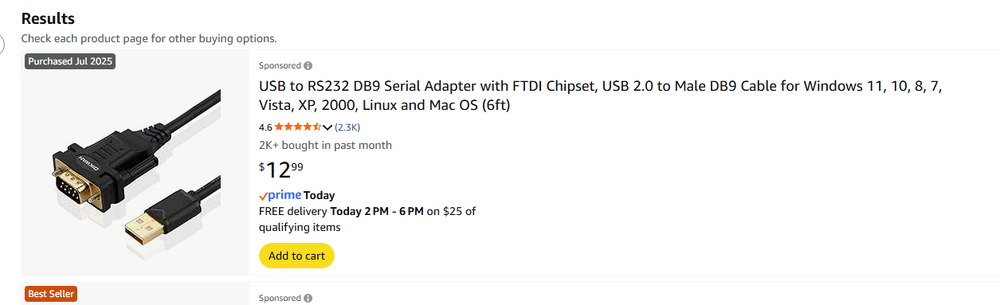
You aren't so much migrating as you are replacing. You aren't going to have both running as you migrate over from one to the other. This should be thought of as a remove and replace. I don't know anything about the 2413UH. It is the "H" part that is unusual and I'm not sure how that will come to play here. But I would not use it. I would continue to use your same PLM, otherwise you will need to re-write links to your entire network and PLM. Get the cable that converts the rj45 on the plm to usb or If you have the DB9/rj45 that came with the PLM, then I would just get the device I linked from Amazon, it is cheap and comes fast and works exactly as it should. You don't need to do anything to your 994 except back it up. Once it is backed up, you are done with it, no need to change any settings on it. Just unplug it. Your Eisy will be on DHCP by default and actually it doesn't even allow a static IP assignment. I would suggest you use your router's DHCP assignment such that it assigns your Eisy the same IP that your 994 was on. It may not matter, but if you have any other devices that link to ISY by that IP address, you won't have to reconfigure them. Also, with a static DHCP assignment, your Eisy will always be given the same IP making it easy to find on your network should you need to SSH into it or manually enter the IP address for whatever reason. Routers do generally keep giving the same device the same IP even if you don't reserve it, but not for necessarily. If you reserve the IP, it will 100% for sure. Typically, if you only have an Insteon network, it really is just a matter of backing up 994, removing it, booting up Eisy with the same PLM you used on 994, and then restoring the backup. You may need to resave network resources if you have any of those, that was something we had to do after updating the eisy firmware to 6.0, if you start right from 6.0, you may not need to. If you have polyglot running on a rpi, you will need to reboot that and I believe you need to change the port number to 8080. Assuming you told your router to use the same Ip as 994, you can leave that setting. Eisy has PG3x built into it, so you may choose to migrate polyglot to that, but you don't have to. PG2 is no longer supported so eventually as the world changes, you will likely need PG3. Finally, if you use the portal, you will need to add the eisy to your account, and then move your subscription from the 994 to the eisy.
-
Sorry, you're right. It is polisy that uses the db9.
-
He must already have the Insteon supplied serial cable with rj45 and db9 with correct pin out. How else would a 2413s connect to a 994? That cable combined with the cable from Amazon works, I am using it right now. And it is same day delivery, at least for my address.
-
You can use that one or you can use one that converts usb to DB9 and continue to use your current wire. That is what I did. Amazon shipped same day, didn't want to wait.
-
Just had a frustrating time with Google Home not wanting to connect to UD. It had been connected with my Polisy and when I moved over to Eisy it lost the connection and would not reconnect, often times giving no error, it just closed the login screen as if I had never logged in. The solution was simple, just uninstall and reinstall Google Home. Of note, the settings I had in Google home were not lost doing this. Also of note, I have two ISY's on the account. If you want Google Home (and Alexa) to see both ISY's, go to the far upper right corner of the portal web page under profile and select Use All ISY's for Google Home and Amazon.
-
My other eisy works with its current configuration already in place (different wireless tag account as well), but it sounds like if I ever lost that and need to reconfigure it, I will lose that as well.
-
Am I the only one? Has anyone else successfully authenticated wireless tag recently? I tried creating a new username and associated the same tag manager to that username and still get the same errors. Wireless tag shows it is connected and has the correct LAN address of my PG, so it is receiving the correct info from PG authentication, but on the other end, PG is not receiving the correct info or is failing to accept the info despite it being correct. I have tried this on both PG2 and PG3x running on different machines.
-
I see this also with the virtual device node. I am getting 0/1 for off/on instead of off/on.
-
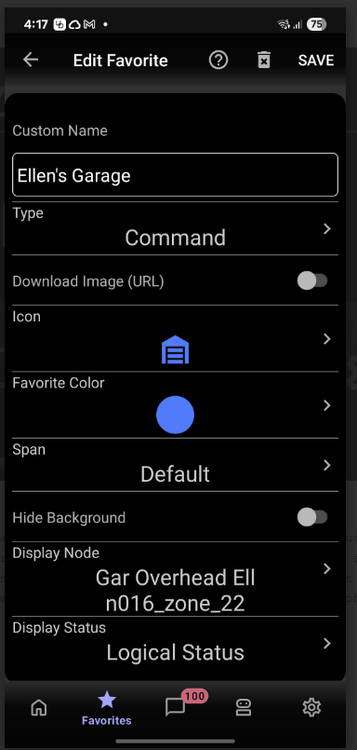
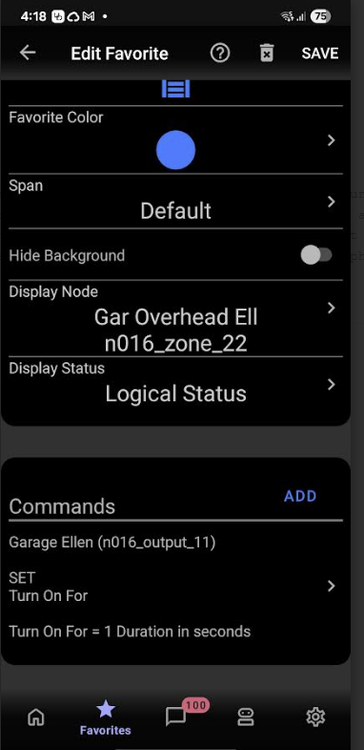
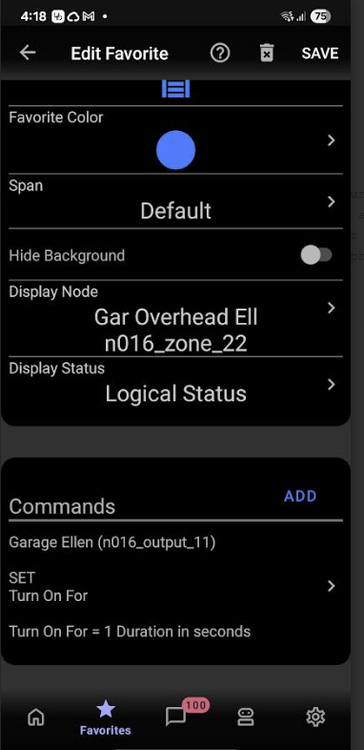
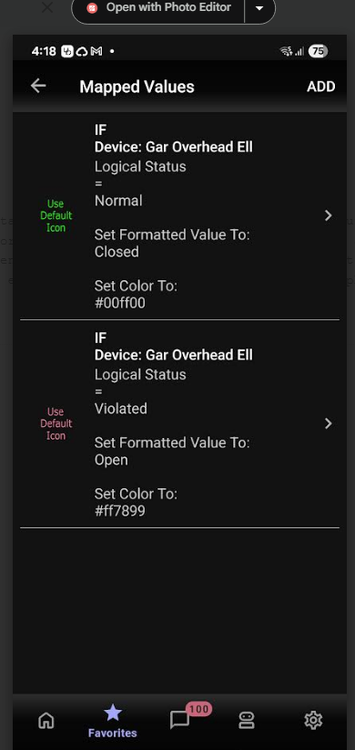
I have an Elk alarm that I physically wired the relay into the garage door opener, so if I turn the Elk relay on for 1 second it is like pushing the button for 1 second. An IO linc would work the same. This is how I set it up. I also set the icon to be green when the door is closed. Hitting the button on UD mobile is the same as hitting the button in the house for 1 second. I do not have a "close" and "open" button because they don't work with garage doors that are already in motion. If the door is closing, it will still register as open. I suppose you could put a delay in that waits for however many seconds your garage door takes to close before testing if the door is closed, but then it will delay every time you try to close the door.
-
What does the program that controlled this look like now?
-
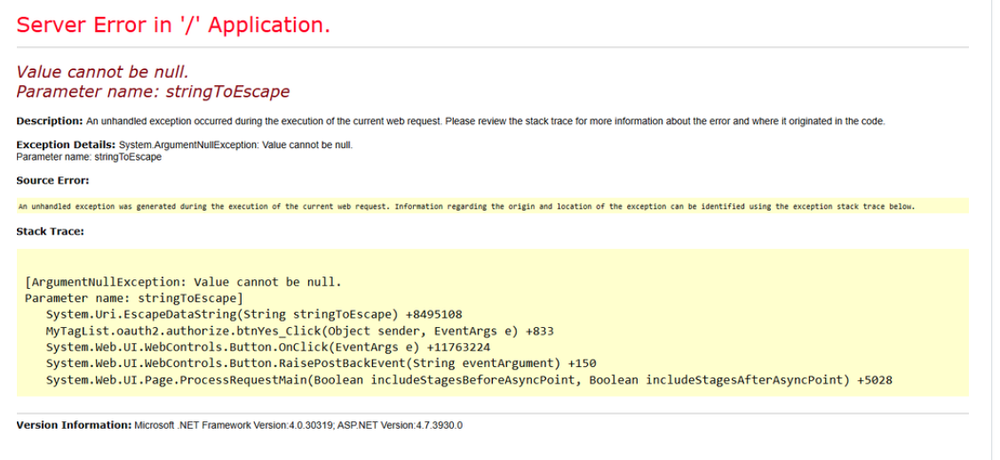
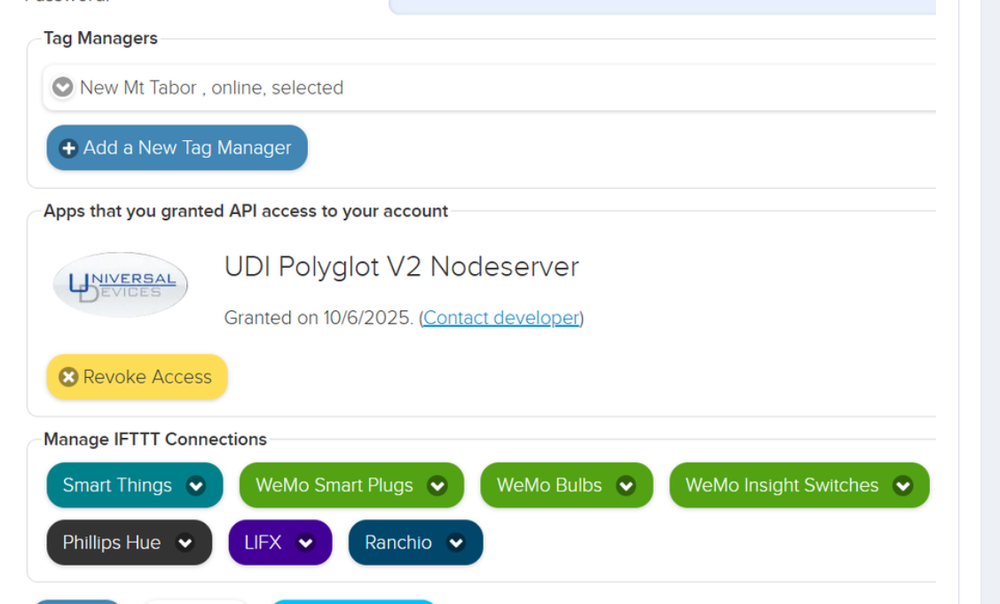
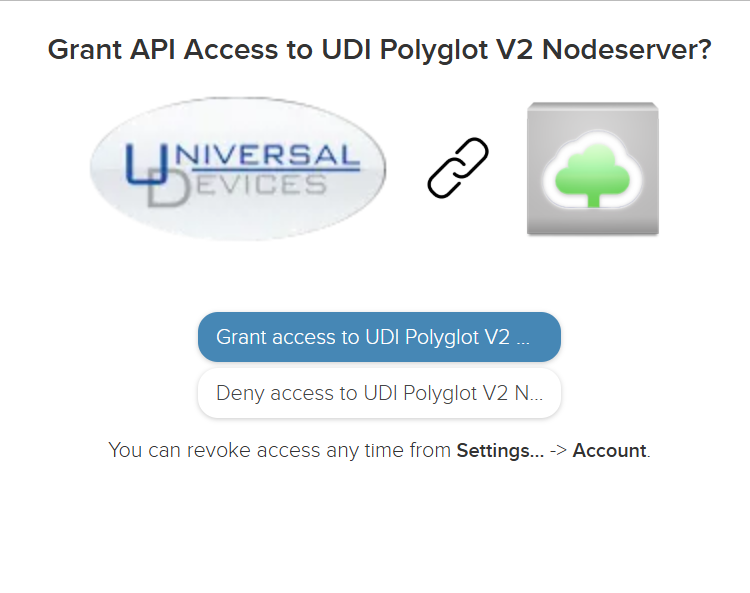
This has been going on for a while. I have tried installing wireless tag via pg2 and pg3x and it is the same result. I have tried creating a whole new account with wireless tag to see if it was a quirk with the account and it didn't fix it. The wireless tag account says that authorization has been granted. But the nodeserver is not getting access. It gives me an error when I authorize UD to access wireless tag. Despite the error, wireless tag lists UD as having access, but like I said, the nodeserver denies that it has access. This is the error message that comes up after I grant permission. Despite the error, wireless tag lists UD as having access I tried creating a new user account and I get the same result. I have revoked access and regranted it multiple times and each time it is the same. When I try to authorize, I get the following screen. I click to authorize, and then I get that error screen. If I click to deny, I also get the error screen with just one word different. EDIT: Also, this used to work. I had this same wireless tag account linked for years. Something happened and I reinstalled the node and this is the result.
-
Looks like you are using roughly 3gb out of 50 total. 50 is a bit of a weird number, maybe it is a 64gb drive and they aren't using all of it? But like Guy said, I wouldn't worry about it. I doubt you will ever need more than 50gb. I believe if you follow the guy on the youtube video posted through the zpool list command it will tell you how big your drive is and how much of it is unallocated.
-
For whatever reason, I logged on this morning and now it is connected. ??? Didn't do anything between then and now.
-
-
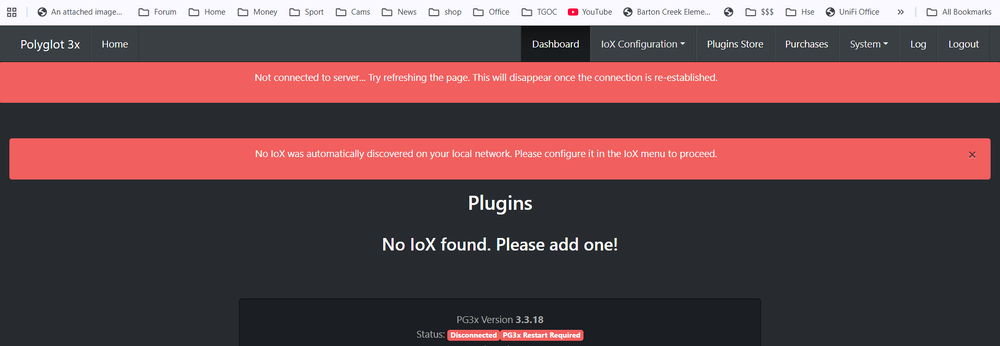
Updated to polisy from 994. Initially 5.9.1. PG3x showed up fine. Updated to 6.0.0 and now pg3x says no IoX discoverable. Of course not only is on the same network but is on the same machine. Under IoX configuration tab it lists no IoX's and trying to manually add it doesn't work either.
-
I'm not positive on this, but I think those images could probably be loaded on "generic" hardware and UD is trying to keep them under wraps. Whatever the partitioning is before you flash the drive is lost when you flash it using rufus and the images UD supplied. The ssd I flashed to I had already formatted to the full 128GB and after flashing it was only ~3GB of usable space and rest inaccessible. While I am sure all imaging software has its own details, the windows imaging software I use on a very regular basis creates an image with a partition size the same as the source. If you try to restore to a smaller drive, it just won't, and if you restore it to a larger drive, you need to do some partition expansion or it goes unused.
-
After I flashed polisy to 5.9.1 I only had 3GB on my drive. I didn't know it at the time because I never checked, did think I needed to. I then tried upgrade packages and it bricked it. Then when I put the drive back onto my windows PC I discovered that the partition was only 3GB. I flashed it again, and once again, 3GB. At this point I did the above youtube instruction and it expanded my partition to 120GB. Then I did the "update packages" command, it worked correctly. So my polisy is now on 6.0.0. EDIT: Of note, after it updated to 6.0.0, polisy was using roughly 6GB of drive space, so I suspect your previous update packages would not have had enough room. Surprised it didn't brick like mine.


