


apostolakisl
Members
-
Joined
-
Last visited
Everything posted by apostolakisl
-
Curiously, you didn't even need to change anything. When I first discovered that messing with node installs screws with programs, I, like you, initially thought you had to actually change something to get an update to put the program in queue to resave. But somehow, probably by accident, found that just hitting "update" with zero changes puts it in the queue to be resaved. Resaving resets everything. Restarting IoX also resets everything, but if you only have a few programs, it is a lot quicker to resave than waiting for a restart to finish.
-
Updated the plugin to now include native support of pentair globrite lights connected to intellicenter. Also updated intellichlor to be configurable from IoX on intellicenter pools that don't have intellichem automatically managing intellichlor. That is a lot of "intelli" to type.
-
You should be able to just restart iox. The nodes should have the exact same address as before so they should re-associate with the programs. If you only have a few programs, it is easier to just open the program (this works from java admin con, not sure about the eisy ui), click on any random line of the program, hit the "update" button at the bottom (don't actually change anything), which then tricks java into thinking the program has been updating and makes it available to resave. The act of saving it reloads all the lines of the programs and it should plug the wireless tag back in again.
-
It would be really nice if you could have alternating lines of slightly darker/lighter so you can follow across the page more easily. Or maybe very faint lined pages, like an excel spreadsheet, but not quite so obvious.
-
After migrating, it appears you also have to either resave any program referencing a tag, or restart iox.
-
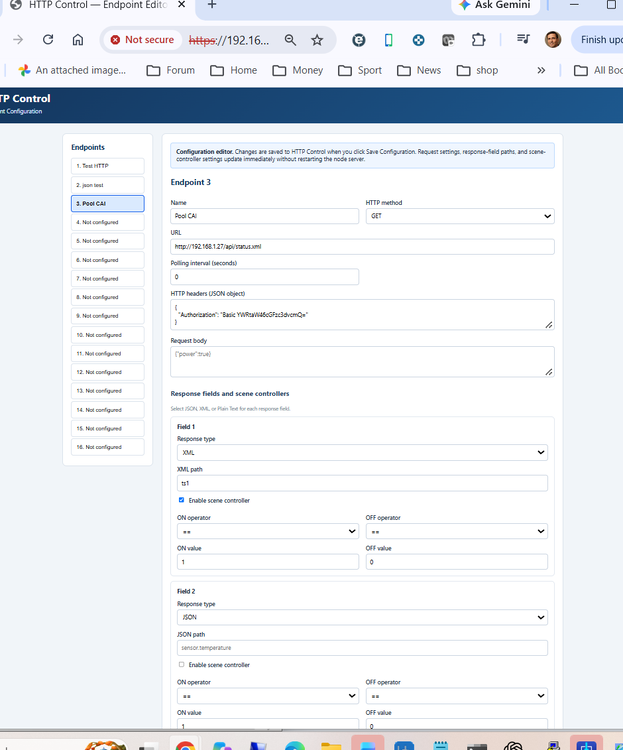
Just updated the plugin to now be configurable from a nice html interface. No plugging in all kinds of parameters and values into the plugin config page. Also added xml to parsing.
-
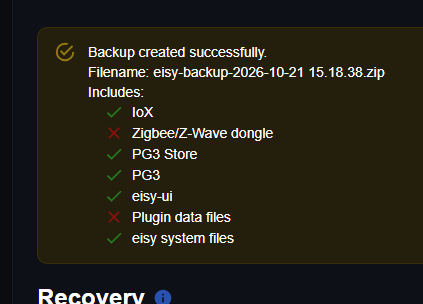
Why do have an x for my plugin data files? Currently, I only have locally installed plugins using the new eisy plugin section, do local plugins not get backed up? I am only using the plugin section at this point for plugins I have created, I have not yet started migrating my purchased plugins over. Also, would a restore put all the plugins into their slots plus configuration files, or just configuration files?
-
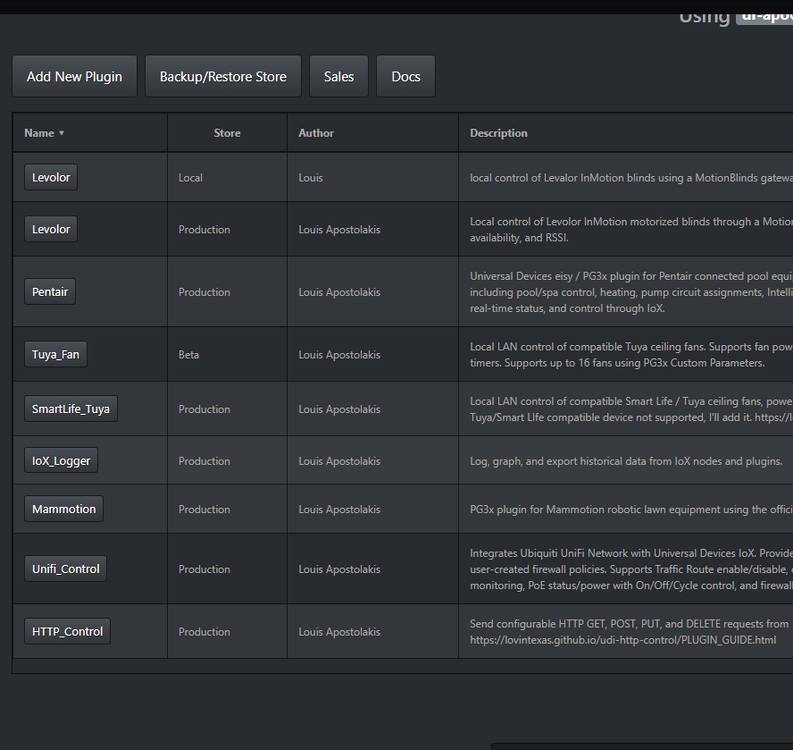
What is happening with the various backups? PG3x plugins have their own backup section. I don't see any backup section under the Eisy-UI plugin section. Backing up the entire Eisy UI shows me this. Where exactly do the EisyUI plugins get backed up? It looks like not here based on the red x. And by data files, do you mean just the configuration or the entire plugins. Where do local plugins in my development section fall? If I need to restore the entire eisy, will it put all my plugins back into the correct slots with all the configurations? And what exactly is getting backed up in the old developer section when I do a backup? For some reason levolor is listed as a local install here, but it also shows up in the new eisy plugin section, which is where it is currently running from. Perhaps I did a local install here and then started using the new (beta at the time) plugin section.
-
We have an official thread for this plugin. HTTP_Control basically can be used as a structure to build custom plugins. If you have some device that is a one-off or otherwise no one wants to make a plugin for it, and it accepts get/post/put/delete requests and responds with plain text or json responses, then you can use http control to create IoX nodes. It is similar to network resources but adds the fact that it creates nodes so sending requests can be done directly from scenes and then the bigger thing is that responses go into nodes and again can be used directly in scenes. Of course you can still use programs to control it. The biggest advantage over network resources is that responses are accepted and usable. The simple example is a thermometer that you make into a thermostat. You can send a request from a node and get a response that then goes into a node. Within the plugin configuration you set certain values to be "on" or "off" allowing for the node to turn scenes on or off, or in the case of a thermostat, perhaps a heater or cooler. You might say above 38 is "on" below 35 is "off" for a fridge., Between 35 and 38 are left alone as hysteresis zone,.
-
We have an official thread here for questions comments regarding Unifi Control. The plugin integrates Ubiquiti UniFi Network with IoX. Provides monitoring and control of Traffic Routes, selected network clients, switch ports, PoE ports, and user-created firewall policies. Supports Traffic Route enable/disable, client online and blocked status with Block/Unblock control, switch-port link and speed monitoring, PoE status/power with On/Off/Cycle control, and firewall policy enable/disable.
-
@aca2b2 Are you using intellicenter or are you directly linked to the Pentair Color Sync Controller? I am testing with a direct connection as I don't have intellicenter. If you turn the lights on/off or whatever from IoX, it should update immediately. If you change it from the app or some other means, you need to wait for the polling interval, which defaults to 30 seconds. EDIT: I see from your other post you are using intellicenter and Globrite lights. I suspect the issue is that the plugin is designed and tested to work with Color Sync controller, both through Intellicenter and via direct link to Color Sync. The API is probably using the same commands as Color Sync commands, but not reporting back using the same format as Color Sync. I'm sure I can work it out and add that, but it would require you giving me your Intellicenter username and password.
-
This is a plugin to link your Mammotion lawn mower to IoX. This is off of the public API. It can do most all of the important stuff, but doesn't have everything. That is because the public api doesn't expose everything. While people have reverse engineered it, Mammotion warns you that if they detect your account hacking in to the non-public stuff, they can cut you off, and apparently have actually done that to some people, so public it is. Plus my first feeble attempts to break in failed and I figured it was just a bad idea anyway. The Mammotion plugin also detects pool robots, but the public api supports basically nothing for them except online/offline. Not sure what good it would do to have IoX control it because you can't control a pool robot when being under water cuts it off from wifi. It might be nice though if it reported state of charge, so you could know if it was done charging. Maybe someday. If Mammotion exposes more features to the public API, I'll likely add them.
-
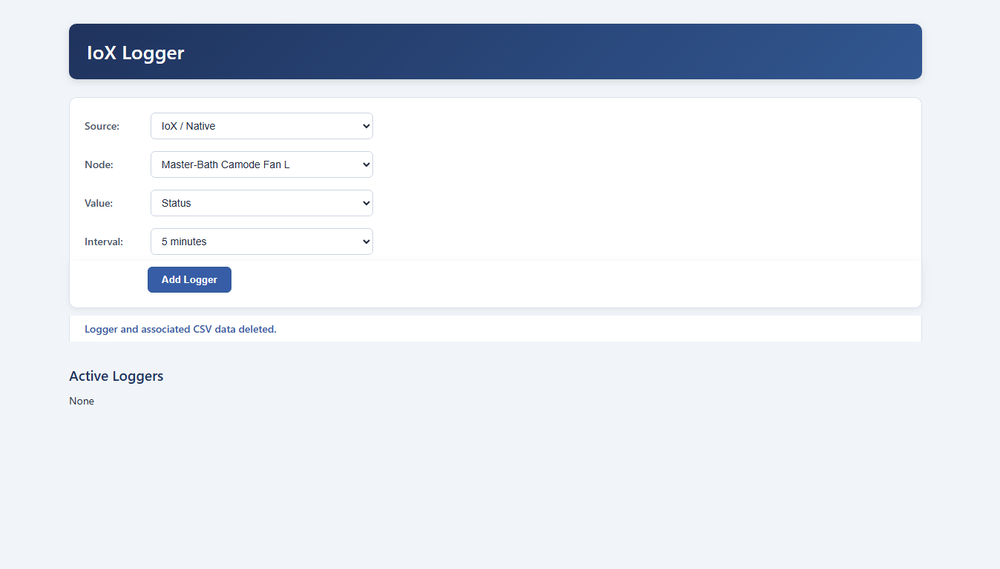
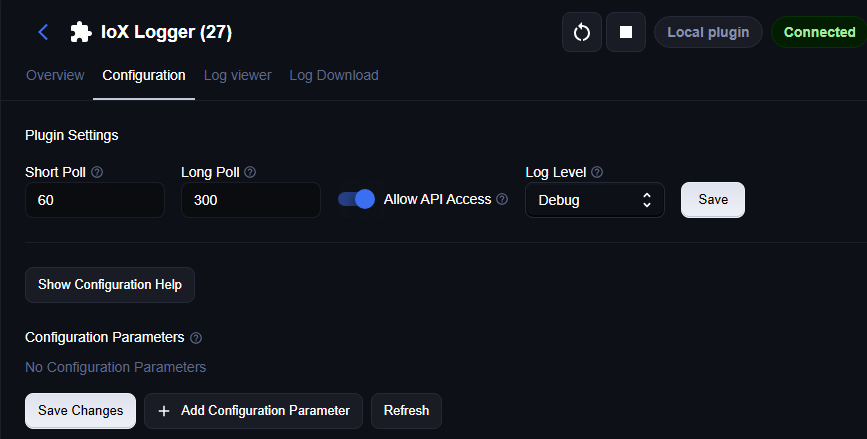
This is the official thread for any questions or issues with IoX logger. IoX logger is a plugin that lets your Eisy (or probably Polisy) host an html interface that lets you choose any node on your IoX and log it at various intervals of your choosing or log on change. It has a rudimentary graphing function built in and you can download a csv file for fancy analysis in Excel or similar. The interface looks like this: To access you go to your IoX LAN address port 8765. Setting it up requires that you give it API access in the configuration page of the plugin. Don't forget to enable API Access when installing it and be sure to hit the save button to the right of that, not at the bottom.
-
@Javi What is the logic of doing away with a purpose built app for phones? Seems like every other company out there tries desperately to get you to install their app rather than use the web interface.
-
They were on Amazon just a few weeks ago. But it appears they sold out. Makes me think someone found some new old stock and put them up for sale and sold out. https://www.amazon.com/WebControl-Network-IO-Controller-Programmable/dp/B00U31CWEI/ref=sr_1_1?crid=4AUF0TY4NDEY&dib=eyJ2IjoiMSJ9.xcHk94X2YIacks38tebFZw.lAqtFQCMZl1HHl0EujgwZIIYwGBIA2dEpC7fANS7QqY&dib_tag=se&keywords=cai+webcontrol&qid=1790443801&sprefix=cai+webcontrol%2Caps%2C124&sr=8-1
-
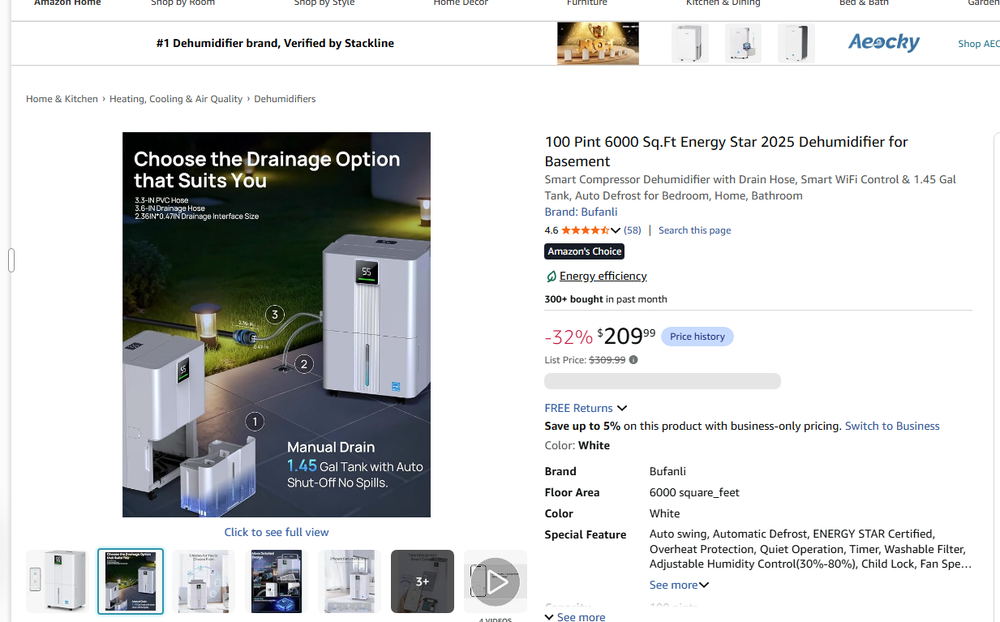
I do not own this dehumidifier but have added functionality based on interaction with another user who does. So, as you might imagine, development is a bit hampered. First draft is posted to the store, if you have a smart life or tuya enabled dehumidifier, give it a try and let me know. I expect to be making a few changes over the next few days to fine tune it, but expect it to largely work as is now. Below is the dehumidifier the plugin is designed around, though I suspect other brands will work identically. Looking at this Amazon site, you really have to dig deep to see that it uses the Smart Life App. I suspect that there are a lot of things that use Smart Life App that searching Amazon for "Smart Life" doesn't bring up because for whatever reason they barely say it. Only place I find it mentioned for this dehumidifier is in the video.
-
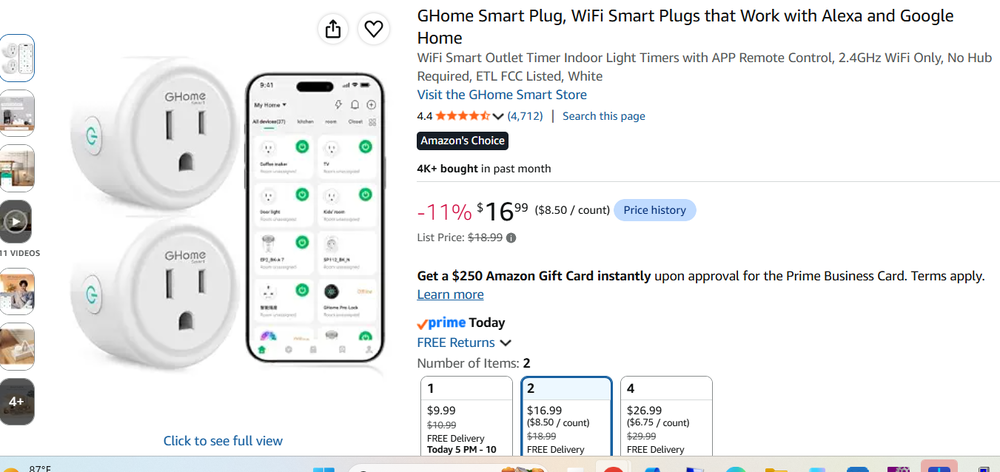
I have now added these guys. They are simple on/off wall warts. They are dirt cheap and conveniently small. I have seen them sold on amazon under a few brand names, they should all work the same, but I can't say for sure. These just do on/off, no energy monitoring or dimming or anything else. Again, this is all local control. IoX does not subscribe, it polls every 30 seconds. So if you change the status manually at the plug or using the app, there will be a delay of up to 30 seconds for IoX to show you the status change. Changing from IoX will give you an immediate update.
-
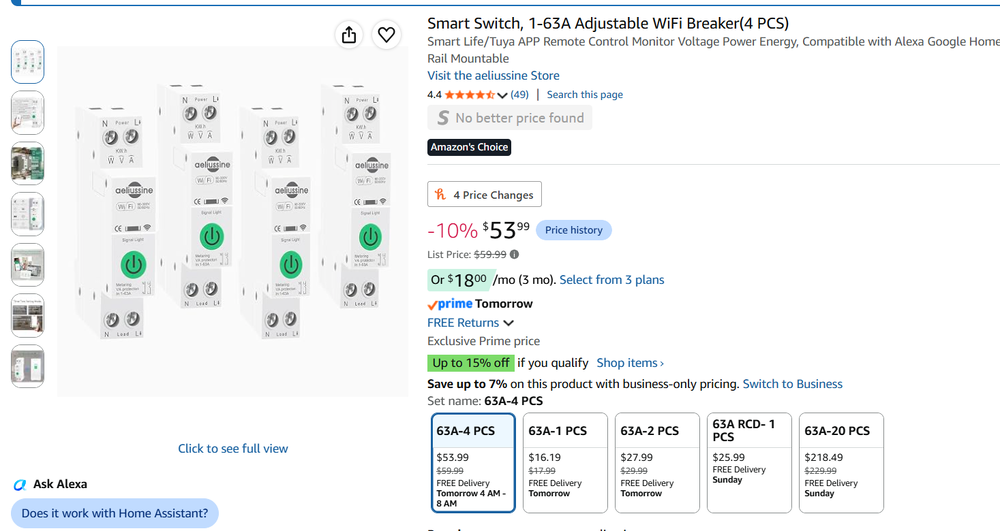
I expanded this plugin to include Smart Life compatible switches. I changed the name of the plugin to Smart Life/Tuya and dropped the reference to fans. These are din rail mounted switches that are shockingly inexpensive and at least after 1 week of use, pretty darn good. Smart Life App and Tuya App are two brands of the same product all using the same api/backend. They are only a bit over $13/ea when you buy a 4 pack. They monitor instant power, kwh consumption over time, amps, and volts. Of course you can remote control them on/off using their app or my plugin. You have to jump through a few hoops with these products to get all the parameters to enter into the plugin, but not that big of a deal. I put extremely detailed instructions at this url. https://lovintexas.github.io/udi-tuya-fan-pg3x/PLUGIN_GUIDE.html
-
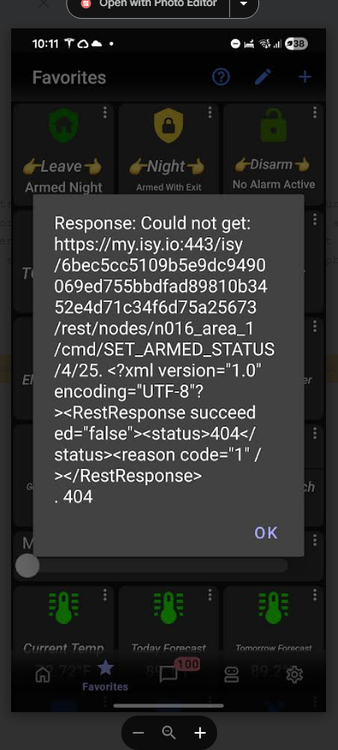
It i just one command, "set armed status night".
-
This is the same issue I see, this is arming my Elk panel. It succeeded in arming, but I got the message. It is a command type of favorite that sets the alarm system to armed night in this instance. Arming the system also triggers some programs in IoX to run.
-
You could try a different computer and see if it has the same behavior. Keep in mind you had more issues than just the Java console. I would look into what @Javi said.
-
I randomly get those errors on ud Mobile as well. The command succeeds, yet I get an error. Unlike the op, I am not consistently seeing it.
-
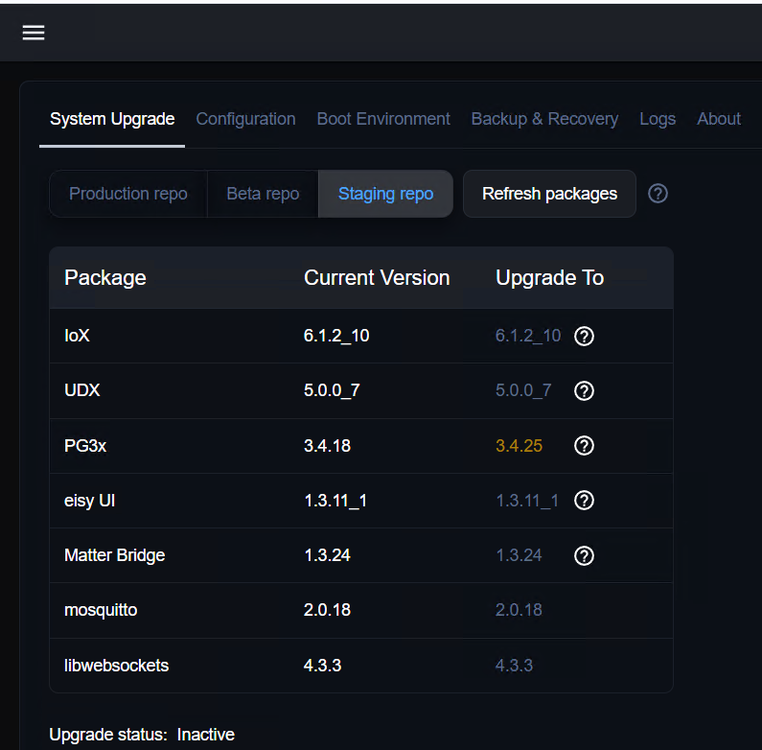
This is where eisy ui says I am after the ssh upgrade. It appears I am in the staging repo. I don't know that I need cutting edge features on this polisy, but I would like to be certain it keeps working smoothly, especially with UD mobile.
-
For what it's worth, I just updated a Polisy as per the above instructions and it seems to have gone off without a hitch. It took just minutes, maybe 10 at the most, probably less. The java admin console and eisy ui both open and everything looks normal. Going forward, I assume i can update using eisy ui update page? Or will polisy continue to require ssh?
-
Nothing is wrong with your router if you can ping the device using the lan address. I was under the impression that your ISY wasn't showing up on the IoX finder, not that it showed up and you couldn't click on it and get a menu. If you put in the LAN address, IoX finder finds it and correctly shows the firmware version and all, but when you click on the line it doesn't pull up a menu, well that isn't your router blocking it. It sounds more like a Java issue. Completely remove Java from your computer and reinstall it and then download the "start.jnlp" file from the forum. https://forum.universal-devices.com/topic/24381-iox-launcher/ None of this explains why you said your programs weren't running.


