


apostolakisl
Members
-
Joined
-
Last visited
Everything posted by apostolakisl
-
There are no clients connected to the ones that won't connect. The ones that will connect have no issue being connected to nodelink and pg3 at the same time and accepting manual queries. The ones with no cleints connected won't respond to manual query commands either. I tried connecting to only 1 thing, then if it didn't work tried the other thing. I agree with chatpgt analysis that the thermostats' public api engine is crashed/frozen/whatever word you want to use. It is clearly on but not responding to anything but simple commands.
-
I just noticed in nodelink that the two t5800 with dongles that aren't connecting are reporting the thermostat type and firmware to nodelink. Nodelink shows that info, but it does not show any data. I did a curl query to one of the thermostats that doesn't connect and the same to the one that does, and the one thermostat gives a response, the other doesn't. It seems as though the local api is off, despite being on. C:\Users\apostolakisl>curl 192.168.3.89:80/query/info {"name":"AHU3 153434240000000000bby","mode":3,"state":0,"fan":0,"fanstate":0,"tempunits":0,"schedule":1,"schedulepart":1,"away":0,"spacetemp":73.0,"heattemp":67.0,"cooltemp":76.0,"cooltempmin":35.0,"cooltempmax":99.0,"heattempmin":35.00,"heattempmax":99.0,"setpointdelta":2.0,"availablemodes":0} C:\Users\apostolakisl>curl 192.168.3.127:80/query/info C:\Users\apostolakisl> CHAT GPT said this: What’s happening internally on your Venstar T5800 is likely: HTTP connection accepted Request handed to handler thread Handler tries to process route (/foobar, /query, etc.) Handler crashes / times out internally Socket closes with no response → curl shows empty reply 👉 That delay = the thermostat is attempting to process the request and failing, not ignoring it. chat gpt basically wants me to do a hard reset. it thinks the api subsystem is locked up. if that fails, do a factory reset. This is consistent with me having issues with other thermostats that somehow stopped having issues. @Guy Lavoie The SD card just needs to be between 2 and 16GB and Fat32 formatted. I use a micro SD and an adapter. You can download a tool from venstar that puts the firmware and any custom images you want onto the card.
-
Things did not go well. 6.0.4 to 6.0.5. Seemed to go well at first glance. But opening java ac takes forever. None of my insteon nodes populate. programs aren't running. Can't open java ac programs page, it times out and gives error. Can't open programs page from ud mobile, gives an error. Can't open eisy ui. It gets a response from eisy as evidenced by the non-secure icon showing open in the browser, then it just spins forever. I tried a reboot from an ssh session. That didn't fix anything. I also did a java update and deleted the cache and all which did not work (as expected since problems all around, not just java).
-
Initial testing would indicate yes. The one node populates several seconds before the other, but it does populate and previously it never populated without a query.
-
I have a similar issue with an Elk node. I have two garages that are monitored by Elk alarm. I set them both up to display on my favorites page. But only one of them ever populates without doing a query. The other always populates. They are identical to each other except for the specific Elk sub-node referenced. It has been like this for a very long time. If I close UD mobile and open it back up, the node is again not populated. According to google play store, I am up to date on ud mobile app. If I look at all of my Elk nodes, it seems hit or miss which ones are populated. What can I do about this?
-
No, you can't. But you don't need to set the on level to 0, just use the controller off button. Of course if you want it so that no matter what action you take at the controller, the scene turns off, then you would need to set on level to 0 for all devices. If it is a kpl, you can set it to non-toggle off instead. Isy used to let you propogate the settings for one controller to all of them, but they got rid of that many moons ago when they added non-insteon products. Apparently the logic broke when applying to node server devices.
-
I now have 3 connected Venstar thermostats. I just added a 4th, and it won't connect. This makes no sense. Two of the others also wouldn't connect, then one day out of the blue they started connecting. The 3rd unit discovered immediately. I do not understand this. I ask the thermostat to do a firmware update and it says it is already up to date. The others supposedly were also up to date. Perhaps some update is actually happening after being online for a while even though it says not? Two of the connected thermostats are t5800 with wifi key, and one is a t7850 with built in wifi. The 4th is also a t5800 with a key. All of them are connected to the Venstar skyport server without issue.
-
Speak for yourself. Texas time. . .
-
Just turn off DST and and use UTC-x hours. No need to pay any attention to the name of your time zone. Like I am in UTC-6. Personally, I am a fan of DST always. I didn't notice any issues with DST except that programs that run continuously looking for failed heartbeats all reported failed heartbeats at 3am. These programs all track thermometers and look for any change in the temp or humidity which restarts the program. They all have a wait time of 10 or 20 minutes and if no re-trigger of the if clause happens in that time, they send an email. So the jump from 2am to 3am was interpreted as no update in one hour. So I guess a wait clause is not a running timer but rather sets a start time upon starting and then loops back every cycle of a code and does some subtraction. Since 2:05 never happened, and the program triggered at 3am, it must do it that way. I would think that things like waits would run on UTC time and be unaffected by the displayed time, but obviously they use the displayed time. I would expect sunrise and sunset to always run on UTC and your latitude/longitude and therefore be unaffected by chosen display time. If ISY just ran on UTC time everything would work fine through DST switch except something scheduled to happen at displayed time between 2 and 3am.
-
The eisy-ui is stable, it is just not complete. It is not yet a replacement for the java ui. It is mostly just a place to view things, not program things. You can turn lights on and off and stuff like that.
-
What link doesn't work? The link I posted works. I just did a java update and used that link to reinstall iox finder last week. And clicking it today downloads the file, though I didn't try installing it.
-
I linked this page to my bookmarks and use it. It has never been changed and still works today since it was posted in 2018.
-
Iox finder would be perfect if it weren't for Java updates. You would load it once and be done. Any isy that it finds or you direct it to find (port 8080 or an isy on a vpn or vlan) would populate and be there indefinitely regardless of isy firmware current or future. But for some stupid reason java makes you redo it with every update. I just bookmarked the page for the start.jnlp link so I can quickly redo it after each update of java. I have not tried where iox finder lets you save/load your configuration. Probably that would let me not manually add back my off-site isy and port 8080 preference.
-
Must not have been using finder. The start.jnlp link must be used, not admin.jnlp. The finder can access multiple isy's on different firmware at the same time. For a while I had a 994i and Polisy at the same time with way different firmware. Clearing the cache is still an issue after updating java, not after updating isy. For local credentials you must manually add. Http://xxx.xxx.xxx.xxx:8080. If you let it automatically find your isy it will go through portal credentials. It really would be fine if it weren't for java updates. Seems like every windows update triggers a java update.
-
I believe that loads a firmware specific IoX launcher. At least it used to, perhaps that has changed. I have had issues with that in the past still getting messed up by cached Java stuff when firmwares change. Again, I haven't messed with this in a long time since I just keep using IoX launcher that I downloaded a long time ago that keeps working on multiple and updated versions of ISY firmware without needing any update to the launcher. The main issue I run into is after updating the actual Java app, not updating ISY. I also manage multiple ISY's at different locations over VPN's so I manually put in the IP addresses. Though you could also go to the ISY portal and copy the portal URL for your ISY and do it over the open internet. In short, either way works. I would suggest that he completely clear Java cache and applets to be sure that everything is starting off fresh.
-
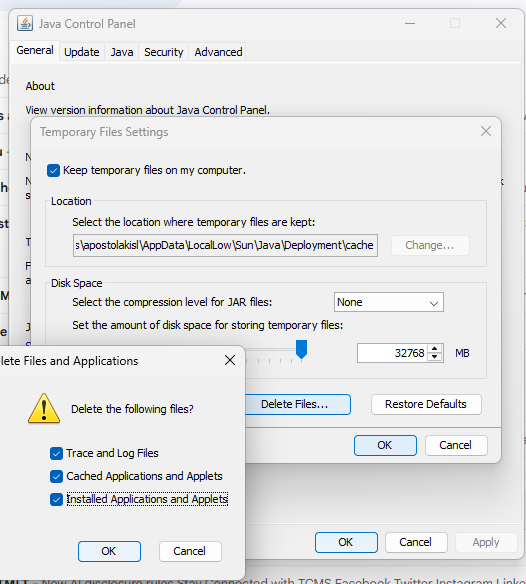
When you load IoX launcher on your desktop, it will find ISY automatically but it will only automatically give you the portal login. If you want to add the local option, click "add" and then type in the url. ie, http://xxx.xxx.xxx.xxx:8080 or you can use the https://xxx.xxx.xxx.xxx:8443 if you want an encrypted connection (I don't see the point when inside your lan). If you have your ISY across a vpn or on a different vlan, or you have auto-discovery blocked by your router, then you will need to manually enter the ip no matter what. Whether you use the local credentials or portal credentials, it doesn't matter, both work the same. And the login prompt will tell you which to use in case you lose track of what you clicked on. EDIT: This is where you want to delete all the java saved applets and configurations. This is very important. When you relaunch the start.jnlp you will get the iox launcher that autodiscovers the firmware and works across multiple firmwares of ISY. Generally, I have found that it will also not need to be cleared again upon further updates to ISY. But if it starts giving you issues, then just repeat this process.
-
Clear your java cache. https://www.java.com/en/download/help/plugin_cache.html. If you just type java in the windows search box you'll see the java admin as an option. Delete all temporary files and applets. Then download the following. https://isy.universal-devices.com/start.jnlp It will put the iox launcher icon on your desktop and it will always get the right version. Even multiple versions if you have multiple isy's.
-
Both units are working now. I don't know why. The only thing I know of is that we had a circuit breaker pop that caused the wifi AP and managed switch that these thermostats use to reboot. But I find it hard to believe that this was fixed by that. Everything else on those devices worked fine before and after and I was able to get responses on port 80 doing "curl" queries from the polisy.
-
Today, I tried hit "discover" again, and for whatever reason, it finds the t7850 thermostat. The one that was working with nodelink. Still not finding the t7800 with the wifi adapter. I have no idea why today it is finding the one thermostat when it wouldn't before. I changed nothing.
-
For what it's worth. I have been using gmail for at least a decade now and it still works just like always.
-
Yes, new Alexa is not so literal. If you say "all lights" it doesn't look for something called "all lights", it behaves more like a human you asked to turn off all the lights. I think it is a better approach, but it takes some adjustment. I find it much better since I no longer need to say precisely the words, I can just say something that a reasonable person would recognize. And it is way better for people who don't know the words at all. And you can throw in a bunch of extraneous words like "could you please" kind of language and it doesn't mess it up.
-
Not exactly, you had touse the portal when you exposed the scene to Alexa in the first place. But it is much simpler to expose your Insteon/ISY scene to Alexa as a light or a switch and skip the routines. There are two independent designations here. 1) What it is in ISY, 2) What it is in Alexa. The two do not have to be the same. Notice that, in the portal, when you expose a device or scene (or variable, or program. . ) to Alexa, you have the option to tell Alexa it is any type of thing you want, it doesn't have to match what it is in ISY. Anything designated as a "light" or "switch" in Alexa will respond directly to voice commands. Anything designated a "scene" can only be addressed in a routine. I really don't know why you would designate something as a "scene" to Alexa. Both scenes and lights/switches are allowed to be targets of routines, so it isn't that. I guess if you want access to a device from an Alexa routine but don't want any "spoken" to trigger it, then setting it up as a scene will do that. When you set the "spoken" for a scene, it really isn't even that, it is just the name of it, speaking its name to Alexa won't do anything.
-
This is screwy, but. . . If you have an Insteon/ISY scene and you want Alexa to control it as if it were a single light, you just tell Alexa it is a light when you set it up in the ISY portal. When you add the scene, you need to start from the scenes tab so the portal gives you a list of all your scenes to select from, but from within the "spoken mapping" setup page, select that it is a light in the Alexa category.
-
I changed the T7800 to https and set a username and password. Nodelink when set to http gave the error that the connection was refused. I changed to https and added the username and password and now the error is a timeout error. So it seems that the thermostat is accepting the https authorization but then ignoring whatever command nodelink is issuing to it. I can only assume that there is something going on with a firmware mismatch.
-
I just successfully added the T7850 to Nodelink.


