


apostolakisl
Members
-
Joined
-
Last visited
Everything posted by apostolakisl
-
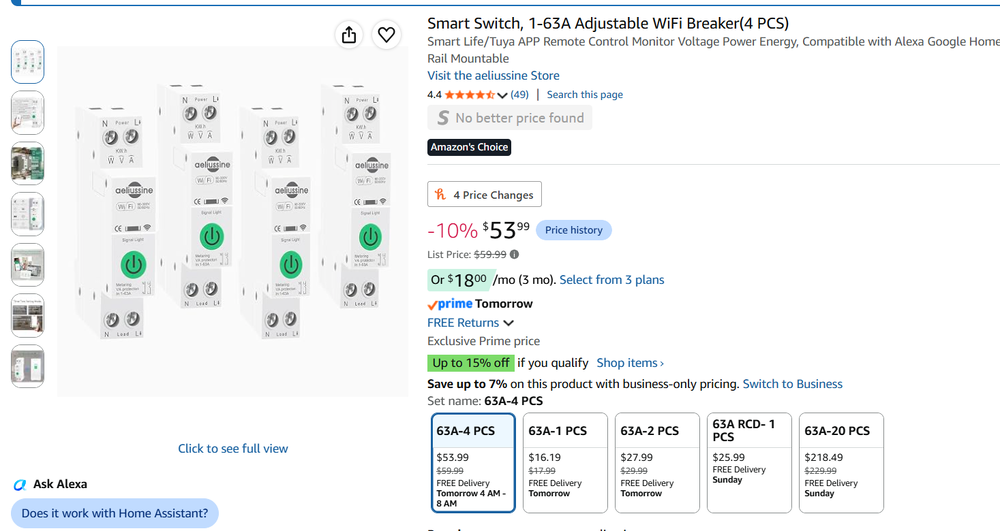
I expanded this plugin to include Smart Life compatible switches. I changed the name of the plugin to Smart Life/Tuya and dropped the reference to fans. These are din rail mounted switches that are shockingly inexpensive and at least after 1 week of use, pretty darn good. Smart Life App and Tuya App are two brands of the same product all using the same api/backend. They are only a bit over $13/ea when you buy a 4 pack. They monitor instant power, kwh consumption over time, amps, and volts. Of course you can remote control them on/off using their app or my plugin. You have to jump through a few hoops with these products to get all the parameters to enter into the plugin, but not that big of a deal. I put extremely detailed instructions at this url. https://lovintexas.github.io/udi-tuya-fan-pg3x/PLUGIN_GUIDE.html
-
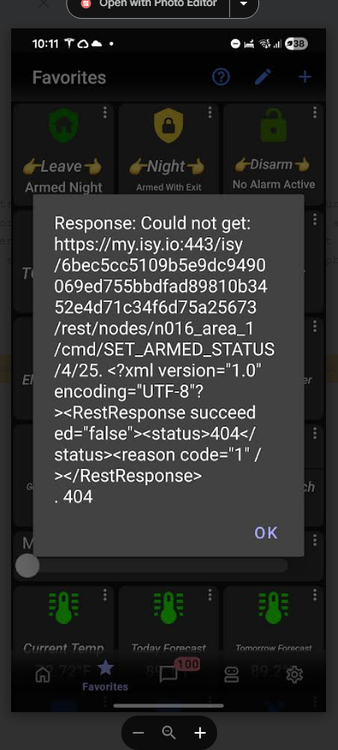
It i just one command, "set armed status night".
-
This is the same issue I see, this is arming my Elk panel. It succeeded in arming, but I got the message. It is a command type of favorite that sets the alarm system to armed night in this instance. Arming the system also triggers some programs in IoX to run.
-
You could try a different computer and see if it has the same behavior. Keep in mind you had more issues than just the Java console. I would look into what @Javi said.
-
I randomly get those errors on ud Mobile as well. The command succeeds, yet I get an error. Unlike the op, I am not consistently seeing it.
-
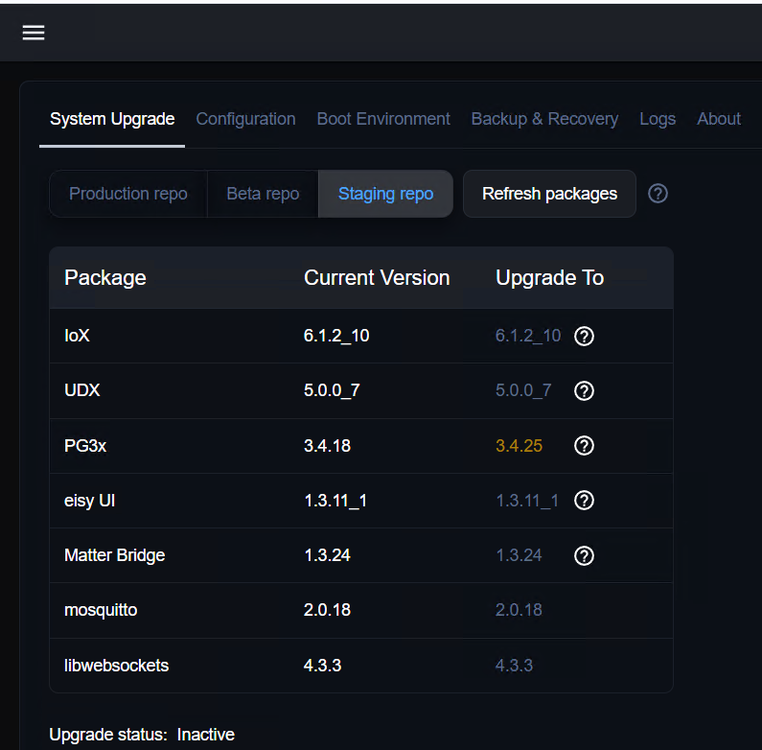
This is where eisy ui says I am after the ssh upgrade. It appears I am in the staging repo. I don't know that I need cutting edge features on this polisy, but I would like to be certain it keeps working smoothly, especially with UD mobile.
-
For what it's worth, I just updated a Polisy as per the above instructions and it seems to have gone off without a hitch. It took just minutes, maybe 10 at the most, probably less. The java admin console and eisy ui both open and everything looks normal. Going forward, I assume i can update using eisy ui update page? Or will polisy continue to require ssh?
-
Nothing is wrong with your router if you can ping the device using the lan address. I was under the impression that your ISY wasn't showing up on the IoX finder, not that it showed up and you couldn't click on it and get a menu. If you put in the LAN address, IoX finder finds it and correctly shows the firmware version and all, but when you click on the line it doesn't pull up a menu, well that isn't your router blocking it. It sounds more like a Java issue. Completely remove Java from your computer and reinstall it and then download the "start.jnlp" file from the forum. https://forum.universal-devices.com/topic/24381-iox-launcher/ None of this explains why you said your programs weren't running.
-
By WAN side of your router, you mean your public Ip address and then you have port forwarding setup? If that works, but being a computer on the same LAN can't see the ISY, then something is wrong with your router. You could also just ping your ISY from inside the LAN. Are you sure the computer you are using is on the same LAN? You don't have it on a guest network or some isolated network? And if your computer is on the same WAN as ISY, and you use WAN:port and have your router set with port forwarding, well that usually doesn't work. You usually can't bounce out of and then back into the same WAN like that. Typically you can only do that from a different WAN. Which would also explain why you aren't seeing ISY on your local connection. Another test, from your computer that is accessing isy, open a command prompt or powershell prompt and type ping xxx.xxx.xxx.xxx again where xxx.xxx.xxx..xxx is you LAN ip address of ISY. You should see 4 successful pings. If not, then you are either not on the same LAN (or VLAN) as ISY, or your router is doing something to block you.
-
By WAN address, do you mean using the portal address? Anyway, that would explain why UD mobile worked, probably you had it configured using the portal rather than a local connection. But if you are logged into the admin console, you can find your LAN ip listed in the settings section and try manually setting those into iox finder as I listed above. Did you set up your isy to have a static address in your router? Iox finder should find your ISY on its own, but if something is going on in your router, your router can block network discovery if configured to do so. I don't know how that would change all by itself, but maybe your router is getting flaky?
-
Are you able to log into your router and check to see an active connection and get the ip address? With the ip address, try putting http://xxx.xxx.xxx.xxx:8080 (substituting your ip address for xxx.xxx.xxx.xxx) into the java iox finder manually and see if it pops up with the unit being present. If so, obviously open it. Also, try using ssh to log into it. In windows, type "powershell" into the search box to open powershell. from the prompt, type ssh admin@xxx.xxx.xxx.xxx (again, subsitute your ip address) and then the password is also admin which it will prompt you for if is alive and responding at that ip. If you have apple, I don't know how to open an ssh session, but I'm sure you can google it. But again, I would take the earlier advice of a new power supply. I'm sure you have a suitable one somewhere in your house, just be sure it has sufficient amps. I forget what that number is, but look at your current ones amp rating and find one with at least that many amps. This is where power supplies fail, they peter out on the supply amps, so they may register 12v when under no load, but as soon as you start pulling a load, the volts drop. ISY can sort of work under these circumstances, which is seemingly your issue. Also, replacing the plm is likely to cause more issues than it solves. To properly replace a plm, you need to be able to log into ISY and tell it "restore plm" or all of the links will be wrong and that just confuses the issue more. A bad PLM would not prevent your from opening the admin console, so don't blame that on the plm. It would probably be better to boot ISY without any plm rather than the wrong one at this point. Again, my first thought would be a flaky power supply.
-
Might just ask the forum or chat gpt how to write the program.
-
I have IoX setup at my church controlling all the HVAC and lights. There are a bunch of people who I want to give access to the system, but setting them up is a bit of a hassle. No way in the world they are going to do a reasonably good job at setting up their own favorites. So, would it be a good idea to backup my own personal UD mobile, then create a UD mobile profile that is good for the church, then backup that profile and restore it to each person's phone? Then restore my own profile back to my phone. Also, do backed up profiles on an Android recover to an Apple?
-
good to see they are available again. The beauty of PLC is that it just never goes sideways on you, never in my life have I ever had to reboot a WC8. I thought they were done since several times I have looked for them and nothing for sale anywhere. And I bet AI can write PLC code like it wasn't nobodies business.
-
Further configuration to make most useful in UD mobile. I wanted to have 4 "radio" buttons in ud mobile that worked like the kpl buttons on my wall. I wanted to tap which ever speed and have that speed turn on and have the icon turn red. Press a different speed, and the previous icon goes back to blue and that one turns red. 1) Created 4 virtual nodes using the virtual node plugin. Set them as "switch". Named one each for off/low/med/high. ie, key 78 value switch, key 79 value switch, etc. Restarted the plugin. If the nodes don't show up in admin con, then restart it. Renamed the 4 nodes in the admin con to Fan off virtual, Fan low virtual, etc. 2) Added all 4 of those nodes to each of the 4 scenes as responders (you could set the one that is for that node as controller, ie high virtual switch as controller in high scene, if you wanted to control that switch and have it control the scene. 3) For each controller of the scene (ie, the primary scene, and the kpl button(s) controlling the scene), set the "on level" for each of the nodes to "off" except the virtual node matching the scene (ie, virtual node high is set to be "on" when the scene is on, all others are set to be "off"). Don't forget to do it for each controller. 4) In UD mobile, create 4 favorites, using the scenes as the display node, one each for each scene, set them as "command" type. 5) Add a command, which is to turn on the scene. 6) Change your display node to the virtual node corresponding to that scene. 7) In advanced configuration, set it to turn the node red if value equal to "on" (ff0000). I also had it set formatted value to "-". I added a second advanced configuration that sets the formatted value to "-" when "off". Now it just always has a dash, it doesn't show on/off which is confusing and unnecessary when the icon turns red when on and blue when off. 8) Finally I set the icon to be a fan. I would expect that if you set the virtual node as a controller for the corresponding scene, you could use that virtual node as the primary node in your ud favorite, but otherwise set things up the same. I didn't try that since I already had created the 4 favorites using the scene before realizing I couldn't get the 4 buttons to turn red when its speed was on.
-
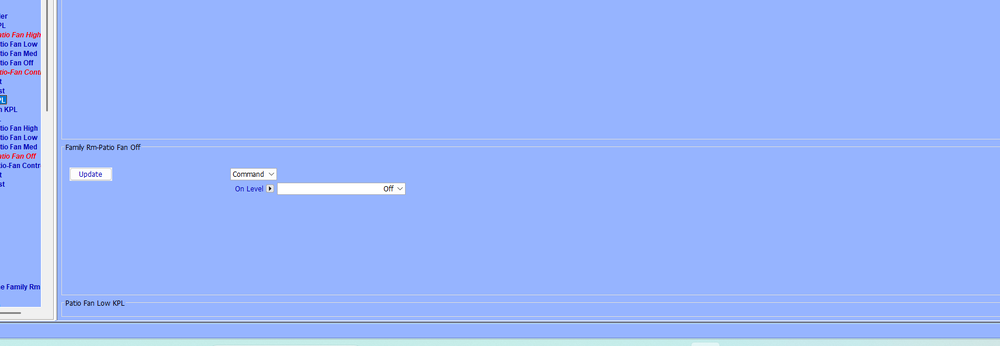
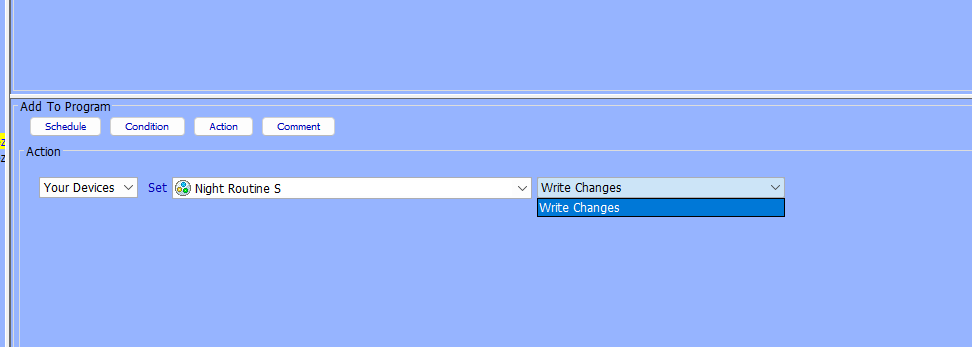
Just doing some programming using the java console. I know you are moving away from it, but something seems to have happened to scene management. If I open a scene on the admin console page, the control buttons (on/off/query) are gone. In addition, if I try to write a program to turn on/off/query a scene, those options do not exist. In programs already written that turn a scene on, it shows "DON", but you can't edit it or write a new program. In Eisy UI, I have those controls. In the screenshot, you can see that bottom section where those buttons would normally be, it is empty. Only option in programs is to write changes. This is on two different computers and having restarted Java console.
-
I have finally gotten around to really using the plugin. I thought it would be helpful to give example how to use it for fans in conjunction with a kpl (or kpls). 1) Create 4 scenes in IoX, one each for fan(s) low/med/high/off 2) Add all the tuya fans you want controlled by the scenes. 3) Set fan "command" to speed 2,4,6 for the low/med/high scenes respectively. For fan off scene , set command off for each fan. 4) Add each of the 4 kpl buttons to each scene, with the 1 kpl button in each scene as a controller for the scene that does its job. ie, in scene fan high, put kpl button high as a controller. 5) In each scene, click on the controller kpl button for that scene, and set the fan speeds accordingly and set the other kpl buttons "on level" to "off". If you are using multiple KPL's, do it for each of the two kpl controller buttons (one from each kpl). ie, in fan high scene, click on the red "fan high" kpl button, then in the menu on the right, set the "on level" for fan off/low/med to "off", set the fans to speed 6. 6) Set the kpl button toggle mode to "on only" for the 4 kpl buttons. To integrate with Alexa 1) expose the 4 scenes to Alexa, set them as "switches" 2) have Alexa discover (usually does it on its own) 3) create 4 routines, one for off/low/med/high. Create a spoken for each routine. 4) to each routine, add the correct scene. You need to use routines here because the scenes are designed to only ever be turned on. As a device on Alexa, Alexa could turn it off. So just like you set your kpl buttons for on only, you need to set alexa for on only using routines. Now Alexa will control one or more fans in parallel with each other and your kpl backlights will match the current state of the fan(s). This is particularly a good way to do it with multiple fans that you want to work together along with a fully sync'd KPL.
-
I feel like the login times out unusually fast as well. Though with auto-fill I am able to log back in very quickly and it opens to the page I was already on, so it is not that big of a deal. Unlike the java admin console that does not auto-fill, takes forever to load, and starts at home. But a "keep me logged in" button would be nice and it would be consistent with how many other similar websites function.
-
Hard to understand why you are seeing that. I am not, and I believe I am running the same IoX firmware.
-
I'm on _7 and I don't see that problem. I never saw a 2 hour delay issue, but I could have not noticed since a lot of the things I have run at specific times are more background things that just need to happen every so often, like water the flowers. The issues I used to have were 1) Sunset would skip a day 2) Programs running between midnight and 12:01:00 would double run. Both are fixed now.
-
Yes, I listed in my first post that it shows the correct next run time. But just because it says that doesn't mean it is going to do that. Also, it appears that programs scheduled for MN that were running twice are no longer running twice. I returned all my programs back to their pre-bug times and tonight will confirm it is fixed. But my test programs ran correctly last night.
-
yes, updated to that from _5 I'll know after sunset tonight for sure if it is fixed.
-
Did some bells and whistles on the plugin. After you initiate a blind position change, the plugin will poll every 10 seconds until the target is met or it times out at 3 minutes. So it won't real time track the status of your moving blind, but you won't have to wait up to a whole minute for the regular polling. Be aware, if you change the blind position using something other than IoX, it will still poll every 60 seconds (like the Levolor phone app or Alexa via the Levolor Alexa skill). Side note re Alexa, you can expose the IoX Levolor node to Alexa and let Alexa control the blinds using IoX as the path or you can use the Levolor skill. Google Home should be the same. If you choose the IoX node, then it will poll every 10 seconds until target met. I also added different ways to view the blind status. You can set UD mobile to display the one that suits your desire. I find that using the UD mobile slider widget is the most practical control interface, unless you never use a mid position. The com between the blinds and the hub can be flaky. Commands consistently go through, but the blinds don't always manage to update the hub with their current status. Nothing I can do about that. The Levolor phone app will also fail to show the correct position. I have just one hub in my house and positioned it so none of the blinds are more than 40 feet away, yet the ones that are more than 20 tend to have missed info or delayed responses to commands. Currently, if you have two hubs, you would need to install the node server twice (use two slots). I would like to change that, but since I only have one hub I'm not going to try to guess if it works. If you have two or more hubs and would like to work with me, I'd be happy to give it a go. Field Meaning Display Status (ST) Binary state, 0–50% = Open, 51–100% = Closed Position (GV4) Actual blind position (0 and 100 sub word open/closed) 0–100%, exact reported position Blind State (GV5) Human-readable description of position 0% = Open, 1–99% = Partially Open, 100% = Closed
-
After one day cycle on the latest software released yesterday, it looks like the sunset issue is fixed. My programs ran last night at sunset (which proves nothing by itself because fresh off a reboot, the sunset problem didn't exist), but now today the "next run time" is correctly listed for tonight. This is where it looks like the fix worked. Prior to the update, after running the first sunset it would then list the next run time ~48 hours later.
-
Yes, I have a ticket running for a few days now about this.


