


IndyUDIuser
Members
-
Joined
-
Last visited
Everything posted by IndyUDIuser
-
I have a 10yo desktop computer that I've used Admin Console on for 10 years - first with an ISY994i and now an Eisy. Several months ago I upgraded it to Windows 11 using a Rufus Installer utility (since Microsoft blocked me from upgrading normally). Now I can no longer install Java, as I get a Windows 1603 error. Oracle says its a known error but evidently they don't care as that was posted years ago. I have tried for hours with no luck... deleting old Java files, removing remnants from the registry, every internet tip I can find. I've pretty much given up. I have a 1yo Windows 11 laptop and Java and Admin Console work fine. So I would recommend against upgrading from Win10 to Win11. YMMV If they get EISY-UI stabilized I may start using that instead of Admin Console. We'll see.
-
Try rebooting the EISY. That seemed to help mine when I was getting those messages. I just pulled the power cord out of the back for 10 seconds and then plugged it back in. Once it rebooted, the "added" messages stopped happening.
-
A follow-up to say I've pretty much given up on this error. I have spent hours trying every suggestion I could find online to fix this, but nothing has worked. I believe it is a Windows error, probably not specific to Java, but I'm not sure. One thought I had is this 10yo PC was originally Windows 10 but I upgraded it several months ago to Windows 11 using a free Rufus upgrade tool. I had to do this because Microsoft kept claiming my mobo was not compatible with Windows 11 (missing some useless "security feature" I cannot remember at this time). The Rufus installer got around that and allowed me to do an in-place upgrade to Win11. This allowed me to keep the 10 year's worth of applications installed. The upgrade worked fine, and I'm now booting Win11. This Java install error is the only problem I've seen so far. I have no plans to replace this workhorse PC, so I'll just have to live without Admin Console on it I guess. I'll just use my laptop instead.
-
@IndyMike and @Guy Lavoie Thank you for the information. Good to know. (I thought about flashing a light but didn't want the neighbors to get suspicious - ha ha).
-
Actually, I changed the code to send a beep to the switch instead of flashing the backlight. That works, and no "System Busy" messages.
-
Thank you! I searched for that node address and found out it was one of my kitchen switches. With more research I found the following program was causing the messages to appear. This was an experimental program to blink the switch's backlight to confirm that the OnVacation variable was set, so that I would remember to turn it off when I got back from vacation. It worked as designed. Alas, every time it repeats, it generates the "System busy" message. I guess maybe that is OK and harmless. I'll delete the program anyways just so this doesn't bug me in the future. KITRMT On vacation blinker - [ID 0046][Parent 0064] If $sOnVacation is 1 Then Repeat Every 5 seconds Set 'Kitchen / KTCHN Lights North Dmr' Backlight 0% Wait 1 second Set 'Kitchen / KTCHN Lights North Dmr' Backlight 100% Else Set 'Kitchen / KTCHN Lights North Dmr' Backlight 100% This will blink the backlight on the north wall switch so I can tell that the On Vacation variable is set.
-
I must be on a different version of UD Mobile than @MKaye . I'm on 1.6.5 (Android). My Favorites tab displays my favorites as square tiles on a white background. At the bottom of the screen there is two buttons labeled "Paste" and "Cancel" but they are ghost images hidden behind the five icons for Home, Favorites, Notifications, Automations, and Settings. Thus the Paste and Cancel buttons are unusable. Looks like a UI design flaw to me. I don't know what you would use them for. I normally go to the Devices screen, click the 3 dots beside a device or scene, and select "Add to Favorites". That creates a "shortcut" on the Favorites screen. When I don't need the Favorite anymore, I go to the Favorites screen, click the three dots on an item's tile, and select "Remove from Favorites". This deletes the tile from the Favorites but does not delete the original device/scene. I don't see what the "Move to Favorites Folder" does. I don't have a folder called Favorites on the Home tab, nor does it create one. Seems useless to me.
-
I have a state variable called sOnVacation that is normally set to zero. I have about a dozen programs that check this variable. I set the variable to 1 when I go on vacation, so my EISY doesn't turn on lamps or fans or other devices while I am gone. I set up all these programs a long time ago but didn't try to set the variable to 1 for the fist time until just before a recent trip. When I updated it to 1, the Admin Console kept displaying the small dialog box saying "System Busy - Please do not power off/unplug the system or make adjustments to liked/attached devices". It displays what looks like an address (56 83 05 1) below that. This dialog box pops up about every 5-10 seconds and then goes away. This happened over and over for close to 10 minutes. I thought maybe IoX was updating the status of all the programs, yet this continued on and on. Finally I changed the variable back to 0 and the messages stopped immediately. Any idea what is going on? Here's a sample of one of my programs: CELFAN 7D 21:00-09:00 MBDRM Fan ON - [ID 001C][Parent 002C] If From 9:00:00PM For 12 hours And $sSummerTime is 1 And $sBedroomIsWarm is 1 And $sOnVacation is 0 Then Set 'Master Bedroom / MBR Fan Sw' On Else Set 'Master Bedroom / MBR Fan Sw' Off
-
I had my bathroom remodeled a year ago. The electrician subcontractor removed a ceiling light fixture (that I had on a 2477D dimmer) and replaced it with a basic LED fan/light combo from Lowes. Within a week the fan motor failed (made a humming noise but wouldn't turn on). By the time the sparky came back to replace the fan, I had switched the 2477D for a 2477S switch. New fan has been working fine since. I would not recommend using a dimmer with one of these fans. EDIT: The 2477D was fine. I'm using it on another LED light fixture in the same bathroom.
-
https://eisy.local/pg3/dashboard This is working for me today. I find the PG3 website/store confusing and not the best designed, but that's just me. I've been adding these tips to a Word document so I can remember what to do the next time I need to look at my one and only plugin in maybe a year or two from now. Ha ha. The "Launch Polyglot V3" in Admin Console takes me to this link. https://192.168.0.76:3000/ Sometimes it works, sometimes it doesn't. I'll try to avoid it from now on and just browse to the PG3 store directly in my browser using eisy.local as you suggested.
-
I was able to get into PG3 web pages today. I spent an hour poking around in the screens and finally (I think) got your plug-in updated so it now tells me I am using the Standard edition instead of the free edition. I am glad this is the only plug-in I use. I find the PG3 Store user interface difficult to use and poorly designed. But that's just me (40 years as a software engineer, 25 years as Insteon/UDI user).
-
That worked fine. Thank you!
-
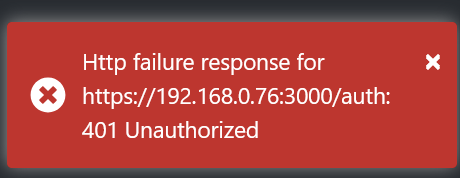
Thanks for the advice. I cannot even get into the PG3 application today. Keep getting an "unauthorized" error. What fun.
-
When I am in Admin Console (current version) and go to Plugins > Launch Polyglot V3 (PG3) I get: I have tried rebooting the EISY from Admin Console, and even restarting EISY by pulling the power cord for 1 minute. Neither helped. I am using Firefox browser from my laptop on the same LAN. How do I resolve this so I can look at my plugins? Thanks in advance. I am using the same login credentials I use to get into Admin Console.
-
I happened to be in the Plugins panel yesterday and saw there was an update available for the "Notifications(1)" plug-in - the only one I use. So I went ahead and purchased it. Now I have four lines in my plugins list for that one plugin. I tried to activate the one I had just purchased, but I'm not sure I know what I'm doing LOL. Anyways, after the update I got a few PG3 SMS notifications on my phone saying they were from the FREE version. @Jimbo.Automates can you help me out to clean this up? Thanks.
-
Thanks for the tip. I've never used SSH to get into my ISY. Can you give me a quick instruction how? "CPU Usage" would be a nice feature to put in Admin Console or the new UI version of the console (I forget what it's called).
-
I have a scene called "Bedroom lights" whose members consist of a wall switch and a lamp module, both in my main bedroom. I have Alexa linked to my EISY so I can say "Turn on bedroom lights", and it turns them on. This has worked reliably for years. Then a couple days ago I noticed with I said "Turn on bedroom lights", the Echo would chime but nothing would happen. Minutes later my wife told me the lights in the other two spare bedrooms had come on for no reason. I was able to reproduce the problem. It happened every time I said "Turn on bedroom lights". So I went in to look at my Alexa setup in IoX (which I haven't touched in over a year) and found that there were at least a half-dozen devices in the "spoken words" list that I had no memory of adding -- including the other two spare bedrooms, and a few devices I would never want Alexa to turn on/off. I deleted all the extra nodes from the list (including bedrooms 2 and 3) and now "turn on bedroom lights" is working properly again. My questions are: 1) How did all these extra devices get added to the list of "spokens"? Is there some automatic or hidden process that tries to "discover" more devices to add, even if I don't need them? Did Amazon do this, or Universal Devices? I haven't messed with the Alexa integration with my EISY in a long time, so maybe there's something occurring that I'm not aware of or have forgotten. 2) Why did Alexa start activating the two switches instead of the "bedroom lights" scene that it's supposed to activate? It's almost as if Alexa heard "bedroom lights" and tried to find any device that had "bedroom" in the spoken. Yet the SCENE called "bedroom lights" (an EXACT MATCH) did NOT get turned on. Which is weird. 3) In recent past I was doing some cleanup work in Admin Console and renamed all of my light switches slightly. But I did not change the scene name "Bedroom lights". And I did not think about the spokens. Did that confuse things for Alexa and cause it to turn on the wrong devices? I'm going to have to be careful to check my spokens list occasionally - a forgotten feature. Now my wife can stop asking why the spare bedroom lights keep coming on. P.S. I have Alexa+ disabled on my Amazon account.
-
I'm curious ... how do you tell if the EISY is in a loop? Is there a way to see how much CPU usage it is consuming (like you would with Windows for instance)? I don't believe I've coded a looping situation (yet), so I'm wondering how I would know if I did. Thanks.
-
I would add a third: Those who cannot remember what data they had or where it is. But that falls under your #2 I guess. It sucks getting old.
-
I don't want to muddy the waters, but based on a recent personal experience, is there a chance your ISY rebooted at about the time these odd notifications started appearing? I have a program that checks for 5 exact times and turns on a device, waits a few seconds, and then turns it off. I found out by accident that if I reboot my EISY, it turns on and then off the device, even though none of those exact times matched the clock time. The "Catch up schedules are restart" setting apparently was the cause. IoX apparently uses some odd logic to determine what to "catch up" on. Perhaps it was trying to "catch up" your programs and sending unwarranted notifications. The setting is under Configuration tab > System tab. I unchecked the checkbox and rebooted my EISY and this time the program did not run unexpectedly. I'm leaving it off. Just a wild guess. Also check the INIT TO settings on your variables to make sure they are what you expect after a power failure.
-
I would think, since my program says to do things at only specific, EXACT times, when the IoX restarts it should look at the clock time and say "nope, doesn't match any of those SPECIFIC times, so this program is to be ignored". DO NOT run the IF or the ELSE. I don't care if ISY was off for hours due to a power outage or something. If this program was controlling something potentially critical (or dangerous?), turning the device on at the wrong time is not good. But then I know not to trust EISY for such tasks. I am turning off the Catch Up setting.
-
Apparently it does. I unchecked the box, clicked the Save button below it, and rebooted EISY. The program did not run this time. Then, to double-check, I checked the box and rebooted again. This time the program did run. I checked the log and it shows a Status On entry for the device seven seconds after it had finished polling all my devices, and then a Status Off entry 13 seconds later (as per the delay in the program). So the "catch up" feature is questionable to me.
-
Yes I do. If this is what is causing this, this doesn't make sense. The program specifies five exact times, so none of them is true at 11:35AM when the system booted up. There was nothing to "catch up" to. But then I don't think like ISY thinks. I'll uncheck it and see if that causes any adverse results. While looking at the Configuration screen I note that there is a "Reboot" button as well as a "Restart IoX". What's the difference? I've always used the Reboot button when I need to restart EISY.
-
I have the following program to turn a small device on 5 times a day. The program is NOT set to run at startup. Yet when I rebooted my EISY at 11:35AM, the device turned on and off. Why isn't the Run At Startup being honored? Also, in the Summary page, that column shows either ON or a dash. I assume the dash means OFF, so why didn't the developer just use OFF to make this more clear? Thanks. BSMT Deodorizer ON-OFF - [ID 002B][Parent 0058] If ( Time is 7:00:00AM Or Time is 10:00:00AM Or Time is 1:00:00PM Or Time is 4:00:00PM Or Time is 7:00:00PM ) And $sOnVacation is 0 Then Set 'Basement / BSMT Deodorizer / BSMT Sprayer Relay' On Wait 15 seconds Set 'Basement / BSMT Deodorizer / BSMT Sprayer Relay' Off Else - No Actions - (To add one, press 'Action') Turn the deodorizer on once at the top of the hour, several times a day.
-
I've lived there 30+ years. Nothing has changed. Some older relatives still use "Slow Time"/"Fast Time". Every road trip requires consideration of what time shifts we have to consider. Every year or two the topic of just sticking with DST (or EST depending on which side you are on) comes up in the state legislature. Briefly makes the news. Then goes back into the dustbin of state history. (Marijuana legalization has now joined it there. All the states around us have legalized it in one form or another, but not Indiana.)

