


Techman
Members
-
Joined
-
Last visited
Everything posted by Techman
-
Are you using the"TREND(CHART)" that's in the tools menu. if so, I don't think that it was ever perfected.
-
Is the time showing the eisy correct? What is the make and model of your Zwave sensors?
-
Is your latest controller a Polisy or an EISY? What is your PG3 version? If they're showing as unmanaged in your current controller that means that they're still being managed by your previous controller. Log into your ISY Portal : ISY portal Make sure your current controlle is there and active Re: the admin console issue, did you clear your java cache and reinstall the IoX Launcher from here: https://isy.universal-devices.com/start.jnlp
-
One last thing you can try. For each device that was in the scene, do a restore device on each of them, then try deleting the scene. Scenes operate independently from the ISY, you could remove the ISY and the scenes would still work as the link tables for scenes reside in the scene and the devices that are, or were, in the scene.
-
Here's the link to replacing the card. They do have a tendancy to fail over time. The contacts on the card can also oxidize so you should first try cleaning them with a soft eraser. ISY-99i/ISY-26 INSTEON:Replacing/Formatting an SD Card - Universal Devices, Inc. Wiki Many years ago X10 made a poweline signal monitor which also showed noise on the powerline. Here's a couple of options: Monterey Instruments X10 Powerline Signal Analyzer - FREE SHIPPING | eBay XTBM / XTBM-Pro X10 Signal Meters - JV Digital Engineering
-
By turning off the breakers you disrupted the Insteon powerline signals. Keep in mind that other Insteon powered devices also act as repeaters. The problem doesn't sound like it's with the PLM. Being that some of the buttons worked correctly on the KPL leads me to believe that you have some invalid links in either the ISY or the KPL. If you have the ISY994 then the issue could be with your SD Card. They have a tendency to fail. What you can try is to remove power from the ISY, then remove the SD Card and clean its contacts with a soft eraser, replace it and power up.
-
Yes, do a search for the files
-
One last thing you can try. Close the admin console and then delete the following files which are located in the windows temporary folder. They will be recreated the next time you open the admin console
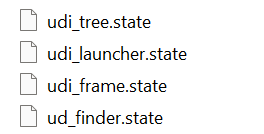
-
Strange that it won't delete, it's possible that the scene is corrupted. Try renaming the scene then deleting.
-
Have you tried rebooting the eisy. Not sure why option isn't displaying. Under options, there should be an option for one node or two nodes, on only or on and off.
-
What's the name of the scene? Did you right click on the scene and then click on delete scene?
-
If the scene is in a folder first move it out of the folder then do a delete. Also try rebooting your ISY
-
@Chevelle Synchronizing ensures that the EISY and the Z-Wave network have the same device information and that all devices in the network are recognized and their information is up-to-date, so it's possible that your zwave network was not current
-
Are you trying to remove a device that's within a scene or the entire scene including the device(s) within the scene or is the scene currently empty? Are your device(s) located in a folder or just in the main device tree,
-
@Chevelle Being that Zwave is an RF only protocol its range will be adversely affected by walls, enclosures, etc. Another factor is the Zwave chip version of the fan controllers, i.e. 300, 500, or 700. The later versions have an improved range. Zwave is a mesh protocol that operates in the 900 Mhz range. If you have other Zwave devices in your network that aren't battery powered they will act as repeaters. The eisy zwave dongle has an effective range of about 20 feet. Even though your distances aren't that excessive, they could be limited by other factors i.e. obstructions. Take a look at the Zooz range extender I mentioned in a previous post.
-
The Aerotec range extender doesn't add to your Zwave network, you just need to plug it in. Another, and probably better, option is the Zooz 800 range extender / amplifier. This unit will add to your zwave netwoek and has a battery backup. It also has a node to show if A/C power is on or off Zooz 800 Series Z-Wave Plus Range Extender ZAC38 - The Smartest House The fan controller will install numerousl nodes, some of which you probably don't need. you can just ignore them or place them in a folder to get thm out of the way
-
@larryllix Just a thought, being that eisy-ui is only supported by the eisy it's possible that 5.9.3 is not yet available for the polisy
-
@TomJ After the update did you clear your java cache, checking all 3 boxes, then download the latest version of the IoX Launcher from here: https://isy.universal-devices.com/start.jnlp
-
@fmk2 Here's the wiki user guide Eisy:User Guide - Universal Devices, Inc. Wiki Take a look at this link for the LIB_ERRORS-403 workaround Using admin console - Can't connect/LIB_ERRORS-403 - eisy - Universal Devices Forum
-
@MTellevik To simplify things, why not have the away button on and lit when you're away, and when you're home the away button is off and unlit.
-
Can you give a little more information, what would the C & D buttons be controlling?
-
@oberkc Here's the wiki page(s) for eisy-ui Eisy:User Guide - Universal Devices, Inc. Wiki Eisy:User Guide - Universal Devices, Inc. Wiki
-
Try this https://polisy.local:8443/WEB/sysconfig.txt
-
All the steps are outlined in the migration notes. Be sure to make a backup of your ISY before migrating. Being the the PLM is 7 years old it would probably be a good idea to replace it as the newer PLMs have updated hardware and firmware. You should replace it with the 2413U PLM which is a USB model and plugs directly into the eisy USB port using a standard USB cable. If you were tio use your existing PLM then you would need a conversion PLM to USB adapter cable as the eisy doesn't directly support the 2413S which is PLM to serial.
-
1. Buy the eisy 2. If you use or plan to use Zwave, Zigbee or Matter then you'll also need to purchase the UDI Zwave dongle. It can also be added on at a later date. 3. Follow the migration instructions: Eisy:User Guide - Universal Devices, Inc. Wiki


