


mmb
Members
-
Joined
-
Last visited
Everything posted by mmb
-
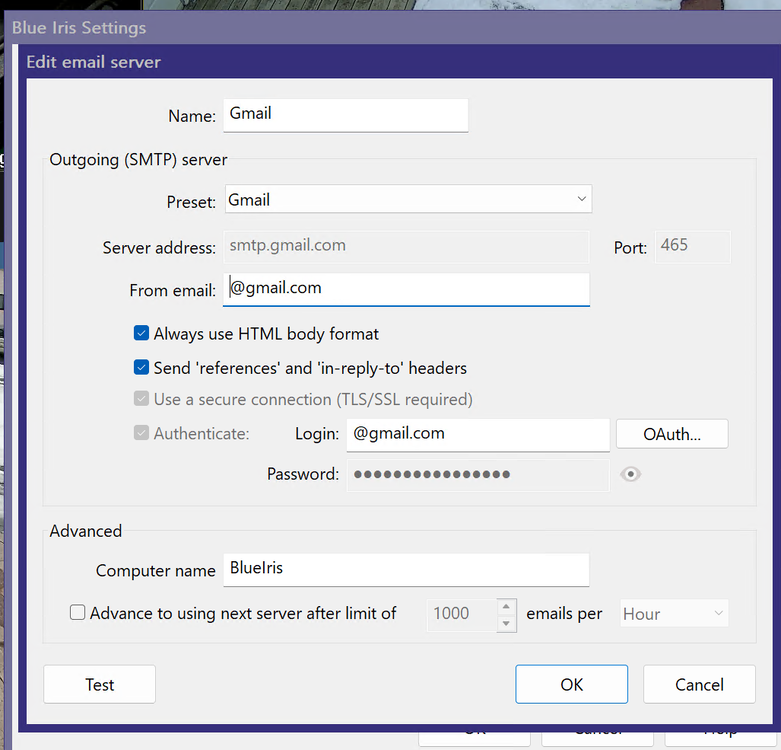
Under Settings / Email Servers / Authenticate
-
That is a good question @Geddy . Something must trigger it. Google began phasing out Basic Authentication which is a simple password over TLS in 2022 with a final cutoff date of March 2025. I changed my ISY to their approved password for less secure Apps in 2022. Since then it hasn't missed a beat. My Blue Iris now requires Oauth authentication, that happened with an app version update last year I think. I think I had to do both an increase in timeout to 3000 and the Google less secure App password procedure.
-
My up to date BI version supports only oauth (over tls) for gmail smtp. Basically Google is phasing out a simple password over TLS and now requires the app to be updated to use stronger authentication (eg oauth over tls (not IOX)) or a procedure to setup a new app password on your google account for apps not updated to a newer authentication methods. Not sure why the ISY Default doesn't work.
-
I didn't read thru the comments but did you follow Google's procedure to create a new app password? Google changed the rules for logging in with TLS. What You Need To Do If an application stops working, you have two options: Switch to Modern Auth: Update your app or switch to an app that supports "Sign in with Google" (OAuth 2.0). Use App Passwords: If the app is older and doesn't support modern sign-in, you must: Enable 2-Step Verification on your Google account. Go to your Google Account settings > Security > App Passwords. Generate a new 16-digit password for that specific app and use it instead of your regular password.
-
Thanks Getty, I can't find the email and nothing on the site that I can find - this prompted the post as I was looking for the webinar date in February. I've suggested to Michel previously that UD undersells itself for such a great automation product.
-
Less technical like my brother 🤦♂️ He would love it!
-
It would be nice it UD published the webinar dates in their Announcements on the Forum.. And if there is a YouTube link so those who miss their webinars can follow up after.
-
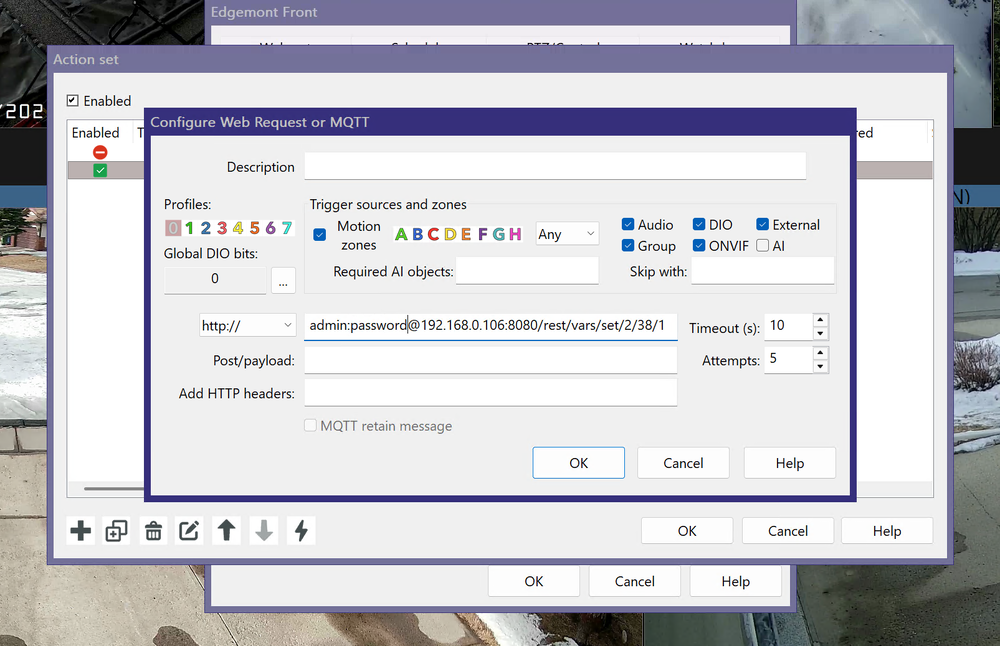
You assume correct, in BI select Settings / Alerts /On Alerts / + (lower left) then create new alert. Then create the EISY Program. Something like this: Motion Cam Lts If $Motion_Cam_Detect is 1 And From 9:05:00PM To 5:00:00AM (next day) Then Set 'Outside Front and Side Lts' On $Motion_Cnt += 1 Wait 10 minutes Set 'Outside Front and Side Lts' Off $Motion_Cam_Detect = 0 Else $Motion_Cam_Detect = 0
-
Regarding Triggers, I took a different approach. I use BI Alerts to set a variable thru Rest on the EISY which triggers an Outdoor Lights Program. The program turns on the outdoor lights then Waits 5 minute then turns them off. Improved lighting helps BI recordings as I don't use IR, just ambient light. For example: user:password@192.168.0.106:8080/rest/vars/set/2/38/1 I been using this combo for about 15 yrs and it works flawlessly, especially since BI's recent incorporation of AI. Of course, this was all done well before PG3 and the BI node plugin, so this is new to me. BTW if you use the UNIFI Protect ecosystem, the Unifi Protect doorbell and cams can trigger the eisy/insteon lighting nicely using their webhooks.
-
Same experience roughly the same time. A hard reboot got it going again and I believe I did a fw update after. I put it off as a fw glitch.
-
-
-
The black page reappears after a period of time. @bmercier says it will be fixed in the next release.
-
@bmercier I'm getting an network error using Firefox after the latest update to 6.03. Edit: must be a caching issue, working now with lots of security warnings in the initial login. Incidentally, all Safari, Firefox and Chrome all take me to a blank page, but a refresh gets the UI to display properly. Edit: the blank page cleared up as well. All good. Thanks!
-
A few years ago I had the same problem, so I disassembled it to have a look at the internals. There was leakage and corrosion around some of the capacitors, simply a mess. I just replaced it.
-
Thanks @bmercier nice design and I confirmed it does indeed work. I have one ISY that will be upgrading to an EISY but does not need a portal account as it's a pure Insteon system for my 90+ yr old parents. (keeps them out of trouble)
-
@bmercier just to be clear, a portal subscription is required now for accessing the eisy in order to obtain a username and password for login? I thought at one point during the eisy updates, the admin/pw combo still worked for the AC but also accepted the portal creds as well? Thanks!
-
Look at the latest Insteon i3 dimmer. My son used a zooz dimmer with his HA setup and is quite happy.
-
@rg65 I seem to remember having this problem. Try logging out then log in again.
-
There are 65,000 ports per IP and you need one or more of them to talk to a server. I wouldn't be concerned except if the eisy stops talking to the server b/c of a portal outage. Your UDMobile app should notify you. Also PG3 nodes can talk to other cloud servers as well, so you may see that traffic from the eisy as well.
-
I think ISY Portal (isy.io)
-
An IP lookup says Amazon.
-
Thanks, that's what I ended up doing. Another thought, when you pair the two iPhones aren't they doing a iPhone to iPhone data transfer?
-
@Javi I recently purchased a new iPhone and, as usual, used Apple’s pairing/data transfer process to set it up. While everything transferred smoothly overall, UDMobile was the one exception. After the transfer completed and I launched UDMobile, I was prompted with two options: “Migrate” or “New Controller.” I entered the new controller IP, then had to manually sync and restore my Favorites. This was further complicated by the fact that my backup had been created under an older Polisy and didn’t reflect the upgrade to a new EISY — something I’d forgotten about. My expectation was that UDMobile’s data would migrate seamlessly along with my other apps, so this came as an unexpected surprise. Do you have any idea why this might have happened?
-
In your web browser: https://eisy.local or https://xxx.xxx.xxx.xxx/


