


paulbates
Members
-
Joined
-
Last visited
Everything posted by paulbates
-
Here is the "On" program If Time is Sunset Or Time is 6:00:00PM Then Set 'Lighting Premise / Premise Lights' On Else - No Actions - (To add one, press 'Action') Here is the off program, I use something simila If Time is 9:50:00PM Then Wait 13 minutes (Random) Set 'Lighting Premise / Premise Lights' Off Else - No Actions - (To add one, press 'Action') This one will start running at 9:50pm, and wait a random amount of time for up to 13 minutes and then shut the lights off. You can tweak that however you want. If you're interested, I can dig out the link to a post where I put lamp post light sensor in a project box with an insteon on/off micro module. It's Velcro'd inside on a window facing out and "switches on" around dusk.. this solves the problem of it being cloudy and dark sooner than dusk.
-
Currently I have just a drip system that I turn the power on and off to the 24vac power supply with an insteon i3 outlet. I have iox programs that take weather data provided by my ecobee thermostat, via its pg3x plugin, to skip waterings based on forecasted rain. I used to have rainmachine at my last house... but it looks like they are not going to make it as a business. Rachio is good choice... while it will operate schedules without the cloud, *it does have cloud dependencies for integration with ha like eisy*. There is a pg3x plugin for it in the store If I choose to install a sprinkler system here, I would go that direction. Scott's bought rachio which gives some confidence. Edit: I'd consider looking for a used rainmachine as its schedule programming and installation are 100% local, and there is a pg3x plugin for it.
-
The pg3x log specifically under the yolink plugin. Set it do debug level
-
"Cloud dependent" is probably the way to say it. Rainmachine and Venstar are examples of technologies that can be programmed and used on local APIs without their cloud capabilities that are nice to haves, but not essentials. (Both companies are still around)
-
The transfer of ISY modules happens at the UDI side, IIRC. Though the 994i is out of support, you could try opening a ticket with UDI. The caveat is, I believe, that even if they will do that, the module is associated with one ISY's UUID.... meaning it cannot be in 2 places at the same time.
-
The easiest and most straight forward would be to have an iox program, or 2, to "backstop" the button presses. In the 2 program model, there would be one program each to catch the switched on and switched off. The one program version would use the else with if switched on and not switched off at the start. Its a nuanced choice of which you like best. The downside of this approach is a short, several second delay between press and activity due to the serial line speed into and out of the PLM
-
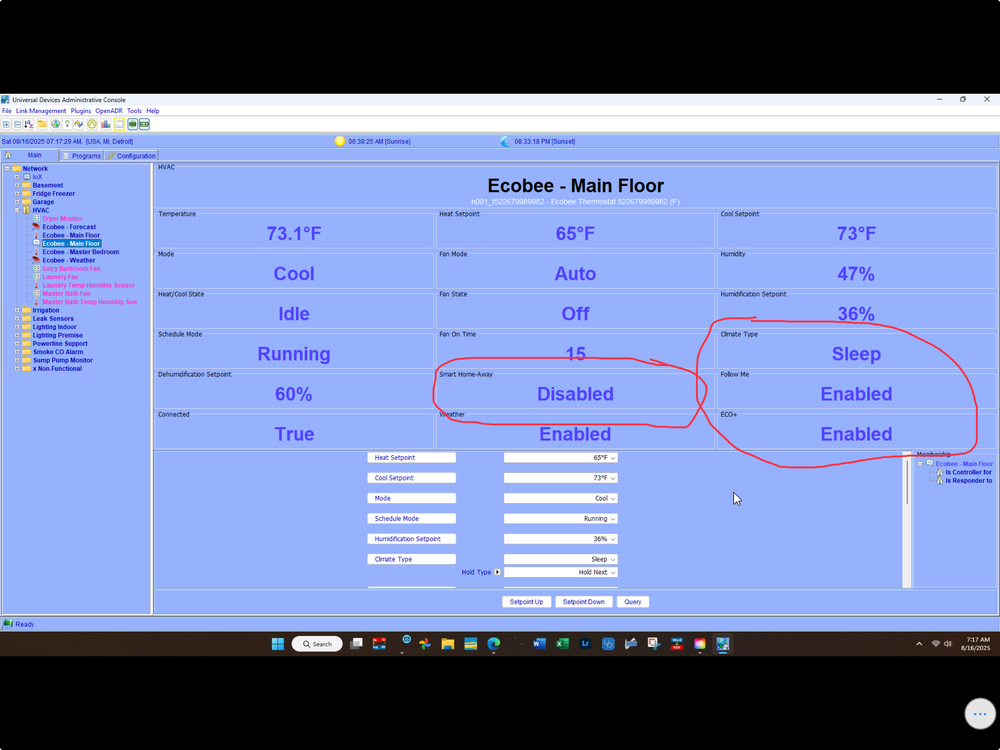
@larryllix agreed, but they both independently (I believe) affect the ecobees temp behavior and could be what's going on. I would expect Vacation to win between product set features, but not sure. It looks like there was an iox program nudging it out of vacation mode, which would explain it.
-
It sounds like no, but do you have any programs that touch the ecobee? Based on what's written, these features of the plugin would affect that behavior. How are they set?
-
Both eisy-ui and HomeKit support are in ongoing development & testing. If you search the main forums page you can find each of those. eisy-ui is in early stages and beta, so many things are not supported yet.
-
They put dot in the middle of the 0 sometimes. That has caught me up before...
-
Correct... If the new switch happened to have links in it from the factory (it happens sometimes) that method deletes them. Then, the replace function puts links in the new switch and updates all the other switches with links to the new replacement switch
-
You'll want the first option to get it recognized by the ISY. After that you'll use the replace function... If it's a like for like switch replacement. That will add all of your configs. The old switch and new switch will need to not be folders when the replace is performed. Afterwards, the old switch can be deleted from the ISY and the new switch placed in a folder.
-
Once more thing to try is a factory reset. Battery Insteon devices can get flaky if the battery slowly loses power until it's dead. I've run into this more with motion sensors, but relatively easy to try. You'll have to do a 'restore device' afterwards, if it's linked to anything like a chime/alarm module
-
Also, try it via telling iox to Start Linking, and go to the device and press the set button for 3 seconds to get it to go in to linking mode. Then go see if it shows up on iox and complete the add
-
App Settings/Gear icon Insteon + It's limited to adding devices via linking mode at this time, can't create, add to or manage scenes via Insteon id
-
I won't hurt. If there's a device that's in all the scenes, right click it and pick 'restore device', that should do it. Or pick a handful of devices in all the scenes and restore device individually
-
Yes and I use that for your's and other's plugins and they do go off every once in a long white. The problem I was having with a plugin (not your's) was that there was no pg3x to iox errors and it still did not function as expected. So I'm adding a layer of error checking to give notice of plugin login failure.
-
Did you look at the devices in the scenes, and make sure the new 6 digit Insteon id is there?
-
Expand the scenes in iox. Which BR switch is in them.. old, new, none? If you used the ISY's replace function it should have done that.
-
Thanks @Goose66 & @bpwwer Bob, for the ecobee plugin, there's a field for the main ecobee controller node labeled "Authorized", which can be true of false. I take it that's the way to do what I want in that particular case? If there's a problem on ecobee side, and the plugin detects its not connected/logged in, that gets flipped to false?
-
Thanks @Goose66. Not surprised at that answer. I'm going off the distant memory of nodelink, It had a heartbeat feature and I think with Venstar it could detect when it lost touch with skyport cloud. To make sure I got it, you're saying a plugin author could do what I'm asking, if they chose to, without the major plugin interface rewrite? or...doing it all would be a major plugin interface re-write?
-
I have a yolink outlet that I use to monitor the power consumption of my second floor dryer, and manage the room exhaust fan when the dryer is in use. It's always worked before, but today I turned the dryer on, and nada. Tried it twice, no go. When I looked at pg3x for the yolink plugin, there were repeating messages that made me believe it wasn't logging in to yolinks servers and there were no device messages. (When I restarted the plugin, I lost the exact messages). There was an update available for the plugin, I updated and normal log messages started flowing by and the dryer room fan worked again. I don't know if this is a feature request, there's a way to do it and I don't know.... or if each plugin author of a plugin that needs authentication to a service.... but here goes: Feature request: I would like a node for each of my networked plugins that is true when it's connected to its products' networked service and false when it's not. It's up to me to write iox programs that deal with that info. (I'd leave a 5 - 10 minute wait as services/plugins do go up and down, briefly and occasionally). The point is, I would like to send a notification, so I don't wait until I stumble across it. This also happened with the ring plugin earlier this year. I did see the forum posts on it. If the answer is the plugin authors need to do it, I'll ask them individually.
-
There's 3 things going on Individual device settings changes .. we just discussed how the buttons do that "Write updates to devices" only comes into play when requested updates don't get acknowledged by one or more devices. You'll know this by the little green 0101 icon next to the devices. Also, when you make changes to Insteon wireless/battery devices, the icon will stay until the device is put into linking mode I think write changes is part of the program tab
-
Open a ticket with UDI
-
You press the button next to whatever feature your are tweaking after you change it. You should not need to write updates to devices, unless the little green 0101 icon is next to the device


