


Brian H
Members
-
Joined
-
Last visited
Everything posted by Brian H
-
I am using Windows 10 on a laptop.
-
I do not believe the ISY994i will be obsolete in December. It has been no longer supported for years. Mine sill works fine and the java console should work just fine even when the non java console is available for the EISY.
-
The easflora is a power line only device. Could be a new noise maker or signal sucker is now effecting the communicating to it, the device has started to fail or your PLM is starting to go bad. There are some tests you can do if you care too.
-
I am on an ISY994i and the UDI support of it is tons of better and longer than most manufacturers these days. Costs money to support old devices. I am very happy with their support as long as was provided.
-
Right now X10 is showing sold out. Sign up to be notified when back in stock. The users information is on the XPF sales page if you want to look at it.
-
You want one that is designee for X10 or Insteon. Many others think Insteon and X10 power line commands are noise and have a capacitor on its input and outputs that absorbs the signals as noise. 120V or 220V and how many amp draw? Big and bulky. X10 XPF. 120VAC 20 amps. For 240VAC you wire two filters. One on each hot wire and neutral to the load being filtered. They do make noise absorbers for noise around X10 and Insteon but I have no data on how they worked for users.
-
Working devices for even years. Can deteriorate and cause all kinds of problems. I have seen phone chargers working for years age and start making power line noise. Causing problems.
-
One of the symptoms of a failing PLM was the Link Database having no or very small entries. It does not sound like yours had the issues.
-
I also have seen older power line only devices have X10 issues. Especially the I1 devices that take 8 messages to program one line in a link database.
-
Good to see you are again working.
-
Now they want to mess with keeping Daylight Saving time. Every time some politicization tries to do what they think I need the short end of the stick is all get. ☹️
-
I would also try a replacement power supply. I have similar issues with both my ISY99i and ISY994i. Try to boot,supply shut down tried to start again in an endless cycle.New supply fixed the issue.
-
Even when a 2477D is set to 100%. There is a short time near zero crossing. There is a time before it conducts. If the fan is inductive. That short no conduction can also lead to issues. Can't say about a I3 paddle. 2477S is also an on-off style.
-
I agree it maybe the power supply. Though your post seems to point more to the SD card. Maybe it got slightly corrupted at power loss or the accidental incorrect ZWave file messed something up. I have had a few over the years. One was weak and my ISY994i was fine until the power went out and then it refused to start. Just a loop of trying to boot, supply shut down and then it tried again.
-
Just some information. The Z Wave board was an option and not all versions ISY4i had Z Wave as sold but we could add one if we wanted too. Most electronics are now much more expensive. Even big vendors have chanced prices. Even Apple. Data centers are sucking up RAM and causing price changes upward.
-
Docs are also here but some maybe duplicates with different revisions. https://github.com/pyinsteon/pyinsteon/commit/2533494a8b13b30b2d0938c9a18afe782b740410
-
A new 2413U probably would be best. Even if stored for a backup. The 2413S serial PLM used by older ISY controllers has been discontinued by Insteon so older users may need to find a new way to replace the PLM or a rebuild.
-
Thank you for the information. We have seen other posts indicating caps didn't always correct things. 2.4 should have the updated serial port daughter board with the better serial interface chip and a surge protection network on the serial signals to the outside world. Along with the better caps. The 2413S serial PLM is now discontinued on the Insteon sales site.
-
All the way back the Joe Dada Smarthome Insteon days. New module issues where fixed many times with a factory reset before use. Some did not get reset in manufacture. Many users always did a factory reset before use.
-
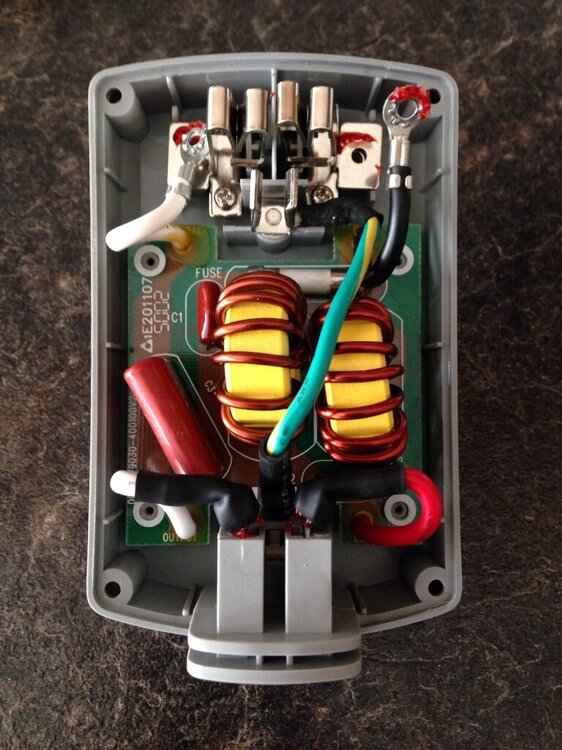
There was for a short tine a five amp version. After examining both version. Only thing I found was a different fuse and a higher price for the 10Amp model. 10Amp, fast blow, 5mmX20mm axial leads, ceramic body. There was a post here a long time ago. Where a member found bad solder joints on the heavy coil leads and re soldering them to the PC board made them operational again.
-
I still have a pair of Access Points in use. You may want to check the date on them. Rev 2.0 and newer are built on the base 2413 PLM board and have the same failed capacitors we see in the 2413S PLM. I had to rebuild a pair myself. The 4 tap/communications builtin test, May give you some added data.
-
I have a few I rebuilt and a spare new one myself.
-
The Insteon web site now says the 2413S serial PLM is discontinued and no longer supported. This should only effect the users still using a ISY994i. InsteonSerial Modem Interface (PLM)This item has been discontinued. Please see our USB Modem Interface.
-
Correct . The Insteon sales site. Says the 2413S PLM is discontinued and no longer available.
-
If I remember correctly. The add on IR Module was needed for the IR module to work. After I got my IR module. UDI had to download something to my ISY994i.


