


johnstonf
Members
-
Joined
-
Last visited
Everything posted by johnstonf
-
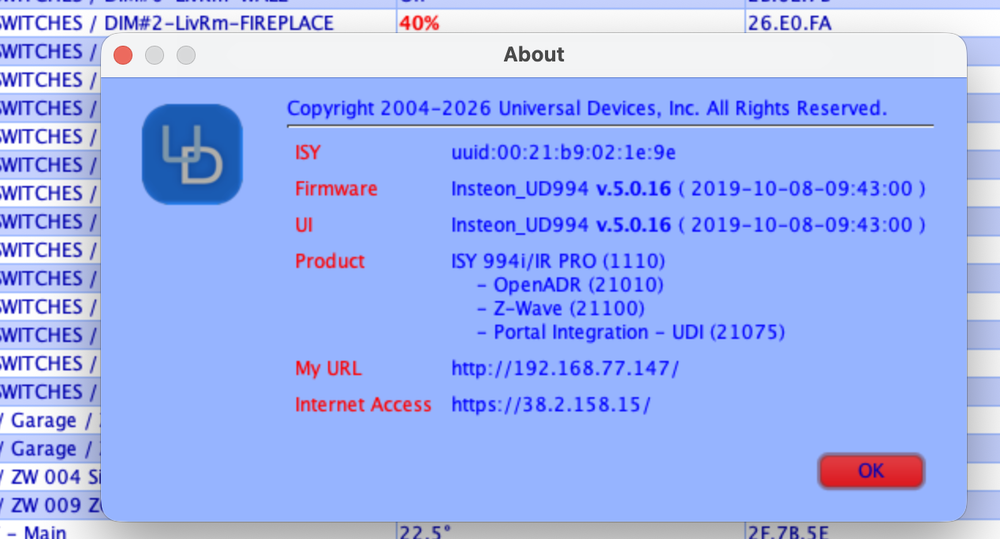
My ISY994i seems to also be rebooting often in a day. I tried another P/Sstill reboots Where can i see the UPTIME? I'm wondering if maybe the microSD is corrupt? I have a new 16GB ordered coming tomorrow... I deleted the Motion and Vacuum programs, so I can't see them... I agree, I'd like to get the errors out before proceeding /f
-
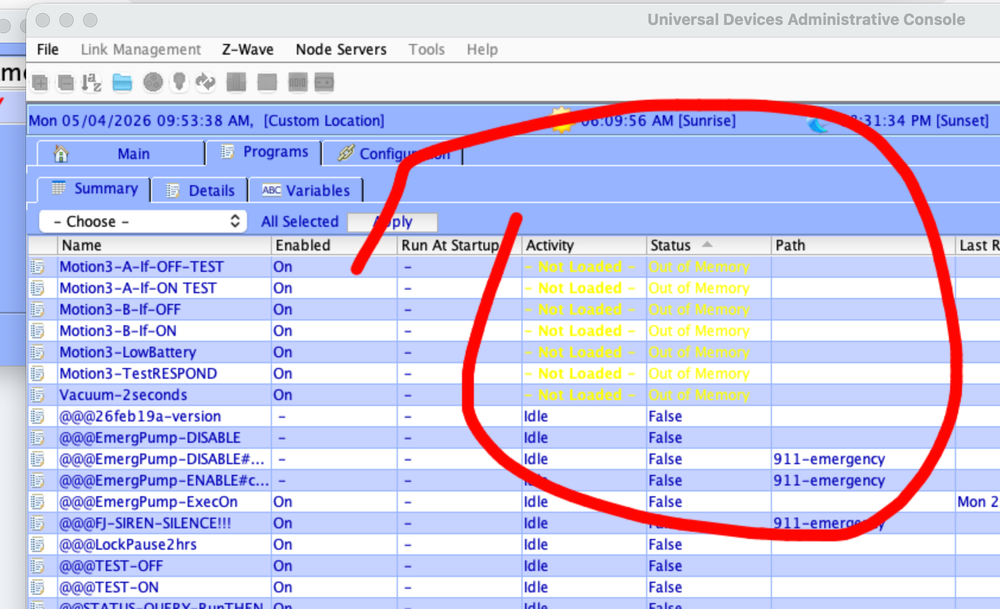
I bought the EISY, serial cable, zwave dongle about 1.5-2 years ago, but never had the guts or time to upgrade my ISY994i/iR. I have lots of Insteon devices, zwave locks, about 25 4&8 button remotes, and now MS making it tough to get to some of the devices. I don't even know where to look to find the best upgrade method/steps. Any direction and cautions VERY MUCH appreciated! (My ISY has gone bezerk, taking 10seconds to minutesto respond, and some "out of memory" errors have crept in from somewhere) I do have in ISY backup from before this mess started, so can I use that to start up the EISY? Can I get the EISY up and running and still get to the ISY to "look" at things while I switch over? THANKS!
-
Hi there! Great to hear from someone! I have a feeling there's a few of us in this boat. I have one Yale lock and 4 Kwikset. All have worked great on the ISY994. My EISY is (Seriously) STILL taped up in the shipping box (they might have sent me a birdfeeder for all I know LoL). I'm reluctant to dig in until I know my path forward. I wish someone from UDI @bmercier ?? at least would confirm or deny my thoughts in this post. So are you back to your ISY994 right now? Are you saying you can flip your PLM back and forth? (sounds dangerous to me). Waiting (im)PATIENTLY... @bmercier
-
VERY helpful advice @Geddy, thanks! (My eISY is still taped in the box... I only have 15 maybe 20 zwave, but ya, locks and programs... not looking forward to it LoL.). (Glad I didn't just hack into it. So my thoughts are... -Backup ISY now -Get the PROGRAMS as you mentioned -Get a list of all Zwave nodes (eg ZW017_1) -Delete all Zwave devices -Backup Zwave (so zero in ISY backup) -Backup ISY (so backup w/o Zwave) -Upgrade ISY to latest version -Backup ISY (With latest firmware, and zero zwave) -Power down ISY -Set up eISY, and move my serial PLM over to it -Restore ISY backup onto eISY -Get all non-zWave stuff going/tested -Plug the ZMATTER-USB in -Redo all zWave from scratch Any hints, or things I've missed? Many Thanks!
-
Well YA LoL... Joke 🤣 😛
-
I'd like a blood curdling scream over all the Google nest devices, because now other people in the house don't have to do it LOL...
-
Received my eISY today... I see where it says Zwave500 but i have old card. How do i migrate ISY994 to EISY (using pre-era Zwave?) (Does the attached tell for sure??)


-
So I have my EISY coming! What (loose steps ok) are the steps to integrate to my YoLink MouseTrap (Called TrapEEzEE at TrapEEzEE.com). Really it's a speakerhub with vibration sensor and trap/adapter. (And I also have about 20 YoLink wet sensors/Temp/RH,DoorOpenClose, etc to do) Thanks! (If anyone wants one, feel free to use my SAVE10 coupon that was in their intro email) (screenshot attached)

-
So i ordered my EISY! They had a direct usb-to-PLM cable specifically for EISY so no DB9 or USB dongle! Also, I just went straight to the expensive zMatter-USB (zwave) dongle, to save time (hopefully) in the end... So I'll post new questions related to this under EISY now (like how to integrate to YoLink)... Thanks all!
-
I thought of zwave a ways back, but didn't go near far enough. Often hard to get 100feet... LoRa on YoLink can reach 1,234ft so that is a game changer! Agree, great for hard to reach places.
-
Thanks, ya i understand
-
Nice... So did it work as is, or did you have to re-pin it or break any pins off to make it work??
-
Ah! that makes more sense to me!
-
So are you saying that the eISY now has a DB9 connector?
-
Thanks... we'll see what other say...
-
I couldn't find the 700 series, but I found an 800 long range zWave 800... Would that work? I couldn't find the 700 series, but I found an 800 long range zWave 800... Would that work?
-
From what I see, I could use my current PLM's (I have a spare one), using a simple (Canada) serial-USB$40 cable, but the price of the Z-Matter USB adaptor that I'm looking at is $200 kind of a choker... Another half the price of Eisy itself $400. Is there a cheaper Zwave only adapter to use?
-
Gives me pause, to throw out a perfectly good ISY994 that's been working so well LOL)... What does the EISY have that makes this doable? Do you know if there's a specific integration set of instructions anywhere for the YoLink hub? (Is it possible to do with my ISY994, or am I out of luck with that?)
-
With the literally thousands of dollars damage done (they ate wires in my car causing a ton of damage, peed on my HVAC controller board, ate holes in a swimming pool, trailer damage, you name it, I'm usually the target LOL). I now consider it cheap insurance to have these in my trailer shed boat, sump area, hard to monitor places. I'm already a fan!
-
I got a couple of the new YoLink smart mousetraps (Crazy good! goes 500ft out to my shed and another to my trailer, where WiFi out the is useless). And it freakin WORKS! So it came with their speakerhub (which, via TTS, can say anything (EG "There's a mouse in North Shed", etc). The website is at https://trapeezee.com if you want more info). (Great too... 2 AAA batteries lasts 2-3 years using this LORA frequency low power thing!). Question... I'd like to somehow link it to my ISY994. How might I be able to do this? Via IFTTT maybe somehow?
-
Great, thanks 👍
-
I just noticed too that the "GH Category", which turns out to be important. Could @bmercier we get that added to the CSV export?
-
Well, I finally think i figured out one of my problems... the spokens not working, or dropping off sometimes. I was checking the devices in GH(GoogleHimeApp), and noticed, kind of by accident, noticed that the OutdoorSwitch was looking like a fader (not on/off like other switches)... (thanks to @bmercier tip to test device in GH... After I changed the category to "Switch", the spokens worked!. So the i flipped it back to open/closed, and if I said "Hey Google set AirConditioner to 100% and 0%" it DID actually turn on and off! Here's a few notes I made to myself... just in case it might help someone else. I had not realized how important it was to get that Category RIGHT (i just thought it was a grouping for when you say "turn on every light" blah blah... My notes: TROUBLESHOOTING STEPS: points to remember: (GH=GoogleHome-APP, Portal=UDI-Portal)... -IMPORTANT!... Portal ’GH-category’ (EG:light/fan…) is how GH handles and displays in GH. If you set to Open/CloseType, then it will be a 'blind', and NOT be ok! This will make the device look and act like a fade up/down device, so where you would normally say, for example, "turn on fan" you would instead have to say, "set fan at 100 percent" (weird), so you think that spokens aren't working at ALL... but they are, just weirdly! -ALSO... the Portal ’Room’ is how GH(GoogleHome) groups things in the GH app! -ALSO... Get a CSV download of all spokens (very handy list)... (no import, you need to manually re-populate)... do this before messing around! -If you change device category or room, and if GH is stubborn to update the change, then delete and re-add the device and spokens etc on Portal and then refresh/restart GH. It's not a huge deal to delete a device and re-add it on the portal, as it doesn't delete the device itself on the Portal, nor in the ISY, etc... Just the set of Spokens for that device (So easy to re-add device on Portal!) -If a device stops working via spokens: -Check that the Category on the Portal hasn't changed -Write down the spokens (or get CSV d/l), then delete/re-add on Portal) HINTS -If device is 'good' in GH then spokens should work: -In GH you should be able to control the device and it should look like an on/off switch in GH if the Category on Portal is correct -Device type important! (How GH assistant handles spokens) (EG if device on Portal is set to “DeviceWithOpenCloseSyntax”, then it shows as a fader/blind -If set as a Light: (sometimes it won't display at all in GH IF it is something else really (EG really a 'Switch') -Need to REFRESH/RESTART GH after change type & send spokens -If you change ‘GH Category’ or ‘Room’, just a refresh of GH-App usually sufficient (Don’t need to resend spoken for that… but no harm in doing that)) -If you don’t see device in GH, try Favorites> "Edit"button!!!> See if you can find and add that device to Favorites)… -Also try… GH> under section “Linked to you”> LongPress-device> and: -Verify it displays as an on/off switch (not dimmer) -Click gear icon on that page -After device is in GH, you can rename from the default "first spoken" by selecting device in Favorites OR Devices, then Gear((UR), click on Name and enter new name for in GH app
-
As in bootstrap the whole thing from scratch... I now have 3 outdoor switches have gone retardo... they work locally, but twhen i try spokens, google says "Sorry, I dont understand" (they were working after the latest resurrection. (I think most other stuff is still miraculously working) Those same switches did the same thing way back, and i had to do a "complete" deletion (i had put in a problem back then, that went on and on as I'm I'm sure you'll recall)... again, back then I was suspicious as to Google not seeing it properly any more). Thanks Thanks Larry... I tried... anyways, i kept it shorter this time. Lesson learned
-
I answered you @bmercier but it's gone... (quite long). Is there a cache or draft somewhere?


