xlurkr
Members
-
Joined
-
Last visited
Everything posted by xlurkr
-
I will add, you can actually get that message when the Remotelinc is too close to the PLM. I used to have to step out into my courtyard to add them. Just another thing to try. -Tom
-
@dbwarner5 said it well. The key point is, you can only make buttons go on and off as part of a scene that gets activated, manually or programmatically. There's no way around that, and it seems to be the thing most people forget when they haven't programmed their Insteon devices in a long time. Or if you're coming from a Lutron background, where the processor always tracks the state of all devices and turns on LEDs whenever the corresponding devices are in the correct state, no matter how they got that way. If you want that kind of behavior, you have to write the logic yourself. -Tom
-
Thanks to this refresher, I finally hooked up my Polisy to send email and cellular text notifications via Gmail. I do need to report a variance, though. I was following the Wiki entry, but when I go to the 2-step verification part, there was no "App Passwords" at the bottom of the page to choose the ">" from. I think it's because I was creating my first one*. Anyway, I then Google searched for "create a google app password", and one of the links was for Google Help. There, I found a link for "Create and manage your app passwords" which took me directly to a screen where I could enter the app name and get a 16-character password - presumably because I had already logged in to get to the 2-step verification page. Documenting in case it helps someone someday. *because now it's there! -Tom
-
I've got a box of popcorn ready. I have both IRLinc devices (T&R) in storage. Never used them. Probably never will. Still, I'm dying to know how this turns out. -Tom
-
Not to be too harsh on UDI, but their Zigbee support is limited, too. The aforementioned FP300 sensor can be linked to ZMAtter, but few attributes show up. Full support has been reported for Aqara, Hubitat (what I'm using), and Home Assistant. I'm not sure who does have the best Zigbee support, in the way that UDI has the undisputably best Insteon support. Probably HA because of its giant and tech-savvy user base, but I personally find that platform confusing and opaque. And there's no direct manufacturer support. -Tom
-
@Riggins44 I think (but not 100% sure) that the Aqara hub only works with Zigbee devices from Aqara, but also works with Thread devices, probably from anyone. I don't have a hub, but I recently got one of the FP300 mmWave presence sensors. It can be set to Thread or Zigbee through their app. So I had to do a lot of reading on Aqara, and it's true that the hubs do not offer broad multivendor Zigbee support. But you might want to read up on their Thread support. They are relatively cheap, and they have a lot of models including some meant to plug into a USB hub or wall wart, and also some built into cameras. Also, check the Thread/Matter version support level. I think I also read that they are a few revisions behind, which would affect the variety of devices they can support, and their level of support. -Tom
-
When I started automating my home, the second thing I did (replacing a single manual dimmer with a KPL was the first) was to set up my 3-way stairwell with Insteon devices - a dimmer on the load, and two switches for the top and bottom non-load locations. It has never (and I mean never) failed to operate correctly at any of the locations or had any delay. And I could dim with the non-load switches, even they were the relay (on/off) version, which seemed like magic at the time. I have also taken maximum advantage of the built-in double tap off - the one at the bottom of the stairs turns everything off upstairs, and the one at the top turns off the downstairs and lights the way to bed. Long story, but I highly recommend you look into an Insteon conversion. The links for N-way are in the devices themselves, so there's never any processing delay, and it still works if the controller is nonresponsive. Some of this (multitap, direct links, etc.) has become possible with Z-Wave since I started automating, because that was a while ago, but I still think no one does direct device-device linking better than Insteon to this day. And if you are going to use Insteon, you MUST have UDI's controllers to set it up and control it. Nothing else comes close for ease of use and versatility. -Tom
-
I get that. but there are Insteon dimmers for lamps and Insteon appliance modules for pumps and freezers and etc., and I still think it is worth thinking about. But, I don't really care one way or another. I have never suffered from an all on event, nor do I have any critical items on Insteon appliance modules. -Tom
-
If memory serves, the all off command in X10 did not apply to appliance plugs, just to dimmers. Probably for safety reasons. Something to think about. -Tom
-
I can confirm that the update status on eisy-ui changes to "A reboot is required" (or something to that effect) when the update is complete. -Tom
-
@paulbates I'm not an electrician, but I think it's good practice to have any outdoor power cord coming from above an outlet do a 180 degree bend below the box before entering the box, so there's a low point for water to run off. Perhaps you don't have a long enough run to allow for that, but if you do, it might be wise to add it. -Tom
-
Manufacturer Name Aqara Model # FP300 Link to sales/availability site(s) Aqara Presence Multi-Sensor FP300: 5-in-1 Detection Key/desired function support Occupancy (must), Illumination (very important), Temp and Humidity (nice to have) This is one of those cool new mmWave occupancy/presence multisensors. It's battery powered and is said to have a multiyear battery life! I have one, bound to my Hubitat hub, but I'd love to see it supported on ISY. Here's a thread where we've been talking about it: Aqara FP300 Thread & Zigbee Motion Sensor - ZMatter - Universal Devices Forum -Tom
-
It is just that. I have one primarily because I wanted to start experimenting with Lutron lighting a few years ago, and it has by far the best support among general-purpose hubs for Lutron (until RA3, that is, because they refuse to support LEAP until they get permission and documentation from Lutron). I mention that because I'm not suggesting it as a solution to this specific problem. I happen to have one and already knew it can easily interact via REST with the ISY and is easy to program, so when I found through my searches that there was a skilled user working on full support for the FP300 (and all other Aqara presence sensors) I went that route. Support for this device could be just as good on the ISY - the missing ingredient is someone who has the skills AND the interest (especially self-interest) and motivation to fully integrate it. I'm going to add my own request to the Zigbee support request thread right after finishing this. If I may make a suggestion, for you I'd recommend either getting the Smilewolf sensor @JP commented on above, or another one anyone else has reported works with the ISY (if one exists) if your primary motivation is to experiment with a mmWave sensor. Or maybe return the FP300 to Matter/Thread mode and see if you can get it to work that way, somehow. From my searches it seems like it can reliably report presence that way, but it exposes fewer setting to tweak and has shorter (but still good) battery life. I like my Hubitat hub, but it seems like overkill and unnecessary additional complexity to support just this one item. -Tom
-
I finally got around to linking this thing (in Zigbee mode) to my Hubitat hub. It's pretty great. It will reliably turn lights on within 1 second of detecting motion (or presence, if you prefer), and off within about 15 seconds of detecting none. And it senses even small amounts of motion all the time, without turning lights off just because you're not moving frantically, i.e., no arm waving or standing up out of your chair required. And it has an ambient light sensor that seems to respond in about 1 second, and temperature and humidity. This is all with the default device and driver settings, which appear to allow for a great deal of tweaking. I could really see relying on this thing to completely control lighting in many of my rooms. I have it sitting on my desk pointing at me at the moment. In the coming days I will experiment with other locations, and some of the settings in the device and its driver. But so far so good! Count me in for begging UDI to provide support for at least one mmWave presence sensor - and this one seems to be a good candidate. -Tom
-
btw, another small difference is that the eisy has an HDMI port, so you can plug in KVM and tinker with FreeBSD, if you're into that sort of thing. You can also run a GUI on it - a GUI for FreeBSD, that is, not the eisy-ui discussed above. Not needed at all for the things most of us do, and frankly a little risky if you don't know what you're doing. -Tom
-
I doubt having the hub would help you much. A quick search turned up IFTTT and Home Assistant integrations for the hub, but no wide-open interface like the REST interface on the ISY. So you'd have to have a third layer, in addition to the Aqara hub and your ISY. I plan to use my FT300 with my Hubitat hub (one of the links I posted above) which has a well-documented REST interface that should allow me to control any lights on my ISY based on the sensor output. But we'll see. I will post my progress here. If it fails, I might try the HA route, but frankly I'd probably be in over my head. As far as direct support from UDI goes, it's probably too bleeding edge for them to worry about right now. But if these presence sensors work as well as many users are saying - truly allowing you to have a light on in the room whenever someone is there, leave it on even if their movement is minor, and turn it off immediately once they're gone - UDI will have to support at least one version of one of these at some point. Who knows? Maybe Insteon will make one... -Tom
-
btw, here are links to the two threads (I hope these are correct!) [BETA] Aqara Multi-Sensor FP300 (PS-S04D) - ⚙️ Custom Apps and Drivers / Custom Drivers - Hubitat Aqara FP300 Early Zigbee Setup : r/homeassistant -Tom
-
From what I have gleaned from the other fora, you do not need an Aqara hub. Also, in the other fora, there is a mention of a need for some modification to the existing drivers on the respective hubs (HA and Hubitat). The authors of these drivers are participating in the threads and making the changes. Therefore, I would expect that the default behavior in IoX will not be ideal at the moment. If we all contribute to this thread as we experiment with our FP300s, and maybe additionally make requests in the general Zigbee support threads here, the team at UDI will likely support this device as well as it can be at some point in the near future, as they have demonstrated numerous times in the past. -Tom
-
I've been following threads on the FP300 in HA and Hubitat fora. I have one on order. In both those threads, they talk about using the Aqara app on your phone to convert from Thread (default as shipped) to Zigbee before adding. Did you do that? -Tom
-
Regardless of how you might want to use the Polisy in the future, I highly recommend you upgrade it to the latest version. There was at least one upgrade case in the past that required reimaging the device. Some day in the future it will probably be impossible to have UDI support such an upgrade. And if you do decide to spend some time on it now, you could always run one or more of the free plugins on it, just to keep up-to-date on the biggest differentiator between Polisy/Eisy and the ISY99 (well, maybe tied with the Zigbee/Matter support, but that isn't really fully baked yet). -Tom
-
Makes sense. But what is the smallest drive ever shipped with a Polisy? Both of mine are 32G, so why not have that be the default partition size? -Tom
-
I think - not sure - that the image I flashed was already 6.0. It was definitely FreeBSD 14.3 based on the name (though it was misspelled "poilsy" as @larryllix correctly documented.) That's why I said it didn't seem like the upgrade packages that I did after the reimage actually did anything. Also, I think I had a 6GB partition from the start. Perhaps Michel is creating these on the fly as each request comes in, and basing each new one on lessons learned from the last one. I know that the link to my image was time-limited, because it timed out and I had to ask for another. Meant to prevent sharing of images, potentially "bad" early ones? Or maybe it's tied to my UUID somehow, for the purpose of tracking portal subscriptions? -Tom
-
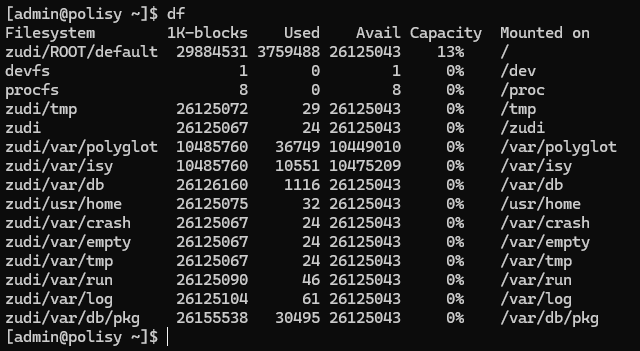
Thanks. I found your older post and just did this on my Polisy. In addition to the zudi substitution, I had to "sudo" the autoexpand command. It looks like it worked. Two additional comments: I'm not sure the update packages that I ran after reimaging did much, if anything. And it probably all fit in the 6G original partition because this is an empty Polisy. Now, I'd love to hear from anyone who has run upgrade packages on a Polisy and had it work correctly. I still have not upgraded my working Polisy, and I don't want to without more confidence that it will work correctly. -Tom
-
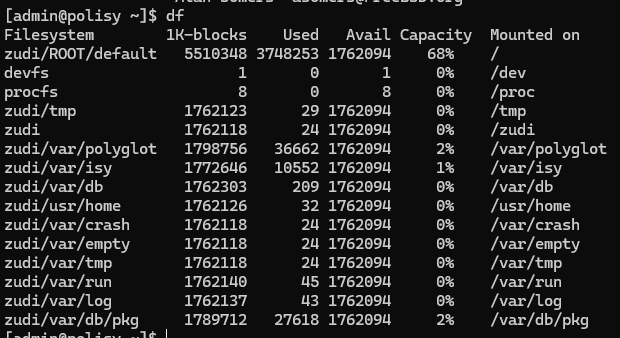
I saw this, but I can't find it. can you repost? Thanks. @Michel Kohanim your image did get me going again, but I'm concerned about the disk image size. Should I be? Is there a reason that the total disk space is so much smaller than before, and the used amount (capacity) is so much higher? -Tom
-
Looks like I got a small partition. This is a 32GB SSD. Everything is working, but not a lot of free space. I'm going to check out the video. -Tom