


apostolakisl
Members
-
Joined
-
Last visited
Everything posted by apostolakisl
-
Not sure what you mean. Faster than using webhook? Both network resource/webhook and setting a variable/contact closure work about the same on the initial trigger. Roughly 1 second. The webhook is dependent on the hosting server response time plus internet latency (to Germany). Similarly, using the variable method is going to have some latency based on ISY portal latency as well as internet latency to wherever ISY portal is hosted. Both would presumably be equally exposed to the same Alexa server latency. But when you use the variable/contact closure method, you are dead in the water for the next 30 seconds. The webhook method is ready to go right away for the next trigger. Also, unlike a toggled variable, with webhooks, you can keep triggering the same routine repeatedly without a toggle event. For example, say you had a routine that triggered a bell to ring. You could keep sending the webhook that triggers the ring over and over. Compared to a contact closure, you need to go 1, then reset to 0, then 1 again, then reset to 0, etc. And because of the 30 second delay, you would be limited to ringing the bell once per minute. variable 1=ring, wait 30 seconds, reset variable to 0, wait 30 seconds, variable 1=ring again. Obviously there is a limit to how fast you can get a webhook and an Alexa routine to respond, but you could probably repeat once a second. You also have to consider the response time of the routine target. If it is an Insteon light for example it has to get from Alexa server, through the ISY portal, to your ISY, through the ISY and then through the Insteon com.
-
So I did some playing around. I used a variable exposed to Alexa as a contact closure and an Insteon light also exposed to Alexa. I set up two routines where toggling the variable between 1 and 0 turns the light on/off. Changing the variable gives you a very quick response, perhaps a second. HOWEVER, the contact closure appears to get locked out for 30 seconds or so. So toggling back and forth in less than 30 seconds will present delays. Should you change the variable before 30 seconds expires the routine won't trigger until the 30 second lockout window has passed. If you change it during the lockout, and then change it back before the 30 second expires, nothing will happen at all. I can see where this time-delay would be desirable, but it makes no sense to me to make it the default. Alexa lets me use the webhooks repeatedly pretty much as fast as I can send them to it.
-
What do you mean by that? I have a bunch of these and they work 100% of the time.
-
As far as I can tell, the only way to use the portal for ISY to signal Alexa is to use either the motion sensor or contact closure variable setup. The "spoken" in these cases I think is irrelevant since Alexa only responds to the state of these variables, it doesn't control them in any way. Anyway, after all my screwing around to get the variables working with Alexa, I am going to stick with using the webhooks. The webhooks always work in a second or two. I am using them for a few things including opening and closing my Levelor blinds. If you push the button to close/open the blinds and then 20 seconds later they finally do it, well that stinks. My wife would certainly complain and this would just be something to try to explain to guests, well if you want the blinds closed push the button and then sometime in the next 30 seconds they will do it.
-
I finally got this working. Benoit at UD gave me all kinds of suggestions, none of which worked. He said all looked fine on his end. I called Amazon customer support and actually got a person. After 90 minutes on the phone they got it to work. However, I have noticed it is not fast to respond. I have it on contact closure and sometimes it takes 20 seconds or more to respond. Fastest I have seen is maybe 3 or 4 seconds.
-
I did a ticket and they said the token had expired and I needed to click on "switch portal profile" which renewed the token. Apparently if you have two ISY's on the same portal account, the token can expire on one and not the other even though they are both on the same portal login (my other ISY/PG3x was working fine the whole time). Apparently logging in from different computers and rebooting ISY doesn't renew the token. "Switch Profile" was the necessary step. Never would have figured that out on my own. And the token only applies to the purchasing part of the PG3x admin console.
-
You do this by using the "command" feature in the favorites. Start by hitting the plus to create a favorite Under type, select "command" Select the display node as you wish Select the "add command" at the bottom (it will tell you have to save first, go ahead and click to save) It opens up the command config page. Select the programs option and whatever program and whatever you want the program to do. You can also further customize the display node by using configure advanced options and have it be different colors and stuff depending on the state.
-
Running 6.0.4 on Polisy. I open PG3x console and navigate to the store, open a node, click "install" and nothing happens. Nothing, no errors, nothing. Tried multiple. I navigate to "purchases", and it forever says "retrieving purchases. . " I rebooted Polisy I tried from both the 3000 port as well as using the Eisy UI interface. Same story.
-
The whole purpose of having the light status in there is because CHANGES in light status will then retrigger the program. That is what you want, as soon as any of the 4 lights finishes its countdown it will change the light status and then disable itself taking it out of the mix. But when its light changes status, it will retrigger the remaining programs that haven't finished and start them over. You will start with 4 programs running, then 3, then 2, then 1 then none. If you really want to be 100% sure this works, use two status clauses for each light since the light can't be two status' at the same time, it will always trigger true. ie If light x is not 1% or light x is not 0% The above if clause will always run true any time the status of light x changes. EDIT: Another way to do this is to use the true/false status as a retrigger. Have each program where the countdown runs to zero, run its own else clause to change it from true to false. Then the other programs will all retrigger on it. Program W If time is sunset or program x is true or prgram x is false or program y is true or program y is false or program z is ture or program z is false then wait 10 seconds repeat while $iW is > 0 $iW = $iW - 1 wait 1 second repeat 1 time turn on light w run else program W Else disable program w So the above program would be duplicated changing out the variables as appropriate for each of the 4 (or more) lights. All 4 programs would run at sunset. The program that finishes first will become false and disable itself. The other 3 will retrigger when this program turns false. Then the process repeats starting with the 3 remaining programs . . .then 2 . . then the last one. EDIT: I actually wrote the program in ISY and copied it to here. Program W - [ID 0001][Parent 0093] If Time Is Sunset Or Program 'Program X' is False Or Program 'Program X' is True Or Program 'Program Y' is False Or Program 'Program Y' is True Or Program 'Program Z' is False Or Program 'Program Z' is True Then Wait 10 seconds Repeat While $i.zW > 0 $i.zW -= 1 Wait 1 second Repeat 1 times Set 'Light W' On Run Program 'Program W' (Else Path) Else Disable Program 'Program W' The above program will run at sunset (making itself true). wait 10 seconds, count down the variable, turn on its light, change itself to false, and disable itself. UNLESS, one of the other 3 programs beats it, in which case the other program will turn false before this finishes. That will re-trigger this program and it will start all over from the beginning.
-
I wrote this program and can confirm it works. Every time I do a "run then" command on it, the 4 variables get randomly assigned a 1,2,3,or 4 with no two being the same. I used 4 here because it proves it works. But you can just as easily make it 30 or whatever. Since you already get the countdown method, then that shouldn't be an issue. Regarding the time allotted. Just figure out what the max possible is. So for example wait 10 plus some random amount between 0 and 30, then the max for each run is roughly 40 times 4 or 160 seconds. So give yourself 3 minutes. Finally, you need a program to do a "run then" on the program "Random" I wrote below. Like If time is sunset minus 10, run then program Random. Random - [ID 0089][Parent 0093] If $i.zW is $i.zX Or $i.zW is $i.zY Or $i.zW is $i.zZ Or $i.zX is $i.zY Or $i.zX is $i.zZ Or $i.zY is $i.zZ Then $i.zW = Random 4 $i.zX = Random 4 $i.zY = Random 4 $i.zZ = Random 4 Run Program 'Random' (If) Else - No Actions - (To add one, press 'Action')
-
I did think of a way to eliminate the risk of two lights coming on at same time, but it is involved. You would need 4 variables. Set the 4 to random values. Then you would need to compare the values to make sure none are equal and if so regenerate values. Once all 4 are different you use those values in the above programs. However, a wait can not be assigned a variable. You need to use "repeat while variable greater than 0" and a 1 second wait. Each repeat subtracts 1 from the variable until it hits 0 at which point the program continues.
-
The following would generate a random order of lights turning on with each turning on between 10 and 40 seconds apart. There is a 1 in 30 chance that two lights will turn on at the same time the way I wrote it, otherwise always a min of 10 seconds, max of 40 seconds and always random order. I don't know a way to stop this. If you increase your random wait time portion, you reduce the chance of two being the same. This is for 4 lights (w, x, y, z) 1) put the 4 programs in a folder that is only active for the time that this is happening (ie sunset minus 1 to sunset plus 4 minutes) 2) create 4 programs, one for each light, as follows but make the obvious changes Program w If time is sunset or if status of light x is not some percentage that it would never be on (ie not the percent you have it set to default come on to) <the point of this status line is to use the change in status to reset the program when one of the others turns on> or if status of light y . . . or if status of light z. . . . then wait 10 seconds wait 30 second random turn on light w disable program w 3) finally, a 5th program that re-enables all of these programs shortly before the run time. If time is sunset minus 30 seconds then enable program w enable program x enable program y enable program z
-
I think you are doing both ways (Alexa voice to isy, isy back to Alexa via a variable triggering a routine. I am pretty sure a voice command can directly trigger a scene though, so not sure you would need to have Alexa use a routine on that at all. I have a number of voice commands that directly trigger Insteon devices without need for a routine. I opened a ticket with UD since my variable changes are not being seen by Alexa and thus my routines are not running.
-
@PB11 You are talking about a different thing here. This is ISY telling Alexa to do something, not Alexa telling ISY to do something. And yes, I have tried deleting variables, and I have added additional variables and exposed them to Alexa. But Alexa, as can be seen from the screenshot, says the device is not responding or sometimes it says the server isn't responding (whose server I don't know). Of course ISY is working with Alexa in the other direction, I can tell Alexa to do something with ISY and indeed ISY does whatever. And I am not using switches or a program at all to change the variable state. I am manually changing the variable, so I know it is changing.
-
@Guy Lavoie I think you are referring to status update. I am speaking of syncing the devices themselves (adding/removing/etc), not their current status. But in my case, I'm not noticing any difference in status populating upon opening. When I open the app, things populate like popcorn, sorting of randomly about.
-
@Mr B @ISY4Me Yes, this is what I am experiencing. I also have noticed that doing a sync is nothing like it used to be. It is taking very little time, not going through anywhere near all the flashing names of stuff that it used to, and when it "finishes" it isn't giving me the usual finished screen with the option to delete unused values.
-
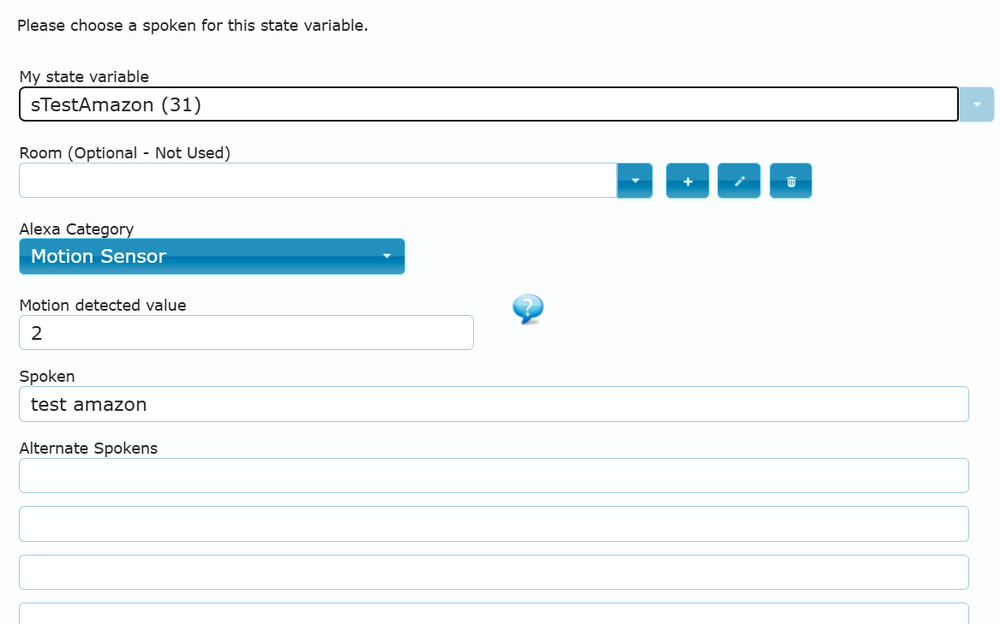
Alexa and ISY are communicating fine for all of my voice commands to Alexa. I can't imagine that my configuration in the portal is wrong. Not a whole lot to do wrong. I chose "2" as the detected value, but I also tried 1.

-
I looked at both the variables I added to Alexa as a contact closure and motion sensor. Changing the value of the variables in ISY is not changing the state Alexa reports. Contact closure for example always reports "closed" in Alexa whether the value is 1or 0. And motion variable always says no motion detected. And both say "device unresponsive" in a banner across the top. Screen shot EDIT: Now it says "server unresponsive" in the banner.

-
I have recently added some state variables. After syncing UD mobile, the variables show up, but are listed by number, not the name I gave them in isy when I created them.
-
Contact closure as mentioned in opening post. And I used 0,1 for that. Contact closure was what @bmercier had suggested in a different thread. I believe the two are equivalent. The both don't work equally for me. I have also switched out the action taken between Alexa actions and Insteon (via isy) actions. Checking the Alexa activity history indicates the routine is not running when triggered by isy variables.
-
I tried for the first time using a variable to trigger an Alexa Routine. It doesn't work. I set it up 3 days ago. The variable is set as a contact closure and is set to be "closed" at a value of 1. Alexa discovered the "contact" just fine and I was able to put it into a routine. But nothing happens. I set it to 1, nothing, I set it to 0, nothing. I have tried periodically going back and forth, leaving it in one state or the other for a while (hours) and nothing. I have not updated to Alexa+ I don't know about this. Seems like everyone has issues with it. UD either needs to fix whatever the issue is or remove the feature. A flaky feature is far worse than no feature. I also just tried adding a variable as a "motion sensor" with 2 as motion, still no triggering of a routine.
-
@Guy Lavoie As mentioned. Uncheck daily and then you pick specific dates. But the issue with that is you would need to go through and set every Christmas (or whatever) for every year going forward. Using the plugin for dates let you use wildcards. In other words, you can set it for every December 25 and the year can be wildcard. Or you can do every other day, or every just about anything you can think of, perhaps requiring some thinking to convert it to what you want, but really nothing can't be done. Many years ago, prior to plugins existing, I wrote a whole series of programs that does the same thing. In fact, I continue to use those programs because they work and why would I go through and re-write a bunch of programs that aren't broken that use the series of date programs. But if I were starting over, I would just use the plugin.
-
What is it you are trying to do? One button seems to cover it. Not sure what you mean by "lock down programs". No programs need to be locked down or I guess disabled if that is what you mean.
-
I still say the easiest way to handle this is a "run then" of the program when using the admin console or mobile linc to set the variable to 0 . Again, I assume that mobile linc lets you execute programs from a favorites folder. If you want to simultaneously shut the lights off when setting the value to 0, then add "off" commands to your then clause for the lights. If the light is already off it won't matter, it will just stay off as if nothing happened. I don't really know how you are handling this since obviously at least one of the lights will shut off if you do a fast off from one of the switches, seems like if you want one of them off you might want all of them off? I don't know what you are going for here. In UD mobile you can create a favorite and set the favorite icon to execute a "run then" upon tapping it. And it lets you name it separately from the program as well. I suspect mobile linc lets you do something similar. And if you are in the admin console, you might also just directly set the value to 0.
-
The language "switched" means you physically pushed the button, or at least that is the case with a switchlinc or KPL. Other devices it means that the command initiated at THAT device. If the device responded to a command issued elsewhere, it won't trigger the program. You would need to add to your program triggers that you can initiate from your phone. The easiest way I would say is to create a favorite in UD mobile that is the actual program. Add to your program to shut the devices off as well. If you actually click the switch itself and do the "fast off", it won't matter that the program shuts it off as well, it will already be off, no harm done. EDIT: I see you are using mobile linc and not UD mobile. I assume Mobile linc also lets you create favorites that might include programs where you can execute a "run then" by hitting the favorite button.


