


atmarosi
Members
-
Joined
-
Last visited
-
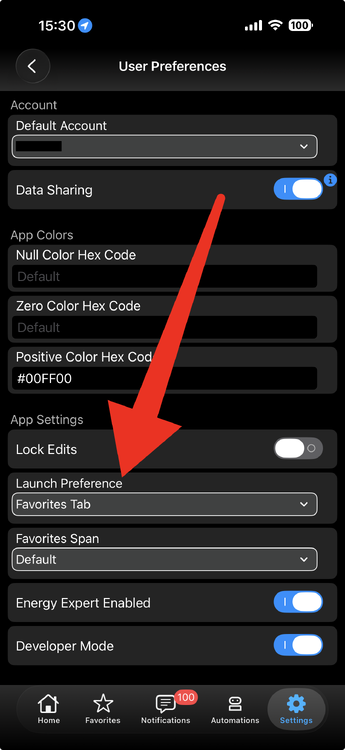
iOS Settings - User Prefs - launch pref Android Long press UDM - Select favorite
-
On iOS it’s under settings -> User Preferences here
-
Isn't 6.0.5 out...? Tried updating?
-
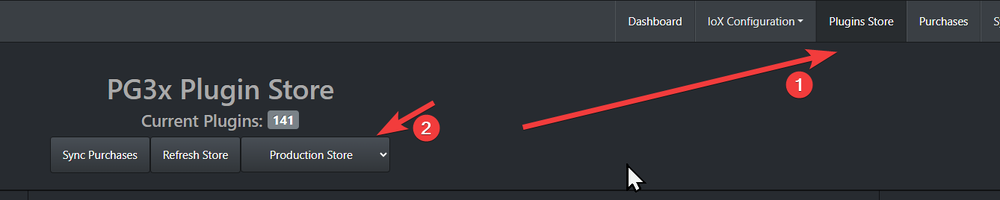
Go to the plugin store from the PG3x console Then install Kasa:

-
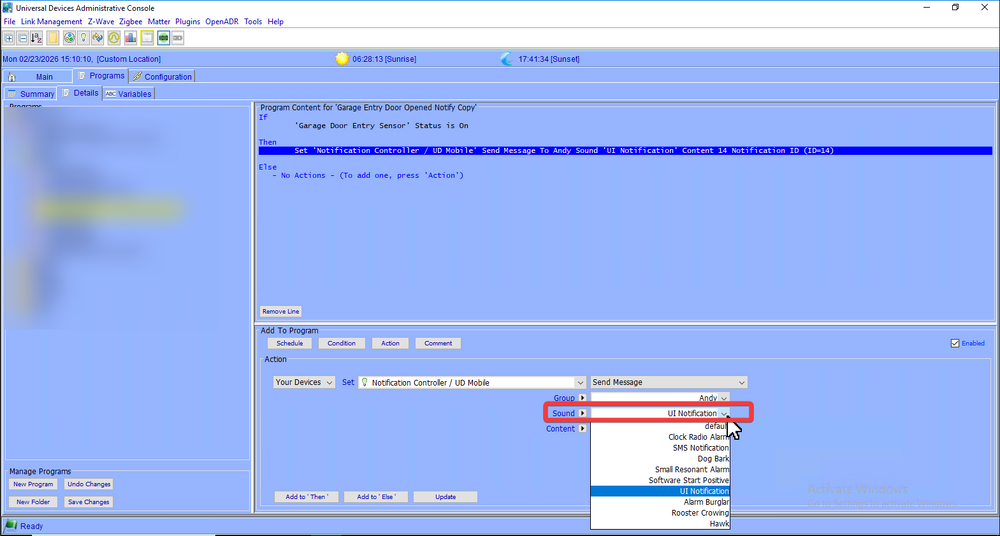
This is where I set it:
-
Nice sleuthing! Keep us posted - I'm sure there are some lurkers that can benefit!
-
401 = auth error; did you take a look here? Eisy:User Guide - Universal Devices, Inc. Wiki I don't have an eisy - i'm stuck on Polisy but from what I understand the eisy-ui changes things up a bit....assuming you did the upgrade of course.
-
From the spec sheet - FilterLinc 1626-10 NOTE: FilterLinc should be installed between the offending device (noise-maker or signal-absorbing appliance) and your home's AC outlet. Another great post: Where to put the noise filter? - ISY994 - Universal Devices Forum
-
You have to 'backup' aka export the config; and then restore it on the new device. They don't back up to iCloud natively like others are doing.
-
REST API network based calls to devices would be another way. The UDI device would do all the Insteon comms.
-
Can't say I've worked with the remote before - but you'll need to figure out how build the API call with the token/auth; someone built something similar for HomeAssistant:
-
You would want to send REST API calls from the Sofabaton to the UD side: ISY Developers:API:REST Interface - Universal Devices, Inc. Wiki Wiki has a great write up on how to use the REST API it has available.
-
You could have the program capture/write out the current level in a variable; turn them off; then turn them back on via the stored state - can't say I would know how to write it but sounds do-able...
-
If you turn off/on the light does it go back to it's prior setting right now? If so it should do the same thing if you off/on the lights via a program.
-
According to the python library that the PG node uses - this model + FW combo you have (HS200 HW 5.26/FW 1.0.3) requires auth.... You may need to do something extra in the config of the device/node server to get it to talk to it...seems like this post has mentioned a beta version that might fix it:


