


JTsao
Members
-
Joined
-
Last visited
Everything posted by JTsao
-
iAqualink node server doesn't appear to work after migrating to eisy-ui plugin either...
-
The Rachio node server did NOT refill my pool today (under eisy program control - via a sprinkler zone) so I guess I have to move it back to PG3 to work for now...
-
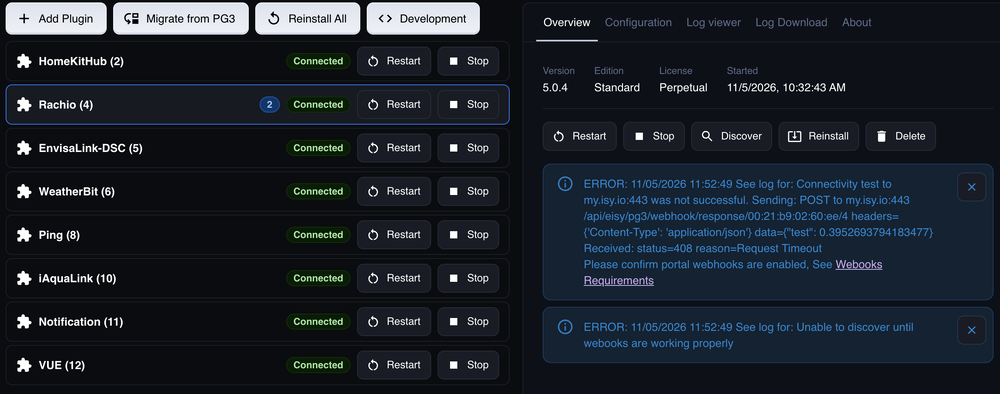
Here's my screen capture:
-
I'm getting an error after migrating the Rachio plugin: ERROR: 11/05/2026 10:32:50 See log for: Connectivity test to my.isy.io:443 was not successful. Sending: POST to my.isy.io:443 /api/eisy/pg3/webhook/response/(redacted)/4 headers={'Content-Type': 'application/json'} data={"test": 0.3952693794183477} Received: status=408 reason=Request Timeout Please confirm portal webhooks are enabled, See Webooks Requirements ERROR: 11/05/2026 10:32:50 See log for: Unable to discover until webooks are working properly When I read about enabling PG3 remote access via the link, the info. is a bit dated, but under my.isy.io I see the following under select tool->PG3->remote connection, anyone else see this problem or have a solution? Remote connection feature available: Yes Remote connection configured: Yes Remote connection active: Yes
-
I've migrated all but 1 plugin from PG3 to eisy, but I don't see a way to update a plugin from the eisy-ui, after migrating, if the developer pushes an update - can anyone explain? Does a "reinstall" do this?
-
It's under XRAY->DH DEVICE - I don't see an equivelant way of displaying in eisy-ui
-
These pending operations have persisted for months on my eisy - this morning I got on a ladder and moved the devices in question near the ZMatter dongle location and was able to clear the "pending operations" by taking one of several actions by right clicking the device in eisy-ui and selecting configuration - I tried "update", "update with interview", "write changes" and "update neighbors" - I think that "write changes" may have been the action that ultimately fixed the issue but not 100% sure as I had some confusion with the eisy-ui interview process (I am not sure if it ever completed successfully for either device) and the first device appears to have self-deleted and I had to re-add it to the system - by the way these were two Zooz ZSE29 outdoor motion sensors that had the "pending operations" issue One question related to this - how do we display the Z-Wave neighbors for a particular device in eisy-ui?
-
I think you're right - it's displaying % - gets to about 70% then fails - I also had to try a couple of extra times to get 7.42 to work (with the same problem)
-
I attempted the upgrade process and was able to get the firmware to version 7.45 and the bootloader to 2.04.00.05 but several attempts to update to 7.46, (tried both on a Windows 11 PC and a Macbook Air), were unsuccessful...
-
I have two zooz exterior motion sensors and they both have had pending writes for some time - this causes eisy-ui to indicate two "Pending Operations" via a pop-up. Is there any way to cancel those pending operations to get rid of the error message? Will this effect updating my Zmatter firmware from 7.32 to 7.46?
-
Any update on getting network resources into eisy-ui? It’s supposed to have 98% of admin console functionality presently and admin console on the way out…
-
I recently created an IoT VLAN on my Ubiquiti UDM-Pro and have moved several devices over to isolate them from the default network (LAN). By applying 2 rules, the IoT VLAN is completely accessible from the default LAN when the connection originates from the default LAN but not vice versa. The eisy is still on the default LAN. I moved my NVR to the IoT LAN and now the ping node server sees the NVR as off-line. At the same time, the ping node server can see my Ecoflow Delta Battery Back Up system which is also on the IoT VLAN. It is also confusing because my PC (on the default LAN) CAN ping the NVR on the IoT LAN and gets responses. Two more bits of information, I am using the UniFi "Virtual Network Override" to select clients to be in the IoT VLAN - the Ecoflow device is on WiFi, but the NVR is wired to one of the UDM-Pro front ports. So, can anyone make a suggestion on how to get the ping responses to the eisy? EDIT: Nevermid - apparently, changing the IP address in the ping node server requires a re-start of the node server and a 2nd instance of the ping target is created in IoX, so I just deleted the offline instance and updated all programs to reference the new instance and now it's working.
-
FWIW, I was using a Harmony Hub Companion Remote with the eISYIR Plugin+Flirc and also I used the Hue Emulator and Virtual Plugins to support harmony remote control of the eISY, but recently started using the Sofabaton X2 and it eliminates the need for all of those plugins because it can natively execute a REST command to the eISY
-
Sorry if this has already been asked, but where in eisy-ui are the "Network Resources"?
-
Sorry for the bad write-up - the Harmony Software crashes, not the eISY or node server - so I can't assign the Hue Emulator Scenes (with spoken=1) to the home control buttons
-
I cleaned up my hue emulator setup, turned off a lot of unnecessary SPOKEN=1 devices and renamed some of the scenes. Now when I attempt to assign a Hue Emulator Scene to a harmony companion home control button, the software crashes. I have tried a lot of things, but can't get it to work. This is with two different hubs. Anyone else experience this and have a work around (hopefully not factory resetting the harmony hub)?
-
Any updates on this? (Still running 6.0.4 and OK with that, but was wondering when it will be OK to attempt an upgrade)
-
OK thanks - that's how I've coded it for now - maybe there's an issue with eisy if my eisy shows "AC mains reconnected" as a valid status item for triggering programs but never can detect it
-
Has anyone else used this device (Zooz ZSE50)? It has a built in battery and can detect power outages and recovery. (Obviously, your eisy needs to be on a battery backup in order to report a power outage.) There are two power alarm states that you can use to trigger programs - "AC Mains Disconnected", or "AC Mains reconnected" - however, only the "AC Mains Disconnected" status seems to work. Has anyone else seen the reconnect status work?
-
Thanks for replying - the ghost devices showing up in the neighbors list, for the most part, are not going away - I had 7 of 30 devices with at least one ghost neighbor - one of them with a single ghost neighbor updated and now has no ghost neighbors, but the other 6 still have one or more ghosts - I was hoping that there was a way to SSH into the eisy and do something to purge all of the ghosts - it's looking like I may have to exclude and re-include some devices - this seems like a bug with ZMatter, but at least all of the devices seem to be working
-
I took a total of 7 Minoston ZP21D's out of service, 5 by excluding - I was finally able to get Zwave->Remove Failed Node to work for the other two, at least the AC did something and they went away, but an error message appeared at the end - Now, unfortunately, I have some of the removed devices appearing in the list of neighbors for some of my remaining z-wave devices - heal network does not make them go away - any advice on how to remove devices from the neighbors list? Is this a problem, or should I just ignore?
-
I have two Minoston ZP21D on off plugs where the button has seized up - I want to take them out of service, but I can't press the button 3X to exclude them - I tried Zwave->Remove Failed Node and get an error message - I want to remove these without leaving any ghost devices - what is the best way to remove them? right click->delete?
-
Let us know where you end up - I also had problems and Michel remotely fixed my eisy, but I am now on version 6.0.4 - he also asked me for my Z-wave device count and briefly mentioned a z-wave issue (but I don't know specifically what that was) - so I'm wondering when it will be safe to attempt a future update - I am not going to try until I hear that the issues, whatever they are, are fixed
-
I think it was 6.0.3 based on the name of the backup file - now, thanks to Michael K I am back up and running, but not on the latest version - now on 6.0.4
-
After re-reading this - I think that I'm in the same state - opened a ticket UPDATE: was able to access AC after pasting "https://eisy.local:8443/desc" into IoX finder because it wouldn't find the eisy, programs would not load, did a "restart IoX" from the Config page, but now I seem to be in an infinite loop where the AC says "Initializing System going from 0-100%" with a dialog box indicating "Completing Initialization" and this just repeats indefintely


