


apostolakisl
Members
-
Joined
-
Last visited
Everything posted by apostolakisl
-
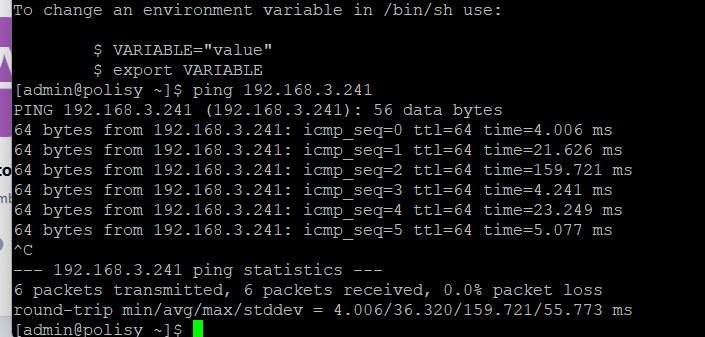
yes, I can ping both of them. Mostly the response times are in the 5-10ms, though a few are much longer. EDIT And I get a response on port 80. Not sure if I should check any other ports.

-
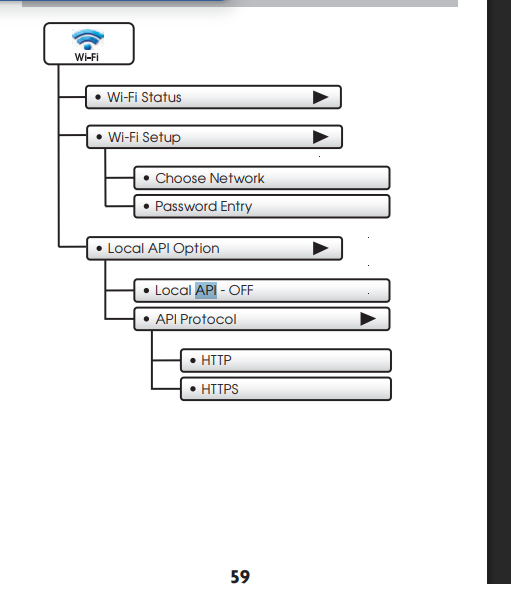
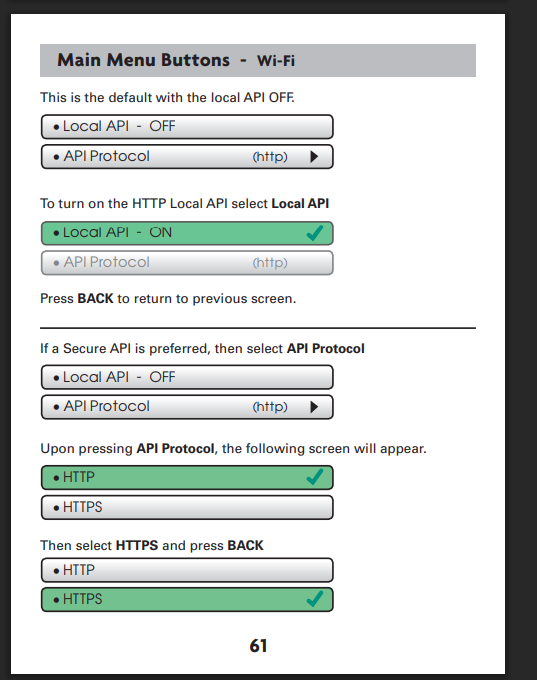
Polisy isn't connected to wifi, it is hard wired, only the thermostats are connected to ssid's. They are all on the same corporate vlan. No firewalls between devices. From a pc on the same vlan I get responses from the IP address of the thermostats. The manual also shows that it has options to http vs https. But once you turn on api, it greyed out to http. Perhaps https could be selected first and then you turn on api?
-
Yes, they are all on the same network as the polisy and of course the wifi is password secured, though that shouldn't have anything to do with anything. They connect to star net and I can ping them and I can go to the http:// address of the units and get a response. Lots of things on that network that polisy connects to fine. I set them to enabled local api right away when I first configured them. I have rebooted the one via a full 60 seconds power down. The http is just the venstar reporting that it is not requiring authentication for the api. I imagine yours says the same thing. Both of mine are identical on the page that toggles the api on/off.
-
@paulbates @hart2hart The local api is enabled on both of them. It was off by default and I clicked to turn it on. There is a second line that is greyed out that says it is http. If local api were off, I'm not sure I would get anything when I go to the url. For exmple, if I do a sensor query I get this. {"sensors":[{"name":"Thermostat","temp":73.0},{"name":"Space Temp","temp":73.0}]}
-
Chat GPT thinks it is the v5 firmware. It thinks when skyport is connected it restricts the local api. I don't know. I don't know how to get the older firmware to try. I suppose I can try disconnecting skyport.
-
I just installed a second Venstar T7850 this time. Same exact thing. So either there is some setting on the thermostat I am not setting correctly, or something is up with the node.
-
No pin is set. The thermostat is not locked, anyone can walk up and change the settings. ChatGPT says So now we have: / → works /query/sensors → works /query/status → hangs That means: ✅ Web server is fine ✅ API framework is running ✅ Sensor subsystem is responding ❗ The status handler specifically is blocking This is not a network problem. It’s not VPN. It’s not UniFi. It’s not DNS. This is almost certainly the thermostat blocking while trying to assemble the full status payload. Why /query/status Is Special/query/status pulls: Equipment state Heat/cool stage status Fan state Mode Schedule status Possibly cloud state Possibly accessory state (humidifier, dehumidifier, etc.) If any one of those internal calls hangs, the entire endpoint never returns. /query/sensors is simpler — it only pulls temperature/humidity inputs. The Most Likely CauseAfter firmware update: One internal module didn’t restart cleanly Or the equipment interface process is stuck Or there’s a bad state flag from the update This is classic “partial subsystem deadlock.” What Will Fix It (Almost Certainly)A full cold power pull. Not menu reboot. Physically remove it from the wall for 60+ seconds. The T7800 WiFi module does not fully reset on soft reboot. Why Skyport WorksSkyport uses: Outbound connection Different internal status routine Not the same HTTP handler So cloud working does NOT mean /query/status will work. Extremely Important QuestionIs the thermostat currently: Actively heating or cooling? Calling a stage? In auto mode? Connected to any accessories? Because I’ve seen /query/status hang when: A stage output is misconfigured A heat pump reversing valve state is weird Accessory configuration doesn’t match hardware Next StepsWhen you’re onsite: Power pull Immediately test /query/status If it works → done If it still hangs → we dig into configuration (not networking) It says to power cycle. Whish is certainly a descent idea. I'll do it later today.
-
I have a Venstar T7800 with the wifi adapter. The thermostat is logged into Venstar Skyport and that works. I enabled Local API. I installed the PG3x node. I clicked "discover". It gave me a message that it failed to find a thermostat. I manually entered an incorrect IP address and it gave the same message (this was an accident, transposed two digits). I corrected that mistake and then hit discover and it does nothing. No messages, no nodes, it is like I didn't hit the discover button. I tried deleting the node and installing again in a different slot. Same results. I tried changing back to an incorrect IP and it gives the message that nothing is there again. The discover button is activating, it changes from almost black to black when I click it. It would seem that the node server is seeing something there but getting in some failure loop or something? Next step? Thanks. EDIT: Also I have put the latest firmware on the thermostat. EDIT2: I put the url (http://192.168.3.127) into a web browser and got this response. {"api_ver":5,"type":"residential"} If put http://192.168.3.127/query/status it just spins and spins. I'm going to try power cycling the thermostat later today when I am physically there. I'm working through a local pc via vpn/remote desktop. @Goose66 here is some of the log AutoScroll 2026-02-12 10:01:26.107 MQTT udi_interface.interface DEBUG interface:_message: QUEUING incoming message discover 2026-02-12 10:01:26.108 Command udi_interface.interface DEBUG interface:_parseInput: DEQUEING discover 2026-02-12 10:01:26.109 Command udi_interface.interface DEBUG interface:_handleInput: PROCESS discover message {} from Polyglot 2026-02-12 10:01:26.110 Thread-54 (_discover_handler) udi_interface.custom DEBUG custom:clear: CUSTOM: Clear ...saving 2026-02-12 10:01:26.111 Thread-54 (_discover_handler) udi_interface.custom INFO custom:_save: Sending data notices to Polyglot. 2026-02-12 10:01:26.111 Thread-54 (_discover_handler) udi_interface DEBUG venstarapi:getThermostatInfo: in getThermostatInfo()... 2026-02-12 10:01:26.119 Thread-1 (send_thread) udi_interface.interface DEBUG interface:_send: PUBLISHING {'set': [{'key': 'notices', 'value': {}}]} 2026-02-12 10:01:26.167 MQTT udi_interface.interface DEBUG interface:_message: QUEUING incoming message custom 2026-02-12 10:01:26.168 Command udi_interface.interface DEBUG interface:_parseInput: DEQUEING custom 2026-02-12 10:01:26.169 Command udi_interface.interface DEBUG interface:_handleInput: PROCESS custom message {'notices': '{}'} from Polyglot 2026-02-12 10:01:26.169 Command udi_interface.interface DEBUG interface:_handleInput: Process custom message notices from Polyglot 2026-02-12 10:01:26.170 Command udi_interface.custom DEBUG custom:load: CUSTOM: load {} 2026-02-12 10:01:26.208 MQTT udi_interface.interface INFO interface:_message: Successfully set key = notices 2026-02-12 10:01:26.418 MQTT udi_interface.interface DEBUG interface:_message: QUEUING incoming message shortPoll 2026-02-12 10:01:26.419 Command udi_interface.interface DEBUG interface:_parseInput: DEQUEING shortPoll 2026-02-12 10:01:26.419 Command udi_interface.interface DEBUG interface:_handleInput: PROCESS shortPoll message {} from Polyglot 2026-02-12 10:01:26.420 Thread-55 (_poll_handler) udi_interface INFO venstarns:shortPoll: Updating node states in shortPoll()... 2026-02-12 10:01:26.528 Thread-54 (_discover_handler) udi_interface ERROR udi_interface:write: Exception in thread 2026-02-12 10:01:26.528 Thread-54 (_discover_handler) udi_interface ERROR udi_interface:write: Thread-54 (_discover_handler) 2026-02-12 10:01:26.529 Thread-54 (_discover_handler) udi_interface ERROR udi_interface:write: : 2026-02-12 10:01:26.529 Thread-54 (_discover_handler) udi_interface ERROR udi_interface:write: Traceback (most recent call last): 2026-02-12 10:01:26.529 Thread-54 (_discover_handler) udi_interface ERROR udi_interface:write: File "/usr/local/lib/python3.11/site-packages/requests/models.py", line 976, in json 2026-02-12 10:01:26.532 Thread-54 (_discover_handler) udi_interface ERROR udi_interface:write: return complexjson.loads(self.text, **kwargs) 2026-02-12 10:01:26.534 Thread-54 (_discover_handler) udi_interface ERROR udi_interface:write: ^ 2026-02-12 10:01:26.534 Thread-54 (_discover_handler) udi_interface ERROR udi_interface:write: ^ 2026-02-12 10:01:26.535 Thread-54 (_discover_handler) udi_interface ERROR udi_interface:write: ^ 2026-02-12 10:01:26.535 Thread-54 (_discover_handler) udi_interface ERROR udi_interface:write: ^ 2026-02-12 10:01:26.535 Thread-54 (_discover_handler) udi_interface ERROR udi_interface:write: ^ 2026-02-12 10:01:26.536 Thread-54 (_discover_handler) udi_interface ERROR udi_interface:write: ^ 2026-02-12 10:01:26.536 Thread-54 (_discover_handler) udi_interface ERROR udi_interface:write: ^ 2026-02-12 10:01:26.537 Thread-54 (_discover_handler) udi_interface ERROR udi_interface:write: ^ 2026-02-12 10:01:26.537 Thread-54 (_discover_handler) udi_interface ERROR udi_interface:write: ^ 2026-02-12 10:01:26.538 Thread-54 (_discover_handler) udi_interface ERROR udi_interface:write: ^ 2026-02-12 10:01:26.538 Thread-54 (_discover_handler) udi_interface ERROR udi_interface:write: ^ 2026-02-12 10:01:26.539 Thread-54 (_discover_handler) udi_interface ERROR udi_interface:write: ^ 2026-02-12 10:01:26.539 Thread-54 (_discover_handler) udi_interface ERROR udi_interface:write: ^ 2026-02-12 10:01:26.540 Thread-54 (_discover_handler) udi_interface ERROR udi_interface:write: ^ 2026-02-12 10:01:26.540 Thread-54 (_discover_handler) udi_interface ERROR udi_interface:write: ^ 2026-02-12 10:01:26.540 Thread-54 (_discover_handler) udi_interface ERROR udi_interface:write: ^ 2026-02-12 10:01:26.541 Thread-54 (_discover_handler) udi_interface ERROR udi_interface:write: ^ 2026-02-12 10:01:26.541 Thread-54 (_discover_handler) udi_interface ERROR udi_interface:write: ^ 2026-02-12 10:01:26.542 Thread-54 (_discover_handler) udi_interface ERROR udi_interface:write: ^ 2026-02-12 10:01:26.542 Thread-54 (_discover_handler) udi_interface ERROR udi_interface:write: ^ 2026-02-12 10:01:26.543 Thread-54 (_discover_handler) udi_interface ERROR udi_interface:write: ^ 2026-02-12 10:01:26.543 Thread-54 (_discover_handler) udi_interface ERROR udi_interface:write: ^ 2026-02-12 10:01:26.543 Thread-54 (_discover_handler) udi_interface ERROR udi_interface:write: ^ 2026-02-12 10:01:26.544 Thread-54 (_discover_handler) udi_interface ERROR udi_interface:write: ^ 2026-02-12 10:01:26.544 Thread-54 (_discover_handler) udi_interface ERROR udi_interface:write: ^ 2026-02-12 10:01:26.544 Thread-54 (_discover_handler) udi_interface ERROR udi_interface:write: ^ 2026-02-12 10:01:26.545 Thread-54 (_discover_handler) udi_interface ERROR udi_interface:write: ^ 2026-02-12 10:01:26.545 Thread-54 (_discover_handler) udi_interface ERROR udi_interface:write: ^ 2026-02-12 10:01:26.546 Thread-54 (_discover_handler) udi_interface ERROR udi_interface:write: ^ 2026-02-12 10:01:26.546 Thread-54 (_discover_handler) udi_interface ERROR udi_interface:write: ^ 2026-02-12 10:01:26.547 Thread-54 (_discover_handler) udi_interface ERROR udi_interface:write: ^ 2026-02-12 10:01:26.547 Thread-54 (_discover_handler) udi_interface ERROR udi_interface:write: ^ 2026-02-12 10:01:26.548 Thread-54 (_discover_handler) udi_interface ERROR udi_interface:write: ^ 2026-02-12 10:01:26.548 Thread-54 (_discover_handler) udi_interface ERROR udi_interface:write: ^ 2026-02-12 10:01:26.548 Thread-54 (_discover_handler) udi_interface ERROR udi_interface:write: ^ 2026-02-12 10:01:26.549 Thread-54 (_discover_handler) udi_interface ERROR udi_interface:write: ^ 2026-02-12 10:01:26.549 Thread-54 (_discover_handler) udi_interface ERROR udi_interface:write: ^ 2026-02-12 10:01:26.550 Thread-54 (_discover_handler) udi_interface ERROR udi_interface:write: ^ 2026-02-12 10:01:26.550 Thread-54 (_discover_handler) udi_interface ERROR udi_interface:write: File "/usr/local/lib/python3.11/json/__init__.py", line 346, in loads 2026-02-12 10:01:26.553 Thread-54 (_discover_handler) udi_interface ERROR udi_interface:write: return defaultdecoder.decode(s) 2026-02-12 10:01:26.554 Thread-54 (_discover_handler) udi_interface ERROR udi_interface:write: ^ 2026-02-12 10:01:26.554 Thread-54 (_discover_handler) udi_interface ERROR udi_interface:write: ^ 2026-02-12 10:01:26.555 Thread-54 (_discover_handler) udi_interface ERROR udi_interface:write: ^ 2026-02-12 10:01:26.555 Thread-54 (_discover_handler) udi_interface ERROR udi_interface:write: ^ 2026-02-12 10:01:26.556 Thread-54 (_discover_handler) udi_interface ERROR udi_interface:write: ^ 2026-02-12 10:01:26.556 Thread-54 (_discover_handler) udi_interface ERROR udi_interface:write: ^ 2026-02-12 10:01:26.557 Thread-54 (_discover_handler) udi_interface ERROR udi_interface:write: ^ 2026-02-12 10:01:26.557 Thread-54 (_discover_handler) udi_interface ERROR udi_interface:write: ^ 2026-02-12 10:01:26.557 Thread-54 (_discover_handler) udi_interface ERROR udi_interface:write: ^ 2026-02-12 10:01:26.558 Thread-54 (_discover_handler) udi_interface ERROR udi_interface:write: ^ 2026-02-12 10:01:26.558 Thread-54 (_discover_handler) udi_interface ERROR udi_interface:write: ^ 2026-02-12 10:01:26.559 Thread-54 (_discover_handler) udi_interface ERROR udi_interface:write: ^ 2026-02-12 10:01:26.559 Thread-54 (_discover_handler) udi_interface ERROR udi_interface:write: ^ 2026-02-12 10:01:26.560 Thread-54 (_discover_handler) udi_interface ERROR udi_interface:write: ^ 2026-02-12 10:01:26.560 Thread-54 (_discover_handler) udi_interface ERROR udi_interface:write: ^ 2026-02-12 10:01:26.561 Thread-54 (_discover_handler) udi_interface ERROR udi_interface:write: ^ 2026-02-12 10:01:26.561 Thread-54 (_discover_handler) udi_interface ERROR udi_interface:write: ^ 2026-02-12 10:01:26.561 Thread-54 (_discover_handler) udi_interface ERROR udi_interface:write: ^ 2026-02-12 10:01:26.562 Thread-54 (_discover_handler) udi_interface ERROR udi_interface:write: ^ 2026-02-12 10:01:26.562 Thread-54 (_discover_handler) udi_interface ERROR udi_interface:write: ^ 2026-02-12 10:01:26.563 Thread-54 (_discover_handler) udi_interface ERROR udi_interface:write: ^ 2026-02-12 10:01:26.563 Thread-54 (_discover_handler) udi_interface ERROR udi_interface:write: ^ 2026-02-12 10:01:26.563 Thread-54 (_discover_handler) udi_interface ERROR udi_interface:write: ^ 2026-02-12 10:01:26.564 Thread-54 (_discover_handler) udi_interface ERROR udi_interface:write: ^ 2026-02-12 10:01:26.564 Thread-54 (_discover_handler) udi_interface ERROR udi_interface:write: ^ 2026-02-12 10:01:26.565 Thread-54 (_discover_handler) udi_interface ERROR udi_interface:write: ^ 2026-02-12 10:01:26.565 Thread-54 (_discover_handler) udi_interface ERROR udi_interface:write: File "/usr/local/lib/python3.11/json/decoder.py", line 337, in decode 2026-02-12 10:01:26.567 Thread-54 (_discover_handler) udi_interface ERROR udi_interface:write: obj, end = self.raw_decode(s, idx=_w(s, 0).end()) 2026-02-12 10:01:26.568 Thread-54 (_discover_handler) udi_interface ERROR udi_interface:write: ^ 2026-02-12 10:01:26.569 Thread-54 (_discover_handler) udi_interface ERROR udi_interface:write: ^ 2026-02-12 10:01:26.569 Thread-54 (_discover_handler) udi_interface ERROR udi_interface:write: ^ 2026-02-12 10:01:26.570 Thread-54 (_discover_handler) udi_interface ERROR udi_interface:write: ^ 2026-02-12 10:01:26.570 Thread-54 (_discover_handler) udi_interface ERROR udi_interface:write: ^ 2026-02-12 10:01:26.570 Thread-54 (_discover_handler) udi_interface ERROR udi_interface:write: ^ 2026-02-12 10:01:26.571 Thread-54 (_discover_handler) udi_interface ERROR udi_interface:write: ^ 2026-02-12 10:01:26.571 Thread-54 (_discover_handler) udi_interface ERROR udi_interface:write: ^ 2026-02-12 10:01:26.572 Thread-54 (_discover_handler) udi_interface ERROR udi_interface:write: ^ 2026-02-12 10:01:26.572 Thread-54 (_discover_handler) udi_interface ERROR udi_interface:write: ^ 2026-02-12 10:01:26.572 Thread-54 (_discover_handler) udi_interface ERROR udi_interface:write: ^ 2026-02-12 10:01:26.573 Thread-54 (_discover_handler) udi_interface ERROR udi_interface:write: ^ 2026-02-12 10:01:26.573 Thread-54 (_discover_handler) udi_interface ERROR udi_interface:write: ^ 2026-02-12 10:01:26.573 Thread-54 (_discover_handler) udi_interface ERROR udi_interface:write: ^ 2026-02-12 10:01:26.574 Thread-54 (_discover_handler) udi_interface ERROR udi_interface:write: ^ 2026-02-12 10:01:26.574 Thread-54 (_discover_handler) udi_interface ERROR udi_interface:write: ^ 2026-02-12 10:01:26.575 Thread-54 (_discover_handler) udi_interface ERROR udi_interface:write: ^ 2026-02-12 10:01:26.575 Thread-54 (_discover_handler) udi_interface ERROR udi_interface:write: ^ 2026-02-12 10:01:26.575 Thread-54 (_discover_handler) udi_interface ERROR udi_interface:write: ^ 2026-02-12 10:01:26.576 Thread-54 (_discover_handler) udi_interface ERROR udi_interface:write: ^ 2026-02-12 10:01:26.576 Thread-54 (_discover_handler) udi_interface ERROR udi_interface:write: ^ 2026-02-12 10:01:26.577 Thread-54 (_discover_handler) udi_interface ERROR udi_interface:write: ^ 2026-02-12 10:01:26.577 Thread-54 (_discover_handler) udi_interface ERROR udi_interface:write: ^ 2026-02-12 10:01:26.577 Thread-54 (_discover_handler) udi_interface ERROR udi_interface:write: ^ 2026-02-12 10:01:26.578 Thread-54 (_discover_handler) udi_interface ERROR udi_interface:write: ^ 2026-02-12 10:01:26.578 Thread-54 (_discover_handler) udi_interface ERROR udi_interface:write: ^ 2026-02-12 10:01:26.579 Thread-54 (_discover_handler) udi_interface ERROR udi_interface:write: ^ 2026-02-12 10:01:26.579 Thread-54 (_discover_handler) udi_interface ERROR udi_interface:write: ^ 2026-02-12 10:01:26.579 Thread-54 (_discover_handler) udi_interface ERROR udi_interface:write: ^ 2026-02-12 10:01:26.580 Thread-54 (_discover_handler) udi_interface ERROR udi_interface:write: ^ 2026-02-12 10:01:26.580 Thread-54 (_discover_handler) udi_interface ERROR udi_interface:write: ^ 2026-02-12 10:01:26.581 Thread-54 (_discover_handler) udi_interface ERROR udi_interface:write: ^ 2026-02-12 10:01:26.581 Thread-54 (_discover_handler) udi_interface ERROR udi_interface:write: ^ 2026-02-12 10:01:26.581 Thread-54 (_discover_handler) udi_interface ERROR udi_interface:write: ^ 2026-02-12 10:01:26.582 Thread-54 (_discover_handler) udi_interface ERROR udi_interface:write: ^ 2026-02-12 10:01:26.582 Thread-54 (_discover_handler) udi_interface ERROR udi_interface:write: ^ 2026-02-12 10:01:26.582 Thread-54 (_discover_handler) udi_interface ERROR udi_interface:write: ^ 2026-02-12 10:01:26.583 Thread-54 (_discover_handler) udi_interface ERROR udi_interface:write: ^ 2026-02-12 10:01:26.583 Thread-54 (_discover_handler) udi_interface ERROR udi_interface:write: File "/usr/local/lib/python3.11/json/decoder.py", line 355, in raw_decode 2026-02-12 10:01:26.585 Thread-54 (_discover_handler) udi_interface ERROR udi_interface:write: raise JSONDecodeError("Expecting value", s, err.value) from None 2026-02-12 10:01:26.586 Thread-54 (_discover_handler) udi_interface ERROR udi_interface:write: json.decoder 2026-02-12 10:01:26.587 Thread-54 (_discover_handler) udi_interface ERROR udi_interface:write: . 2026-02-12 10:01:26.588 Thread-54 (_discover_handler) udi_interface ERROR udi_interface:write: JSONDecodeError 2026-02-12 10:01:26.588 Thread-54 (_discover_handler) udi_interface ERROR udi_interface:write: : 2026-02-12 10:01:26.589 Thread-54 (_discover_handler) udi_interface ERROR udi_interface:write: Expecting value: line 1 column 1 (char 0) 2026-02-12 10:01:26.589 Thread-54 (_discover_handler) udi_interface ERROR udi_interface:write: During handling of the above exception, another exception occurred: 2026-02-12 10:01:26.590 Thread-54 (_discover_handler) udi_interface ERROR udi_interface:write: Traceback (most recent call last): 2026-02-12 10:01:26.590 Thread-54 (_discover_handler) udi_interface ERROR udi_interface:write: File "/usr/local/lib/python3.11/threading.py", line 1045, in bootstrapinner 2026-02-12 10:01:26.594 Thread-54 (_discover_handler) udi_interface ERROR udi_interface:write: self.run() 2026-02-12 10:01:26.595 Thread-54 (_discover_handler) udi_interface ERROR udi_interface:write: File "/usr/local/lib/python3.11/threading.py", line 982, in run 2026-02-12 10:01:26.598 Thread-54 (_discover_handler) udi_interface ERROR udi_interface:write: self._target(*self._args, **self._kwargs) 2026-02-12 10:01:26.600 Thread-54 (_discover_handler) udi_interface ERROR udi_interface:write: File "/var/polyglot/pg3/ns/000db9593970_8/venstarns/nslib.py", line 87, in discoverhandler 2026-02-12 10:01:26.602 Thread-54 (_discover_handler) udi_interface ERROR udi_interface:write: self.discover() 2026-02-12 10:01:26.603 Thread-54 (_discover_handler) udi_interface ERROR udi_interface:write: File "/var/polyglot/pg3/ns/000db9593970_8/venstarns/venstarns.py", line 143, in discover 2026-02-12 10:01:26.604 Thread-54 (_discover_handler) udi_interface ERROR udi_interface:write: thermoInfo = api.getThermostatInfo(hostName, LOGGER) 2026-02-12 10:01:26.605 Thread-54 (_discover_handler) udi_interface ERROR udi_interface:write: ^ 2026-02-12 10:01:26.606 Thread-54 (_discover_handler) udi_interface ERROR udi_interface:write: ^ 2026-02-12 10:01:26.607 Thread-54 (_discover_handler) udi_interface ERROR udi_interface:write: ^ 2026-02-12 10:01:26.607 Thread-54 (_discover_handler) udi_interface ERROR udi_interface:write: ^ 2026-02-12 10:01:26.608 Thread-54 (_discover_handler) udi_interface ERROR udi_interface:write: ^ 2026-02-12 10:01:26.608 Thread-54 (_discover_handler) udi_interface ERROR udi_interface:write: ^ 2026-02-12 10:01:26.608 Thread-54 (_discover_handler) udi_interface ERROR udi_interface:write: ^ 2026-02-12 10:01:26.609 Thread-54 (_discover_handler) udi_interface ERROR udi_interface:write: ^ 2026-02-12 10:01:26.609 Thread-54 (_discover_handler) udi_interface ERROR udi_interface:write: ^ 2026-02-12 10:01:26.610 Thread-54 (_discover_handler) udi_interface ERROR udi_interface:write: ^ 2026-02-12 10:01:26.610 Thread-54 (_discover_handler) udi_interface ERROR udi_interface:write: ^ 2026-02-12 10:01:26.611 Thread-54 (_discover_handler) udi_interface ERROR udi_interface:write: ^ 2026-02-12 10:01:26.611 Thread-54 (_discover_handler) udi_interface ERROR udi_interface:write: ^ 2026-02-12 10:01:26.612 Thread-54 (_discover_handler) udi_interface ERROR udi_interface:write: ^ 2026-02-12 10:01:26.612 Thread-54 (_discover_handler) udi_interface ERROR udi_interface:write: ^ 2026-02-12 10:01:26.613 Thread-54 (_discover_handler) udi_interface ERROR udi_interface:write: ^ 2026-02-12 10:01:26.613 Thread-54 (_discover_handler) udi_interface ERROR udi_interface:write: ^ 2026-02-12 10:01:26.614 Thread-54 (_discover_handler) udi_interface ERROR udi_interface:write: ^ 2026-02-12 10:01:26.614 Thread-54 (_discover_handler) udi_interface ERROR udi_interface:write: ^ 2026-02-12 10:01:26.615 Thread-54 (_discover_handler) udi_interface ERROR udi_interface:write: ^ 2026-02-12 10:01:26.615 Thread-54 (_discover_handler) udi_interface ERROR udi_interface:write: ^ 2026-02-12 10:01:26.616 Thread-54 (_discover_handler) udi_interface ERROR udi_interface:write: ^ 2026-02-12 10:01:26.616 Thread-54 (_discover_handler) udi_interface ERROR udi_interface:write: ^ 2026-02-12 10:01:26.617 Thread-54 (_discover_handler) udi_interface ERROR udi_interface:write: ^ 2026-02-12 10:01:26.617 Thread-54 (_discover_handler) udi_interface ERROR udi_interface:write: ^ 2026-02-12 10:01:26.618 Thread-54 (_discover_handler) udi_interface ERROR udi_interface:write: ^ 2026-02-12 10:01:26.618 Thread-54 (_discover_handler) udi_interface ERROR udi_interface:write: ^ 2026-02-12 10:01:26.618 Thread-54 (_discover_handler) udi_interface ERROR udi_interface:write: ^ 2026-02-12 10:01:26.619 Thread-54 (_discover_handler) udi_interface ERROR udi_interface:write: ^ 2026-02-12 10:01:26.619 Thread-54 (_discover_handler) udi_interface ERROR udi_interface:write: ^ 2026-02-12 10:01:26.620 Thread-54 (_discover_handler) udi_interface ERROR udi_interface:write: ^ 2026-02-12 10:01:26.620 Thread-54 (_discover_handler) udi_interface ERROR udi_interface:write: ^ 2026-02-12 10:01:26.621 Thread-54 (_discover_handler) udi_interface ERROR udi_interface:write: ^ 2026-02-12 10:01:26.621 Thread-54 (_discover_handler) udi_interface ERROR udi_interface:write: ^ 2026-02-12 10:01:26.622 Thread-54 (_discover_handler) udi_interface ERROR udi_interface:write: ^ 2026-02-12 10:01:26.622 Thread-54 (_discover_handler) udi_interface ERROR udi_interface:write: ^ 2026-02-12 10:01:26.622 Thread-54 (_discover_handler) udi_interface ERROR udi_interface:write: ^ 2026-02-12 10:01:26.623 Thread-54 (_discover_handler) udi_interface ERROR udi_interface:write: ^ 2026-02-12 10:01:26.623 Thread-54 (_discover_handler) udi_interface ERROR udi_interface:write: ^ 2026-02-12 10:01:26.624 Thread-54 (_discover_handler) udi_interface ERROR udi_interface:write: File "/var/polyglot/pg3/ns/000db9593970_8/venstarns/venstarapi.py", line 385, in getThermostatInfo 2026-02-12 10:01:26.625 Thread-54 (_discover_handler) udi_interface ERROR udi_interface:write: thermostatInfo.update(response.json()) 2026-02-12 10:01:26.626 Thread-54 (_discover_handler) udi_interface ERROR udi_interface:write: ^ 2026-02-12 10:01:26.627 Thread-54 (_discover_handler) udi_interface ERROR udi_interface:write: ^ 2026-02-12 10:01:26.627 Thread-54 (_discover_handler) udi_interface ERROR udi_interface:write: ^ 2026-02-12 10:01:26.628 Thread-54 (_discover_handler) udi_interface ERROR udi_interface:write: ^ 2026-02-12 10:01:26.628 Thread-54 (_discover_handler) udi_interface ERROR udi_interface:write: ^ 2026-02-12 10:01:26.629 Thread-54 (_discover_handler) udi_interface ERROR udi_interface:write: ^ 2026-02-12 10:01:26.629 Thread-54 (_discover_handler) udi_interface ERROR udi_interface:write: ^ 2026-02-12 10:01:26.630 Thread-54 (_discover_handler) udi_interface ERROR udi_interface:write: ^ 2026-02-12 10:01:26.630 Thread-54 (_discover_handler) udi_interface ERROR udi_interface:write: ^ 2026-02-12 10:01:26.631 Thread-54 (_discover_handler) udi_interface ERROR udi_interface:write: ^ 2026-02-12 10:01:26.631 Thread-54 (_discover_handler) udi_interface ERROR udi_interface:write: ^ 2026-02-12 10:01:26.631 Thread-54 (_discover_handler) udi_interface ERROR udi_interface:write: ^ 2026-02-12 10:01:26.632 Thread-54 (_discover_handler) udi_interface ERROR udi_interface:write: ^ 2026-02-12 10:01:26.632 Thread-54 (_discover_handler) udi_interface ERROR udi_interface:write: ^ 2026-02-12 10:01:26.632 Thread-54 (_discover_handler) udi_interface ERROR udi_interface:write: ^ 2026-02-12 10:01:26.633 Thread-54 (_discover_handler) udi_interface ERROR udi_interface:write: File "/usr/local/lib/python3.11/site-packages/requests/models.py", line 980, in json 2026-02-12 10:01:26.636 Thread-54 (_discover_handler) udi_interface ERROR udi_interface:write: raise RequestsJSONDecodeError(e.msg, e.doc, e.pos) 2026-02-12 10:01:26.637 Thread-54 (_discover_handler) udi_interface ERROR udi_interface:write: requests.exceptions 2026-02-12 10:01:26.638 Thread-54 (_discover_handler) udi_interface ERROR udi_interface:write: . 2026-02-12 10:01:26.638 Thread-54 (_discover_handler) udi_interface ERROR udi_interface:write: JSONDecodeError 2026-02-12 10:01:26.639 Thread-54 (_discover_handler) udi_interface ERROR udi_interface:write: : 2026-02-12 10:01:26.639 Thread-54 (_discover_handler) udi_interface ERROR udi_interface:write: Expecting value: line 1 column 1 (char 0) 2026-02-12 10:01:46.389 MQTT udi_interface.interface DEBUG interface:_message: QUEUING incoming message shortPoll 2026-02-12 10:01:46.390 Command udi_interface.interface DEBUG interface:_parseInput: DEQUEING shortPoll 2026-02-12 10:01:46.390 Command udi_interface.interface DEBUG interface:_handleInput: PROCESS shortPoll message {} from Polyglot 2026-02-12 10:01:46.392 Thread-56 (_poll_handler) udi_interface INFO venstarns:shortPoll: Updating node states in shortPoll()... 2026-02-12 10:02:06.406 MQTT udi_interface.interface DEBUG interface:_message: QUEUING incoming message shortPoll 2026-02-12 10:02:06.407 Command udi_interface.interface DEBUG interface:_parseInput: DEQUEING shortPoll 2026-02-12 10:02:06.408 Command udi_interface.interface DEBUG interface:_handleInput: PROCESS shortPoll message {} from Polyglot 2026-02-12 10:02:06.409 Thread-57 (_poll_handler) udi_interface INFO venstarns:shortPoll: Updating node states in shortPoll()... 2026-02-12 10:02:10.370 MQTT udi_interface.interface DEBUG interface:_message: QUEUING incoming message stop 2026-02-12 10:02:10.371 Command udi_interface.interface DEBUG interface:_parseInput: DEQUEING stop 2026-02-12 10:02:10.372 Command udi_interface.interface DEBUG interface:_handleInput: PROCESS stop message {} from Polyglot 2026-02-12 10:02:10.372 Command udi_interface.interface INFO interface:_handleInput: Received stop from Polyglot... Shutting Down. 2026-02-12 10:02:10.374 Thread-58 (_stop_handler) udi_interface DEBUG venstarns:stop: In node server stop()... 2026-02-12 10:02:10.375 Thread-58 (_stop_handler) udi_interface.interface INFO interface:stop: Disconnecting from MQTT... localhost:8883 2026-02-12 10:02:10.379 Thread-58 (_stop_handler) udi_interface.interface INFO interface:_disconnect: MQTT Unexpected disconnection. Reason code: Normal disconnection. Sent by server: False. Retry in 10 seconds. 2026-02-12 10:02:20.505 MainThread udi_interface INFO polylogger:set_basic_config: set_basic_config: enable=True level=30 2026-02-12 10:02:20.506 MainThread udi_interface INFO init:<module>: UDI interface initializing 2026-02-12 10:02:20.506 MainThread udi_interface INFO init:<module>: User=None 2026-02-12 10:02:20.507 MainThread udi_interface INFO init:<module>: Home=/var/polyglot/pg3/ns/000db9593970_8 2026-02-12 10:02:20.508 MainThread udi_interface INFO init:<module>: Node Server Path=/var/polyglot/pg3/ns/000db9593970_8 2026-02-12 10:02:20.508 MainThread udi_interface INFO init:<module>: PG3INIT=eyJ1dWlkIjoiMDA6MGQ6Yjk6NTk6Mzk6NzAiLCJwcm9maWxlTnVtIjo4LCJsb2dMZXZlbCI6IkRFQlVHIiwidG9rZW4iOiJsMElGVS1DSmdNUDBvTmt2IiwibXF0dEhvc3QiOiJsb2NhbGhvc3QiLCJtcXR0UG9ydCI6ODg4Mywic2VjdXJlIjoxLCJpc1BHM3giOnRydWUsInBnM1ZlcnNpb24iOiIzLjQuMTEiLCJpc3lWZXJzaW9uIjoiNi4wLjQiLCJlZGl0aW9uIjoiU3RhbmRhcmQifQ== 2026-02-12 10:02:20.509 MainThread udi_interface INFO init:<module>: Loading interface module 2026-02-12 10:02:20.778 MainThread udi_interface INFO interface:<module>: Loading MQTT module 2026-02-12 10:02:23.590 MainThread udi_interface INFO interface:<module>: MQTT module loaded 2026-02-12 10:02:24.891 MainThread udi_interface INFO init:<module>: Loading udi_interface module 2026-02-12 10:02:24.895 MainThread udi_interface INFO init:<module>: Loading node module 2026-02-12 10:02:24.896 MainThread udi_interface INFO init:<module>: Loading custom module 2026-02-12 10:02:24.896 MainThread udi_interface INFO init:<module>: Loading isy module 2026-02-12 10:02:24.897 MainThread udi_interface INFO init:<module>: Loading OAuth module 2026-02-12 10:02:24.900 MainThread udi_interface INFO init:<module>: UDI interface initialized 2026-02-12 10:02:24.901 MainThread udi_interface INFO init:<module>: UDI Python Interface for Polyglot version 3 3.4.5 Starting... 2026-02-12 10:02:24.923 MainThread udi_interface.interface INFO interface:__init__: Initialization received from Polyglot V3 3.4.11 [ISY: 6.0.4, Slot: 8] 2026-02-12 10:02:24.924 MainThread udi_interface.interface INFO interface:__init__: Connect: Network Interface: {'addr': '192.168.3.82', 'netmask': '255.255.255.0', 'broadcast': '192.168.3.255'} 2026-02-12 10:02:24.927 Interface udi_interface.interface INFO interface:_startMqtt: Connecting to MQTT... localhost:8883 2026-02-12 10:02:24.929 MainThread udi_interface INFO main:<module>: Starting VenstarCT node server... 2026-02-12 10:02:24.931 Interface udi_interface.interface INFO interface:_startMqtt: Using SSL cert: 000db9593970_8.cert key: 000db9593970_8.key ca: /usr/local/etc/ssl/certs/ud.ca.cert 2026-02-12 10:02:24.966 Interface udi_interface.interface INFO interface:_startMqtt: MQTT keepalive is 300 seconds. 2026-02-12 10:02:24.995 MainThread udi_interface.interface INFO interface:updateProfile: Sending Install Profile command to Polyglot. 2026-02-12 10:02:25.091 MQTT udi_interface.interface INFO interface:_connect: MQTT Connected with Reason code: Success 2026-02-12 10:02:25.093 MQTT udi_interface.interface INFO interface:_connect: MQTT Subscribing to topic: udi/pg3/ns/clients/00:0d:b9:59:39:70_8 - MID: 2 Result: 0 2026-02-12 10:02:25.142 MQTT udi_interface.interface INFO interface:_subscribe: MQTT Subscribed Successfully for Message ID: 2. Reason codes: ['Granted QoS 0'] 2026-02-12 10:02:25.260 MQTT udi_interface.interface DEBUG interface:_message: QUEUING incoming message getAll 2026-02-12 10:02:25.261 Command udi_interface.interface DEBUG interface:_parseInput: DEQUEING getAll 2026-02-12 10:02:25.262 Command udi_interface.interface DEBUG interface:_handleInput: PROCESS getAll message {'id': '5280b596-377f-4116-b330-a854973396f8', 'uuid': '00:0d:b9:59:39:70', 'profileNum': 8, 'key': 'customparams', 'value': '{"hostname":"192.168.3.127"}', 'dbVersion': 1} from Polyglot 2026-02-12 10:02:25.265 MQTT udi_interface.interface DEBUG interface:_message: QUEUING incoming message getNsInfo 2026-02-12 10:02:25.266 Thread-3 (_parameters_handler) udi_interface.custom DEBUG custom:load: CUSTOM: load {'hostname': '192.168.3.127'} 2026-02-12 10:02:25.267 Command udi_interface.interface DEBUG interface:_handleInput: PROCESS getAll message {'id': '4b876651-db51-462a-a395-5cfe8f28e21d', 'uuid': '00:0d:b9:59:39:70', 'profileNum': 8, 'key': 'customparamsdoc', 'value': '<h2>VenstarCT NodeServer Configuration</h2>\n\n<h4>Advanced Configuration:</h4>\n\n<ul>\n<li>key: shortPoll, value: polling interval for thermostat states on the local network in seconds (default 15)</li>\n<li>key: longPoll, value: polling interval for alerts, sensor states, and runtimes in seconds (default 150)</li>\n</ul>\n\n<h4>Custom Configuration Parameters:</h4>\n\n<ul>\n<li>key: hostname, value: hostname(s) or IP address(es) for thermostat(s), seperated by semicolons, to bypass SSDP discovery (optional)</li>\n</ul>\n', 'dbVersion': 1} from Polyglot 2026-02-12 10:02:25.269 Thread-3 (_parameters_handler) udi_interface.custom DEBUG custom:load: CUSTOM: -- checking hostname / 192.168.3.127 2026-02-12 10:02:25.269 MQTT udi_interface.interface DEBUG interface:_message: QUEUING incoming message custom 2026-02-12 10:02:25.270 Command udi_interface.interface DEBUG interface:_handleInput: PROCESS getAll message {'id': '354710a9-207c-4206-b98c-9bd1880bb47b', 'uuid': '00:0d:b9:59:39:70', 'profileNum': 8, 'key': 'customtypeddata', 'value': '{}', 'dbVersion': 1} from Polyglot 2026-02-12 10:02:25.273 MQTT udi_interface.interface INFO interface:_message: Successfully set key = customparamsdoc 2026-02-12 10:02:25.273 Command udi_interface.interface DEBUG interface:_handleInput: PROCESS getAll message {'id': 'e5d74080-c776-4845-a528-057e04335fa2', 'uuid': '00:0d:b9:59:39:70', 'profileNum': 8, 'key': 'notices', 'value': '{}', 'dbVersion': 1} from Polyglot 2026-02-12 10:02:25.275 Command udi_interface.custom DEBUG custom:load: CUSTOM: load {} 2026-02-12 10:02:25.275 Command udi_interface.interface DEBUG interface:_handleInput: PROCESS getAll message {'id': 'd2817683-f838-48f8-97a4-f173961bdabc', 'uuid': '00:0d:b9:59:39:70', 'profileNum': 8, 'key': 'nsdata', 'value': 'null', 'dbVersion': 1} from Polyglot 2026-02-12 10:02:25.276 Command udi_interface.interface DEBUG interface:_handleInput: Key nsdata should be passed to node server. 2026-02-12 10:02:25.278 Command udi_interface.interface DEBUG interface:_handleInput: PROCESS getAll message {'id': 'bcf70dd4-e466-4935-a198-0cf59c984ebf', 'uuid': '00:0d:b9:59:39:70', 'profileNum': 8, 'key': 'oauth', 'value': 'null', 'dbVersion': 1} from Polyglot 2026-02-12 10:02:25.278 Command udi_interface.interface DEBUG interface:_handleInput: Key oauth should be passed to node server. 2026-02-12 10:02:25.282 Thread-8 (_configdone_handler) udi_interface DEBUG venstarns:start: In node server start()... 2026-02-12 10:02:25.284 Command udi_interface.interface DEBUG interface:_parseInput: DEQUEING getNsInfo 2026-02-12 10:02:25.285 Command udi_interface.interface DEBUG interface:_handleInput: PROCESS getNsInfo message {'id': '06508a20-b2e2-47f7-8d13-5484a60f48e2', 'uuid': '00:0d:b9:59:39:70', 'name': 'Sensibo', 'nsid': '2cd1ff14-8482-4947-a806-e5fa6f42f793', 'expires': 0, 'nickname': None, 'profileNum': 3, 'developerMode': 0, 'timeAdded': 1760666052837, 'timeStarted': 1770587657120, 'timeModified': 1770587665363, 'version': '2.0.13', 'edition': 'Free', 'branch': 'master', 'url': 'https://github.com/UniversalDevicesInc-PG3/udi-sensibo-poly.git', 'home': '/var/polyglot/pg3/ns/000db9593970_3', 'log': 'logs/debug.log', 'logLevel': 'INFO', 'logLevelList': '[{"id":4,"name":"Debug","value":"DEBUG","level":10},{"id":3,"name":"Info","value":"INFO","level":20},{"id":2,"name":"Warning","value":"WARNING","level":30},{"id":1,"name":"Error","value":"ERROR","level":40},{"id":0,"name":"Critical","value":"CRITICAL","level":50}]', 'enabled': 1, 'connected': 1, 'devMode': 0, 'type': 'python3', 'executable': 'sensibo_poly.py', 'shortPoll': 60, 'longPoll': 600, 'allowIsyAccess': 0, 'nsInfoPoll': 0, 'discover': 1, 'oauth': 0, 'requestId': 0, 'status_node': None, 'status_driver': None, 'orderId': None, 'store': 'Production', 'option': 'e24dff66-902a-4401-80ed-513fc7bca3e9', 'noLicense': 0, 'latestVersion': '2.0.13', 'dbVersion': 1} from Polyglot 2026-02-12 10:02:25.285 Command udi_interface.interface DEBUG interface:_handleInput: PROCESS getNsInfo message {'id': 'e93316a8-833e-426f-9a15-bc37f487ae78', 'uuid': '00:0d:b9:59:39:70', 'name': 'Virtual', 'nsid': '2bc787f3-277a-42b1-839f-e85561e1604f', 'expires': 0, 'nickname': None, 'profileNum': 6, 'developerMode': 0, 'timeAdded': 1767895590458, 'timeStarted': 1770587711402, 'timeModified': 1770587718394, 'version': '3.1.26', 'edition': 'Free', 'branch': 'v3.1.2x', 'url': 'https://github.com/UniversalDevicesInc-PG3/Virtual.git', 'home': '/var/polyglot/pg3/ns/000db9593970_6', 'log': 'logs/debug.log', 'logLevel': 'INFO', 'logLevelList': '[{"id":4,"name":"Debug","value":"DEBUG","level":10},{"id":3,"name":"Info","value":"INFO","level":20},{"id":2,"name":"Warning","value":"WARNING","level":30},{"id":1,"name":"Error","value":"ERROR","level":40},{"id":0,"name":"Critical","value":"CRITICAL","level":50}]', 'enabled': 1, 'connected': 1, 'devMode': 0, 'type': 'python3', 'executable': 'udi-Virtual-pg3.py', 'shortPoll': 3, 'longPoll': 30, 'allowIsyAccess': 1, 'nsInfoPoll': 0, 'discover': 1, 'oauth': 0, 'requestId': 0, 'status_node': 'controller', 'status_driver': 'ST', 'orderId': None, 'store': 'Production', 'option': '671a0b64-3de5-434d-a20e-350e38ee5a37', 'noLicense': 0, 'latestVersion': '3.1.26', 'dbVersion': 1} from Polyglot 2026-02-12 10:02:25.286 Command udi_interface.interface DEBUG interface:_handleInput: PROCESS getNsInfo message {'id': 'a9cd23b9-ab9f-421e-9d9b-1bcca6006273', 'uuid': '00:0d:b9:59:39:70', 'name': 'VenstarCT', 'nsid': '639a432c-972f-4b09-a168-0225f01d08a0', 'expires': 1773006399000, 'nickname': None, 'profileNum': 8, 'developerMode': 0, 'timeAdded': 1770911132984, 'timeStarted': 1770912140230, 'timeModified': 1770912145163, 'version': '3.0.11', 'edition': 'Standard', 'branch': None, 'url': 'https://pg3store.isy.io/v2/nodeservers/production/venstar-pg3-3.0.11.zip', 'home': '/var/polyglot/pg3/ns/000db9593970_8', 'log': 'logs/debug.log', 'logLevel': 'DEBUG', 'logLevelList': '[{"id":4,"name":"Debug","value":"DEBUG","level":10},{"id":3,"name":"Info","value":"INFO","level":20},{"id":2,"name":"Warning","value":"WARNING","level":30},{"id":1,"name":"Error","value":"ERROR","level":40},{"id":0,"name":"Critical","value":"CRITICAL","level":50}]', 'enabled': 1, 'connected': 1, 'devMode': 0, 'type': 'python3', 'executable': 'main.py', 'shortPoll': 20, 'longPoll': 150, 'allowIsyAccess': 0, 'nsInfoPoll': 0, 'discover': 1, 'oauth': 0, 'requestId': 0, 'status_node': None, 'status_driver': None, 'orderId': None, 'store': 'Production', 'option': '05cc4cc4-406d-46a0-8a80-1582d54d344f', 'noLicense': 0, 'latestVersion': '3.0.11', 'dbVersion': 1} from Polyglot 2026-02-12 10:02:25.286 Command udi_interface.interface DEBUG interface:_parseInput: DEQUEING custom 2026-02-12 10:02:25.287 Command udi_interface.interface DEBUG interface:_handleInput: PROCESS custom message {'customparamsdoc': '<h2>VenstarCT NodeServer Configuration</h2>\n\n<h4>Advanced Configuration:</h4>\n\n<ul>\n<li>key: shortPoll, value: polling interval for thermostat states on the local network in seconds (default 15)</li>\n<li>key: longPoll, value: polling interval for alerts, sensor states, and runtimes in seconds (default 150)</li>\n</ul>\n\n<h4>Custom Configuration Parameters:</h4>\n\n<ul>\n<li>key: hostname, value: hostname(s) or IP address(es) for thermostat(s), seperated by semicolons, to bypass SSDP discovery (optional)</li>\n</ul>\n'} from Polyglot 2026-02-12 10:02:25.287 Command udi_interface.interface DEBUG interface:_handleInput: Process custom message customparamsdoc from Polyglot 2026-02-12 10:02:29.145 MQTT udi_interface.interface INFO interface:_message: Profile installation finished 2026-02-12 10:02:40.234 MQTT udi_interface.interface DEBUG interface:_message: QUEUING incoming message shortPoll 2026-02-12 10:02:40.236 Command udi_interface.interface DEBUG interface:_parseInput: DEQUEING shortPoll 2026-02-12 10:02:40.236 Command udi_interface.interface DEBUG interface:_handleInput: PROCESS shortPoll message {} from Polyglot 2026-02-12 10:02:40.238 Thread-9 (_poll_handler) udi_interface INFO venstarns:shortPoll: Updating node states in shortPoll()... 2026-02-12 10:02:52.618 MQTT udi_interface.interface DEBUG interface:_message: QUEUING incoming message stop 2026-02-12 10:02:52.619 Command udi_interface.interface DEBUG interface:_parseInput: DEQUEING stop 2026-02-12 10:02:52.620 Command udi_interface.interface DEBUG interface:_handleInput: PROCESS stop message {} from Polyglot 2026-02-12 10:02:52.621 Command udi_interface.interface INFO interface:_handleInput: Received stop from Polyglot... Shutting Down. 2026-02-12 10:02:52.622 Thread-10 (_stop_handler) udi_interface DEBUG venstarns:stop: In node server stop()... 2026-02-12 10:02:52.623 Thread-10 (_stop_handler) udi_interface.interface INFO interface:stop: Disconnecting from MQTT... localhost:8883 2026-02-12 10:02:52.626 Thread-10 (_stop_handler) udi_interface.interface INFO interface:_disconnect: MQTT Unexpected disconnection. Reason code: Normal disconnection. Sent by server: False. Retry in 10 seconds. 2026-02-12 10:03:02.937 MainThread udi_interface INFO polylogger:set_basic_config: set_basic_config: enable=True level=30 2026-02-12 10:03:02.938 MainThread udi_interface INFO init:<module>: UDI interface initializing 2026-02-12 10:03:02.939 MainThread udi_interface INFO init:<module>: User=None 2026-02-12 10:03:02.940 MainThread udi_interface INFO init:<module>: Home=/var/polyglot/pg3/ns/000db9593970_8 2026-02-12 10:03:02.940 MainThread udi_interface INFO init:<module>: Node Server Path=/var/polyglot/pg3/ns/000db9593970_8 2026-02-12 10:03:02.941 MainThread udi_interface INFO init:<module>: PG3INIT=eyJ1dWlkIjoiMDA6MGQ6Yjk6NTk6Mzk6NzAiLCJwcm9maWxlTnVtIjo4LCJsb2dMZXZlbCI6IkRFQlVHIiwidG9rZW4iOiJsMElGVS1DSmdNUDBvTmt2IiwibXF0dEhvc3QiOiJsb2NhbGhvc3QiLCJtcXR0UG9ydCI6ODg4Mywic2VjdXJlIjoxLCJpc1BHM3giOnRydWUsInBnM1ZlcnNpb24iOiIzLjQuMTEiLCJpc3lWZXJzaW9uIjoiNi4wLjQiLCJlZGl0aW9uIjoiU3RhbmRhcmQifQ== 2026-02-12 10:03:02.942 MainThread udi_interface INFO init:<module>: Loading interface module 2026-02-12 10:03:03.299 MainThread udi_interface INFO interface:<module>: Loading MQTT module 2026-02-12 10:03:06.293 MainThread udi_interface INFO interface:<module>: MQTT module loaded 2026-02-12 10:03:07.848 MainThread udi_interface INFO init:<module>: Loading udi_interface module 2026-02-12 10:03:07.852 MainThread udi_interface INFO init:<module>: Loading node module 2026-02-12 10:03:07.853 MainThread udi_interface INFO init:<module>: Loading custom module 2026-02-12 10:03:07.854 MainThread udi_interface INFO init:<module>: Loading isy module 2026-02-12 10:03:07.854 MainThread udi_interface INFO init:<module>: Loading OAuth module 2026-02-12 10:03:07.857 MainThread udi_interface INFO init:<module>: UDI interface initialized 2026-02-12 10:03:07.858 MainThread udi_interface INFO init:<module>: UDI Python Interface for Polyglot version 3 3.4.5 Starting... 2026-02-12 10:03:07.886 MainThread udi_interface.interface INFO interface:__init__: Initialization received from Polyglot V3 3.4.11 [ISY: 6.0.4, Slot: 8] 2026-02-12 10:03:07.887 MainThread udi_interface.interface INFO interface:__init__: Connect: Network Interface: {'addr': '192.168.3.82', 'netmask': '255.255.255.0', 'broadcast': '192.168.3.255'} 2026-02-12 10:03:07.889 Interface udi_interface.interface INFO interface:_startMqtt: Connecting to MQTT... localhost:8883 2026-02-12 10:03:07.892 MainThread udi_interface INFO main:<module>: Starting VenstarCT node server... 2026-02-12 10:03:07.893 Interface udi_interface.interface INFO interface:_startMqtt: Using SSL cert: 000db9593970_8.cert key: 000db9593970_8.key ca: /usr/local/etc/ssl/certs/ud.ca.cert 2026-02-12 10:03:07.930 Interface udi_interface.interface INFO interface:_startMqtt: MQTT keepalive is 300 seconds. 2026-02-12 10:03:07.966 MainThread udi_interface.interface INFO interface:updateProfile: Sending Install Profile command to Polyglot. 2026-02-12 10:03:08.058 MQTT udi_interface.interface INFO interface:_connect: MQTT Connected with Reason code: Success 2026-02-12 10:03:08.059 MQTT udi_interface.interface INFO interface:_connect: MQTT Subscribing to topic: udi/pg3/ns/clients/00:0d:b9:59:39:70_8 - MID: 2 Result: 0 2026-02-12 10:03:08.112 MQTT udi_interface.interface INFO interface:_subscribe: MQTT Subscribed Successfully for Message ID: 2. Reason codes: ['Granted QoS 0'] 2026-02-12 10:03:08.168 MQTT udi_interface.interface DEBUG interface:_message: QUEUING incoming message getAll 2026-02-12 10:03:08.169 Command udi_interface.interface DEBUG interface:_parseInput: DEQUEING getAll 2026-02-12 10:03:08.170 Command udi_interface.interface DEBUG interface:_handleInput: PROCESS getAll message {'id': '5280b596-377f-4116-b330-a854973396f8', 'uuid': '00:0d:b9:59:39:70', 'profileNum': 8, 'key': 'customparams', 'value': '{"hostname":"192.168.3.127"}', 'dbVersion': 1} from Polyglot 2026-02-12 10:03:08.172 Thread-3 (_parameters_handler) udi_interface.custom DEBUG custom:load: CUSTOM: load {'hostname': '192.168.3.127'} 2026-02-12 10:03:08.173 Command udi_interface.interface DEBUG interface:_handleInput: PROCESS getAll message {'id': '4b876651-db51-462a-a395-5cfe8f28e21d', 'uuid': '00:0d:b9:59:39:70', 'profileNum': 8, 'key': 'customparamsdoc', 'value': '<h2>VenstarCT NodeServer Configuration</h2>\n\n<h4>Advanced Configuration:</h4>\n\n<ul>\n<li>key: shortPoll, value: polling interval for thermostat states on the local network in seconds (default 15)</li>\n<li>key: longPoll, value: polling interval for alerts, sensor states, and runtimes in seconds (default 150)</li>\n</ul>\n\n<h4>Custom Configuration Parameters:</h4>\n\n<ul>\n<li>key: hostname, value: hostname(s) or IP address(es) for thermostat(s), seperated by semicolons, to bypass SSDP discovery (optional)</li>\n</ul>\n', 'dbVersion': 1} from Polyglot 2026-02-12 10:03:08.174 Thread-3 (_parameters_handler) udi_interface.custom DEBUG custom:load: CUSTOM: -- checking hostname / 192.168.3.127 2026-02-12 10:03:08.175 Command udi_interface.interface DEBUG interface:_handleInput: PROCESS getAll message {'id': '354710a9-207c-4206-b98c-9bd1880bb47b', 'uuid': '00:0d:b9:59:39:70', 'profileNum': 8, 'key': 'customtypeddata', 'value': '{}', 'dbVersion': 1} from Polyglot 2026-02-12 10:03:08.176 Command udi_interface.interface DEBUG interface:_handleInput: PROCESS getAll message {'id': 'e5d74080-c776-4845-a528-057e04335fa2', 'uuid': '00:0d:b9:59:39:70', 'profileNum': 8, 'key': 'notices', 'value': '{}', 'dbVersion': 1} from Polyglot 2026-02-12 10:03:08.177 Command udi_interface.custom DEBUG custom:load: CUSTOM: load {} 2026-02-12 10:03:08.177 Command udi_interface.interface DEBUG interface:_handleInput: PROCESS getAll message {'id': 'd2817683-f838-48f8-97a4-f173961bdabc', 'uuid': '00:0d:b9:59:39:70', 'profileNum': 8, 'key': 'nsdata', 'value': 'null', 'dbVersion': 1} from Polyglot 2026-02-12 10:03:08.178 Command udi_interface.interface DEBUG interface:_handleInput: Key nsdata should be passed to node server. 2026-02-12 10:03:08.180 Command udi_interface.interface DEBUG interface:_handleInput: PROCESS getAll message {'id': 'bcf70dd4-e466-4935-a198-0cf59c984ebf', 'uuid': '00:0d:b9:59:39:70', 'profileNum': 8, 'key': 'oauth', 'value': 'null', 'dbVersion': 1} from Polyglot 2026-02-12 10:03:08.180 Command udi_interface.interface DEBUG interface:_handleInput: Key oauth should be passed to node server. 2026-02-12 10:03:08.185 Thread-8 (_configdone_handler) udi_interface DEBUG venstarns:start: In node server start()... 2026-02-12 10:03:08.206 MQTT udi_interface.interface DEBUG interface:_message: QUEUING incoming message getNsInfo 2026-02-12 10:03:08.207 Command udi_interface.interface DEBUG interface:_parseInput: DEQUEING getNsInfo 2026-02-12 10:03:08.208 MQTT udi_interface.interface DEBUG interface:_message: QUEUING incoming message custom 2026-02-12 10:03:08.209 Command udi_interface.interface DEBUG interface:_handleInput: PROCESS getNsInfo message {'id': '06508a20-b2e2-47f7-8d13-5484a60f48e2', 'uuid': '00:0d:b9:59:39:70', 'name': 'Sensibo', 'nsid': '2cd1ff14-8482-4947-a806-e5fa6f42f793', 'expires': 0, 'nickname': None, 'profileNum': 3, 'developerMode': 0, 'timeAdded': 1760666052837, 'timeStarted': 1770587657120, 'timeModified': 1770587665363, 'version': '2.0.13', 'edition': 'Free', 'branch': 'master', 'url': 'https://github.com/UniversalDevicesInc-PG3/udi-sensibo-poly.git', 'home': '/var/polyglot/pg3/ns/000db9593970_3', 'log': 'logs/debug.log', 'logLevel': 'INFO', 'logLevelList': '[{"id":4,"name":"Debug","value":"DEBUG","level":10},{"id":3,"name":"Info","value":"INFO","level":20},{"id":2,"name":"Warning","value":"WARNING","level":30},{"id":1,"name":"Error","value":"ERROR","level":40},{"id":0,"name":"Critical","value":"CRITICAL","level":50}]', 'enabled': 1, 'connected': 1, 'devMode': 0, 'type': 'python3', 'executable': 'sensibo_poly.py', 'shortPoll': 60, 'longPoll': 600, 'allowIsyAccess': 0, 'nsInfoPoll': 0, 'discover': 1, 'oauth': 0, 'requestId': 0, 'status_node': None, 'status_driver': None, 'orderId': None, 'store': 'Production', 'option': 'e24dff66-902a-4401-80ed-513fc7bca3e9', 'noLicense': 0, 'latestVersion': '2.0.13', 'dbVersion': 1} from Polyglot 2026-02-12 10:03:08.210 MQTT udi_interface.interface INFO interface:_message: Successfully set key = customparamsdoc 2026-02-12 10:03:08.212 Command udi_interface.interface DEBUG interface:_handleInput: PROCESS getNsInfo message {'id': 'e93316a8-833e-426f-9a15-bc37f487ae78', 'uuid': '00:0d:b9:59:39:70', 'name': 'Virtual', 'nsid': '2bc787f3-277a-42b1-839f-e85561e1604f', 'expires': 0, 'nickname': None, 'profileNum': 6, 'developerMode': 0, 'timeAdded': 1767895590458, 'timeStarted': 1770587711402, 'timeModified': 1770587718394, 'version': '3.1.26', 'edition': 'Free', 'branch': 'v3.1.2x', 'url': 'https://github.com/UniversalDevicesInc-PG3/Virtual.git', 'home': '/var/polyglot/pg3/ns/000db9593970_6', 'log': 'logs/debug.log', 'logLevel': 'INFO', 'logLevelList': '[{"id":4,"name":"Debug","value":"DEBUG","level":10},{"id":3,"name":"Info","value":"INFO","level":20},{"id":2,"name":"Warning","value":"WARNING","level":30},{"id":1,"name":"Error","value":"ERROR","level":40},{"id":0,"name":"Critical","value":"CRITICAL","level":50}]', 'enabled': 1, 'connected': 1, 'devMode': 0, 'type': 'python3', 'executable': 'udi-Virtual-pg3.py', 'shortPoll': 3, 'longPoll': 30, 'allowIsyAccess': 1, 'nsInfoPoll': 0, 'discover': 1, 'oauth': 0, 'requestId': 0, 'status_node': 'controller', 'status_driver': 'ST', 'orderId': None, 'store': 'Production', 'option': '671a0b64-3de5-434d-a20e-350e38ee5a37', 'noLicense': 0, 'latestVersion': '3.1.26', 'dbVersion': 1} from Polyglot 2026-02-12 10:03:08.213 Command udi_interface.interface DEBUG interface:_handleInput: PROCESS getNsInfo message {'id': 'a9cd23b9-ab9f-421e-9d9b-1bcca6006273', 'uuid': '00:0d:b9:59:39:70', 'name': 'VenstarCT', 'nsid': '639a432c-972f-4b09-a168-0225f01d08a0', 'expires': 1773006399000, 'nickname': None, 'profileNum': 8, 'developerMode': 0, 'timeAdded': 1770911132984, 'timeStarted': 1770912182556, 'timeModified': 1770912188126, 'version': '3.0.11', 'edition': 'Standard', 'branch': None, 'url': 'https://pg3store.isy.io/v2/nodeservers/production/venstar-pg3-3.0.11.zip', 'home': '/var/polyglot/pg3/ns/000db9593970_8', 'log': 'logs/debug.log', 'logLevel': 'DEBUG', 'logLevelList': '[{"id":4,"name":"Debug","value":"DEBUG","level":10},{"id":3,"name":"Info","value":"INFO","level":20},{"id":2,"name":"Warning","value":"WARNING","level":30},{"id":1,"name":"Error","value":"ERROR","level":40},{"id":0,"name":"Critical","value":"CRITICAL","level":50}]', 'enabled': 1, 'connected': 1, 'devMode': 0, 'type': 'python3', 'executable': 'main.py', 'shortPoll': 20, 'longPoll': 150, 'allowIsyAccess': 0, 'nsInfoPoll': 0, 'discover': 1, 'oauth': 0, 'requestId': 0, 'status_node': None, 'status_driver': None, 'orderId': None, 'store': 'Production', 'option': '05cc4cc4-406d-46a0-8a80-1582d54d344f', 'noLicense': 0, 'latestVersion': '3.0.11', 'dbVersion': 1} from Polyglot 2026-02-12 10:03:08.214 Command udi_interface.interface DEBUG interface:_parseInput: DEQUEING custom 2026-02-12 10:03:08.214 Command udi_interface.interface DEBUG interface:_handleInput: PROCESS custom message {'customparamsdoc': '<h2>VenstarCT NodeServer Configuration</h2>\n\n<h4>Advanced Configuration:</h4>\n\n<ul>\n<li>key: shortPoll, value: polling interval for thermostat states on the local network in seconds (default 15)</li>\n<li>key: longPoll, value: polling interval for alerts, sensor states, and runtimes in seconds (default 150)</li>\n</ul>\n\n<h4>Custom Configuration Parameters:</h4>\n\n<ul>\n<li>key: hostname, value: hostname(s) or IP address(es) for thermostat(s), seperated by semicolons, to bypass SSDP discovery (optional)</li>\n</ul>\n'} from Polyglot 2026-02-12 10:03:08.215 Command udi_interface.interface DEBUG interface:_handleInput: Process custom message customparamsdoc from Polyglot 2026-02-12 10:03:09.227 MQTT udi_interface.interface INFO interface:_message: Profile installation finished 2026-02-12 10:03:22.569 MQTT udi_interface.interface DEBUG interface:_message: QUEUING incoming message shortPoll 2026-02-12 10:03:22.570 Command udi_interface.interface DEBUG interface:_parseInput: DEQUEING shortPoll
-
Have you tried linking Venstar directly to Alexa using the Alexa skill? I would assume that this would be more efficient than using eisy/pg3x as an intermediary and I would assume that eisy will see any changes you make using alexa no different than if you manually changed the thermostat. From what I understand, Venstar has a cloud service called skyport. Skyport has an api that google and alexa can tap into. The PG3x node however uses a local api, so it would still work without internet connectivity so long as the lan is up. I am just in the process of setting up Venstar thermostats for the first time and this is my understanding, but I have not yet completed my configuration to say for sure.
-
The wiki gives you all the REST commands that are possible. From there it is just having something that can send a REST command. Anything that can ping a URL. For the most part, you would want to keep it to things inside your LAN, otherwise you would have to open ports which is generally not a good idea. Apple phones (and I think Android) have the ability to give a voice command to Siri and send a URL. For example, I set my daughters phone up so she can use Siri to voice a command and that will trigger the REST command to open the garage door. Otherwise you would have to open an app and whatnot vs just a voice command to an otherwise idle phone. BI of course works great with motion activations. Raspberry pi or Arduino. But I will tell you that with node servers the need to use REST is much less. REST is also a one way street whereas node servers mostly keep things in sync. Using BI with REST to notify you of motion for example is a great use of REST since it is just a momentary event. But most stuff isn't like that.
-
You can have REST commands do just about anything. Change the status of a node, query a node, run programs (then/else/whatever) . . .
-
It only repeats every hour if it fails to be connected. So if something is wrong with Blue Iris that keeps being wrong, it will keep trying to reconnect. I also get an email every hour pestering me to go find out what is up with Blue Iris. The program will only trigger on a change of status of BI. This is why you need the run at startup (and also why you need the repeat). You need to get the repeat every hour thing going if at boot of ISY BI is offline.
-
There conditions besides "disconnected" that will be there when it is disconnected. Like "red". Anyway, use backward logic. Blue Iris Re-Discover - [ID 00F9][Parent 0172][Run At Startup] If 'Blue Iris' NodeServer Online is not Connected Or 'Blue Iris' Server Status is not Green Then Wait 1 minute Repeat Every 1 hour Send Notification to 'apo' content 'Blue Iris Disconnected' Set 'Blue Iris' Re-Discover Else - No Actions - (To add one, press 'Action') This works for me. Problem for whatever reason is if Blue iris goes offline (reboot the computer, power outage, or some hiccup), either Blue Iris needs to restart or you need to rediscover. This is a bug in the node server that they can't seem to correct.
-
That would be perfect to use my basic idea. If you have a few failed pings in a row, reboot. You could just ping 8.8.8.8
-
A site to site VPN with IOX updating variables to each other plus no changes to a cloud PG3x would rule out an isolated PG3x or VPN issue. If both PG3x and VPN are down, then it is almost certainly and internet issue. You could set it to only reboot if both were down. If $state.variable.updated.by.remote.Iox.is 1 (set this to update via Rest command sent from remote Iox every minute or so between 1 and 0) or $state.variable.updated.by.remote.Iox.is 0 or weather PG3x node is not -50 degrees or weather PG3x humidity is not 100% Then wait 30 minutes send notification "about to reboot router" (if you get this email, presumably both your vpn and your PG3x node are down) wait 10 minutes set appliance link off wait 10 seconds set appliance link on wait 10 minutes send notification "router rebooted" The program will keep re-triggering true every time any of those things changes so it will never finish the 30 minute wait unless all of them stop updating. Alternatively, get yourself a modem/router that actually works. They do exist, I have never had to reboot mine in years, home of office. Only reboots are when I am rearranging plugs or something. They are on UPS.
-
I have a VPN between two sites and I have some items that PG3x controls on the other end of the VPN. If that heartbeat goes down, I have it send me an email. This works very well to tell me if the remote site has gone down or the VPN has gone down. Now if you put an Iox at both ends of the vpn, you could heartbeat between the two devices. If the heartbeat goes down, you can have both of them send you a text/email (obviously only the one still connected goes through) and it reboots the router via an appliancelinc. I would put a delay in there of like 30 minutes or more to give you time to react to the text to block it from rebooting the local machine if it is the remote one that went down. You would need routers at both ends that do site to site vpn. I use ubiquiti stuff which is insanely easy to setup site to site. You also need a public IP address at one (or both) of the endpoints for Ubiquiti site magic to work. If you have CGNAT at both ends, you will need to do something like tailscale and rpi's at each end. In short, I wouldn't bother with this if I had CGNAT at both ends.
-
If I had this issue I don't think I would do a scheduled reboot. What if my router hung up and the reboot wasn't for another couple days? I would use some node servers that rely on a cloud connection. Something that regularly changes. For example, use a weather app. If the temp and humidity stay exactly the same for like an hour, reboot the router using Insteon. Maybe just to be sure it isn't the weather app that went down, use two different apps both of which have values that get updated every few minutes. If neither changes for an hour, reboot. The only caveat here is if PG3x is somehow down. But I would add to the mix an email notification telling you it has rebooted. At this point you can manually check it out. Obviously, if it is pg3x that is down, you will still be able to access your ISY remotely and ISY will still be able to send you an email remotely. Perhaps two notifications, one that sends before the reboot and one after. If you get the first one, you know it was an unnecessary reboot and to figure out what is up with PG3x.
-
In my experience, these things usually are a link table error. Unless things are super complicated, I usually just delete the scene and recreate it. Next step is to delete the devices and readd. Finally, the admin console opening up showing the last device added every time is a bug in the recent firmware. You need to reboot your iox to get rid of it.
-
UD is building a browser based configuration tool now that is hosted directly on polisy and eisy. Every month or so they release a new version that adds another layer of control, but it is not a full replacement yet. Also, UD mobile (Android/Iphone app) hosts many configuration features.
-
I had a fried SSD and had to replace it. I flashed the image that Michel gave me, but it turns out the drive only got formatted to slightly bigger than the image leaving most of the ssd unformatted and incapable of taking any further updates due to insufficient space. I had to figure out how to repartition the SSD. It wasn't terribly hard, but it was something I had no idea how to do since I had only ever worked with PC hard drives. If you need to do it, I believe I posted how I did it in the forum. EDIT Here is how to do it.
-
Same here. Some bug in the firmware now causes newly added devices to keep giving you the pop up every time you open the admin console. Solution for me was the same. Reboot. @larryllix @bgrubb1
-
Too bad because otherwise they were perfect for my needs. They were very compact and kept a fiber to ethernet converter, small switch, and VOIP modem running all day long when new. I assumed they used crappy cells, but I guess it was the assembly?
-
Unless they cheaped out, the power supply should be PD3.0 meaning that it doesn't deliver power until after it first does a data link to the device and establish what voltage is requested. Maybe I'm wrong, but that is how I understand it. Perhaps it might deliver 5v if there is no PD3.0 data connection established. A USB C power supply that just spits out 12v no questions asked would be a dangerous thing. And obviously your USB C to barrel connector could also be a dangerous thing depending on what voltage you plug into the barrel and what USB C device you plug it into. I do like the UPS's that just do the AC to DC conversion and output the UPS directly to DC. I would caution folks about the brand Talentcell. I bought one, it worked great, so I bought more, 10 in total. Well, they all failed in less than 2 years. Complete waste of money. https://www.amazon.com/dp/B07WLD32RP?ref_=ppx_hzsearch_conn_dt_b_fed_asin_title_44#averageCustomerReviewsAnchor
-
A ticket seems to be needed. But in the meantime, check your router and see what IP and mac address show. You can then manually enter the IP in iox finder and use port 8080. Http://xxx xxx.xxc.xxx:8080. Assuming a brand new eisy it should login with admin/ admin. If memory serves, the backup restore will not tx your password so you'll want to set that. From there you can restore your 994i backup to it. You should be able to register it to your portal account and tx your portal subscription.
-
Benoit tells me that the contact closure (and I assume motion sensor) methods of triggering a routine in Alexa have a UD built-in "debounce" that blocks changes in the variable from being propagated to Alexa. He didn't say it was 30 seconds, but if it isn't 30 exactly, it is real close to that. UD is concerned about API request limits set by Alexa. I don't know if the API issue is per Alexa account or if it is for all API requests from all UD portal users. If it is the former, I would prefer that UD just gives you a warning not to overdue it and if you do, it is on you.

