


dbwarner5
Members
-
Joined
-
Last visited
Everything posted by dbwarner5
-
@johnmsch If the switch can NOT be replaced by the above mechanism, you will have two steps to complete. One is manual, the other can be automated. I always start with a temporary name until everything is completed below, then delete the old switch and then I rename the temporary name to the original name such as Office. 1) Scenes: Any scene the old switch is in, you will need to move the new switch into and duplicate the settings from the original switch. Manual. 2) Programs: Any program that contains the old switch can be automatically replaced by the new one by using the Find / Replace command by right clicking on the topmost folder level of your programs and following the prompts to Find the original switch, and replace with the temporary named switch. Hope that helps if it the original shortcut method doesnt work!
-
@johnmsch If you wanted to secure some replacement switches, you might want to look at this. @vbPhil was great to deal with and promptly sent out a few items that I needed for backup / replacement.
-
I know. And I dont understand why more people dont know of this method or use it. IT IS FAR SUPERIOR than dealing with the finder.
-
@apostolakisl All great and correct information. However, the easiest method though when local is to skip the finder completely., http://<your Eisy IP>:8080/admin.jnlp and click on the link that gets downloaded. Use local NOT portal credentials when prompted by the EIsy and you are immediately connected. No waiting, no manual loads, just a simple and immediate connection.
-
when connection locally, you do not use your portal credentials.. you use your local username/ paswd
-
Just learn to avoid the finder unless you are remote. Do this instead, after every update. -enter this in your browser: http://<your Eisy IP>:8080/admin.jnlp -a file titled admin.jnlp will download. -move it to your desktop or other easily access location -click on it. this will take you DIRECTLY to your Eisy w/o using the finder -enter your local username / password. This direct link will work until the next time you update and then just do it again. Easy, simple and quick.
-
@Techowl Seems like a weird answer, when your last message said the above, that you have NOT solved your problem with gmail. My post was to help you with the gmail issue, and hence why I reposted BCreekDaves post. I was having the same difficulty until I followed the instructions I posted which you have NOT said you have followed specifically, just that you "tried your method", insinuating the post directly above yours by Ross. Answers like yours dont encourage people to actually want to help when I have read every post and it seems like you actually didnt. Good luck.
-
@Techowl I havent been using the email option for a long time, but decided to try to set it up. I followed the advice below and it worked immediately with the settings as shown above by @Ross Have you set up an App password in Google?
-
@SSamuels Sometimes the easiest solution to try first is to go to the program, make any adjustment that will require re-saving the program. Try that before you get to involved in other solutions since you said that the MD is triggering and the program runs if yo manually run it. Similar to what @Techman suggested above but w/o the need to recreate the whole thing.
-
@GreyFox My launcher consistently does not have the correct paths showing up. I have two work arounds that save me a bundle of effort: 1) When local, I connect directly to the EISY w/o using the launcher. To set this up, go to http://<your eisy IP>:8080/admin.jnlp . This will automatically download a shortcut called admin.jnlp. Move this to your desktop. Single click on it will take you immediately to the sign in screen for your local admin / password. This is the ONLY way I sign in when local. Skips the whole clunky Finder step 2) When I am remote, I have to use the Finder, but it doesnt populate consistently or fully. So I manually added every URL that I have to connect to the Eisy, then hit SAVE. I saved this file in an easy location so that each time I open the Start.jnlp finder file, I then hit LOAD and navigate to the file I previously saved. It then "thinks" for about 15-30 seconds and then all my connection options load. Hope this helps!
-
@Maniacal611 Thanks for the information! Very helpful descriptions.. Verified that Alex + thinks it's pretty smart and outsmarts itself when all we wanted was a simple link to ISY. Another option may be to change the verbal command to "Alex, go dark", but it may just literally turn itself off! cheers.
-
You marked the solution.. did you get it to work consistently? you need to make sure in the Portal that the Alexa link has the correct verbal command you want and the correct link to the Scene in ISY where you have the light and the button. Sometimes Alexa can be finicky with new links: May need to ask Alexa to discover new devices, and then even though it shows up, it doesn't always work consistently for about 24 hours.
-
Try to put the light and the button into a scene and then link that scene to Alexa. Or less elegant is to have Alexa linked to the light and then have a program that checks the state of the light and turns on / off the button, which would be in a scene by itself.
-
I have not gone to Alexa+ yet. But it sounds like in this instance that the program is no longer being invoked, but instead Alexa is manually turning each light off. Is this a voice command that runs the program or a routine? If it's a voice command / program link in portal, have you tried to delete the link in the Portal and recreate the link to the voice command?
-
and then there is this element:
-
definitely sounds like a great plugin, combined with maybe a mandatory reboot every 2 weeks thru a z-wave or Insteon plug for the modem. Awesome solutions. thanks!
-
wow.. daily reboot..... I was thinking monthly at most.
-
I imagine a z-wave plug (which I have) would work as well for the modem as no internet is needed for that either? I have kasa plugs that I could use for the EISY... thanks!
-
What do you use to turn your router off for 1 minute?
-
Like @Guy Lavoie Its much easier to have the geofence toggle a variable between 1 and 0. example variable: Mark is home Geofence when entered, changes variable "mark is home" to 1, when leaving changes it to 0 The program is then always enabled and the trigger is when " mark is home' =1 (plus your time constraints) Works very cleanly and is easy to manage and troubleshoot.
-
@Diesel So I guess its S0... but working.. battery life isnt great.. about 9 months. But it's working and I a ton of programs that relay on the current "node" as well as resources etc. SO LEAVE IT BE is the answer! thanks!

-
Do I have to do anything special to get it to do S2? And how would I know if my 10yr old Yale lock is even capable of it? Thanks.
-
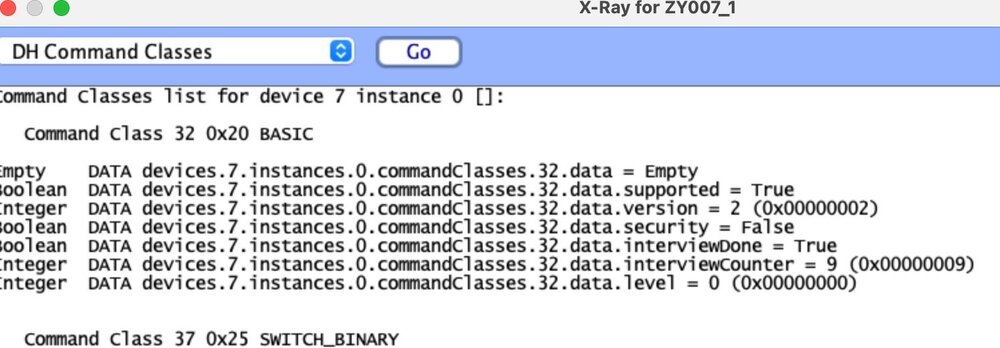
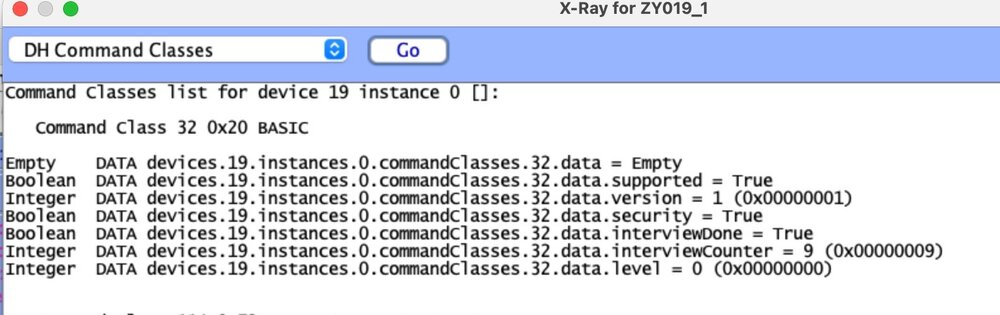
Trying to determine if my locks are using the proper security, I ran Xray DH Command Class on one of hte locks and then on a wall wart plug and a zooz relay switch. Not really knowing what I am looking at, I do see a difference between the lock and hte others. Specifically in the fourth line which has the word SECURITY. in it. For the lock it says True, for the others it says False. So @Diesel I wonder if the security is correct and with the EISY zooz stick, it no longer needs the 75' cable / proximity to associate correctly?
-
I have a 6 button keypad in my bedroom. Main button controls a light. KP1: fan low --> in a scene with fanlinc motor KP2: fan med--> in a scene with fanlinc motor KP3: fan high--> in a scene with fanlinc motor KP4: security If my security system is engaged at night and I am home, kp4 lights up and is set up as a quick and easy way for me turn off the security and if pressed again w/in x minutes, will reengage the security. I have this so that in the rare occasions, if in the middle of the night my dog needs to go out my bedroom door, it's a quick and easy way for me to deal with the alarm system. So last night, the dog needed to go out. I pressed kp4. The kp button turned off, the security system turned off.... all as expected. When the dog came back in, I re-pressed kp4, just like I have done many many times over the last 8+ years where there have been no changes to this program or the Fanlinc scenes etc. However, instead of the security coming on, suddenly the fan started to turn on and off and all the keypads buttons that control the fan started to blink on and off corresponding with the power level that the fan was turning on! Thinking the switch had somehow shorted out, I pulled the gap out. Switch went dead but the fan kept cycling. I opened up UDM to the fan scenes and the cycling was continuing there. Trying to stop or start turn on turn off etc was not affecting the cycling of the fan. I finally went to the fanlinc motor node and hit stop and all was good again. Pushed the stop gap back in, pressed the security button and the security came on as expected. In 15 years with this technology.. this was a new type of "event" for me.. lol.. and not a fun one at 3:15am... enclosed is movie of UDM cycling. Why kp4 triggered this event is beyond me. And no, for those of you wondering, there is no program associated with this fanlinc at all and never has been. The wonders of gremlins. ScreenRecording_01-11-2026 03-08-31_1.mov
-
Agree I did that many years ago..... this time I did not. Is there a way to tell how they are connected now? Seems like the zwave signals are stronger than they used to be as well, as if I remember correctly, I needed the 75' cable and close proximity to the i994 to even get it to join. This time, w/o the proximity it joined immediately.


