


Javi
Employees
-
Joined
-
Last visited
Everything posted by Javi
-
Error loading data would be a n issue. This could likely cascade to other things. Please share a screenshot of the firmware version from eisyui. So we can verify eisy is on the latest firmware.
-
Yes, it is purely cosmetic. The Insteon device type name mappings were hard coded in the admin console, so there was no method for other clients to retrieve the names. There were similar mappings based on type spread into 3 locations so we tried to consolidate them into a server API. Possible there are others. If you can please show me the rest/nodes/{device address}. And the exact name shown in the Admin Console to investigate. New API for Insteon Type maps: /api/family/1/1/type-map
-
-
At some point it may be moved to the node page. However the command and request have a shape that doesn't fit into existing commands and properties. This is the same reason it is not in ud mobile or programs, it is not a standard command and requires a separate unique UI implementation. These unique implementations break the separation of concerns and causes confusion. So instead of butchering the shared command shape, we need to reevaluate implementation. Due to higher priorities of getting everything into eisyui, this will have to be investigated at a later date. Insteon also has a few devices with the same issue which also use the configurations page.
-
The only things I can think are: Eisy-ui service is not running. ssh to eisy. sudo service eisyui restart. Or An upgrade didn't finish. Might try upgrading again+ reboot after.
-
Did you try a new incognito as suggested?
-
First backup then upgrade to the latest version, eisy-ui contains about 98% of admin console functionality. The last gaps will be filled soon.
-
While the current firmware works on Polisy, Polisy is out of the support timeframe. See https://forum.universal-devices.com/topic/47042-eisy-ui-is-getting-there-heres-where-we-stand/ for information on upgrade. In short, we stopped providing firmware updates to Polisy in January, there is no guarantees of future upgrades on Polisy. We provided instructions on updating Policy to the current firmware ex-gratia due to end of admin console support. eisy can be configured using any firmware backup starting with 4.9.x (maybe earlier).
-
Not related, but check an incognito page, browser might need a hard refresh (F5) to clear cache.
-
Ok I am almost sure Beta 6.1.2_3 had the time issue. There are a few topics on the forum. I think @apostolakisl reported the issue, but I'm having a difficult time finding the forum topics. With regards to eisy-ui version the URL must match the eisy-ui version installed, if not it could have strange behaviour. This is not a major upgrade, but It is always safest to do when on location.
-
See my edit, race condition found. With regards to AC, I'm not sure I don't have windows machine available. My guess is same old Java issues.
-
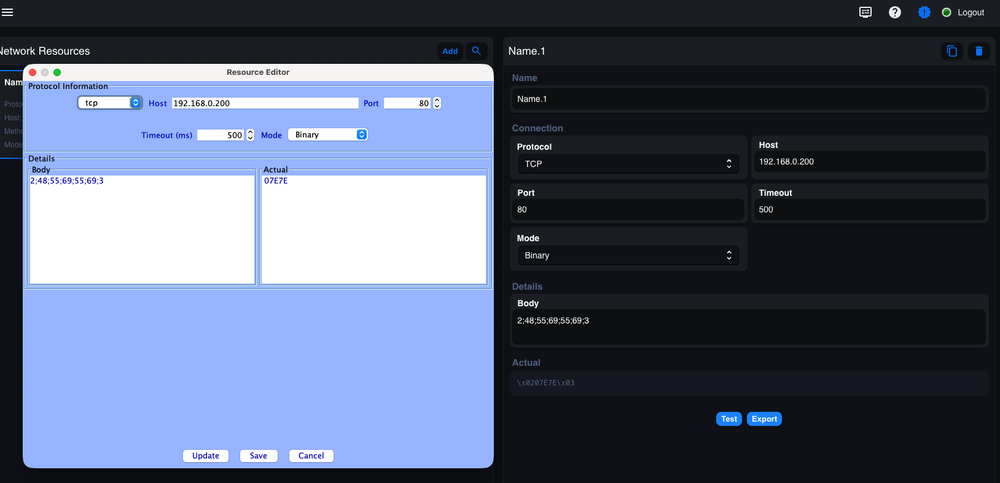
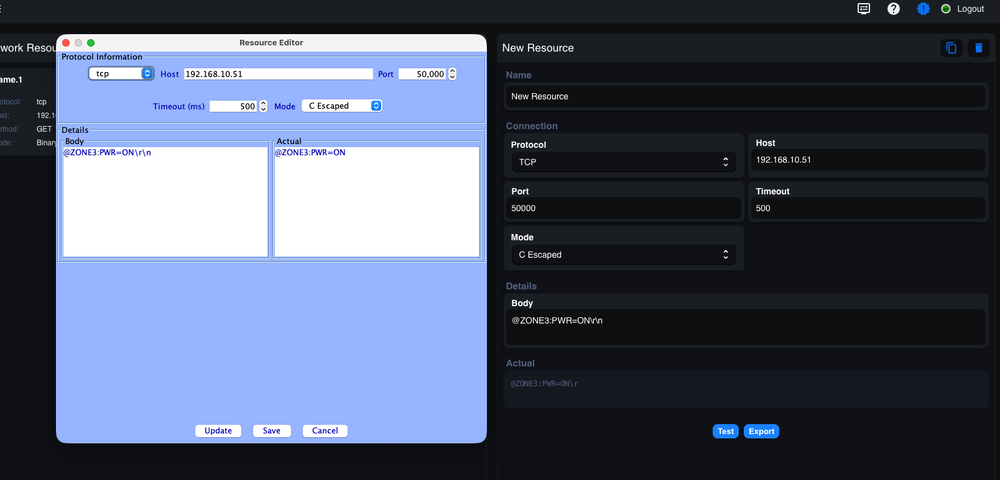
I'm not sure, I can replicate the exact text and it shows in both AC and eisy-ui. There does a appear to be a small bug when refreshing the b with a resource open, which causes the body and Actual to not be populated. However Clicking the resource (to close details) then clicking again (to open details) fixes. Edit: I think I found a race condition in populating the body. Likely why it is hard to replicate, submitted fix. ID: pull/113/changes
-
Ok, it is not clear if the issue persist
-
What is your firmware (iox/udx) versions? If not on the latest production firmware this could be related to a bug in a previous beta/staging Just want to be sure we are both looking at the same firmware.
-
Being Polisy I'm not sure. Might require a reboot, or ssh to update. I believe the ssh commands are on the first page of this topic.
-
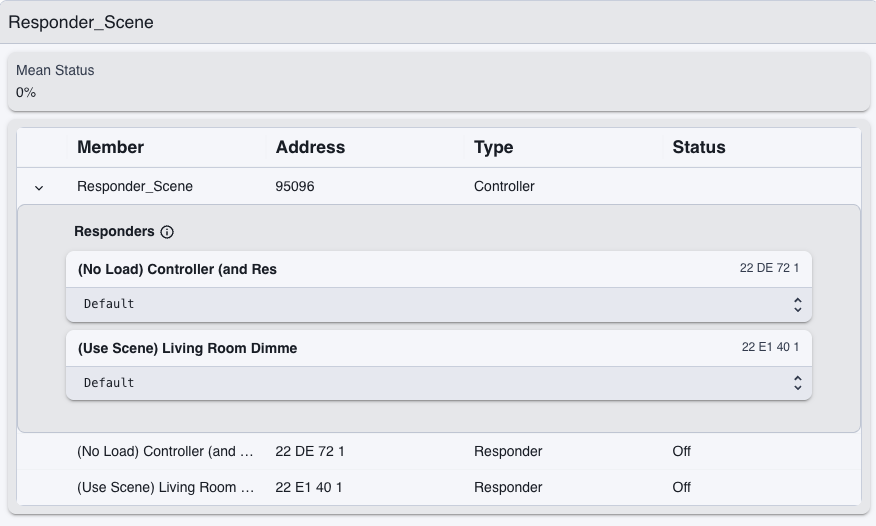
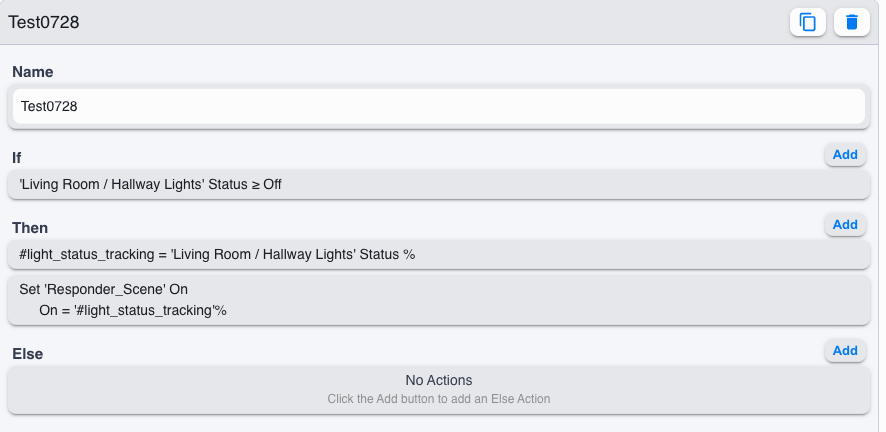
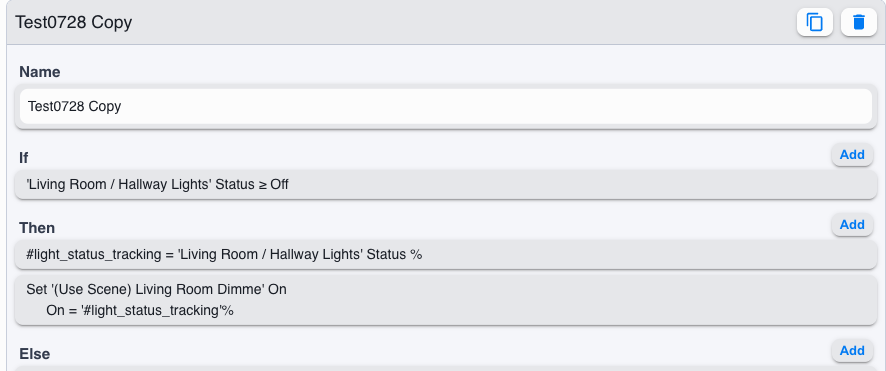
The Bad News: The issue is status, scenes do not have a status, a widget requires both a command and status, the status is used to set the current position of the slider. Scenes allow command can be set to all members, but combining status for all members presents issues. While this seems easy, what happens when on bulb is off and one is on, the mean is 50% but neither light is at 50%. So it is easy to set multiple devices to a value, difficult to make a slider or other widget. In UDM we use this mean status, and this is frequently debated and incorrect. At some point we may implement the same as UDM, but is likley months out at this point. The Good News. This will work with programs but is not instantaneous, will also work with setting hue for all Devices. Choose one device as the controller then track its status and set a variable. Then either create a scene with the other devices as "default" and set the scene to the variable OR set each device to the variable. Note my device is named '(Use Scene) Living Room Dimme' ..not a great name for this example. Default (Do not use native as ON percentage commands do not pass through native): OR Each Device: Now control the device selected as the controller, the program will update the others
-
First it looks like eisy-ui is not up do date, please check for an update from within eisy-ui or if remote verify the url has the correct eisy-ui version. This may answer some of you other questions. The items per page are controlled by browser zoom. I have ~19 lines at 100%. The breadcrumbs are removed in newer versions of eisy-ui so it adds more space.
-
Is this remote from isy.io? If so please verify the version number in the URL matches the eisy-ui version number. These are new APIs, not found is the clue.
-
Please open a support ticket, will likely need to be re-flashed with a USB drive. https://forum.universal-devices.com/topic/47042-eisy-ui-is-getting-there-heres-where-we-stand/
-
This is a browser's global setting, different depending on the browser. While some browsers support "Save As" not all so would be inconsistent. Vertical spacing of what?
-
Yes, for some of the suggestions, not quite for hue slider with scenes. Play with favorites edits by adding multiple nodes. Most of the good from UD Mobile will be added to eisy-ui some of the legacy (synchronization !) will not . Favorites are scheduled to be moved into a grid so they work well on both Mobile and larger screens with options for multiple sizes.
-
De Depending on the starting point it could be a few issues. If upgrade was done from admin console, reboot from admin console. Could be browser cache, try an incognito browser, if it works hard refresh (usually F5). Finally failed upgrade, may requires ssh to restart. See https://forum.universal-devices.com/topic/47258-cant-access-eisy-ui-with-same-portal-credentials/#findComment-408360
-
Must Right Click Node > Configuration. At some point it might be moved into the node page itself, but it is not a standard command so we would be trying to force its shape.
-
Before ssh try upgrade packages again + wait 10 min. If that does not work, ssh to eisy: ssh admin@ipaddress. Then a sinlge command (below), wait a few seconds then check if the page loads. sudo service isy restart sudo service eisy-ui restart sudo service udx restart
-


