


Guy Lavoie
Members
-
Joined
-
Last visited
-
Currently
Viewing Topic: eisy-ui 1.3.4 - Integrated plugins (Beta)
Everything posted by Guy Lavoie
-
He means the beta build for eisy-ui. If you activate the beta repository and upgrade, you'll get it. This will probably also upgrade IoX to something like 6.1.2_9.
-
Whatever works for you. I copy files back and forth from my PC using the scp command. The syntax takes a bit of getting used to, but I like the command line convenience. The format is similar to using ssh, along with path names. No harm in using chmod to make directory access easier.
-
Are you looking for an older version of a program that still exists on your controller, or it was deleted? There might be a way, though it would be quite involved, going in by ssh, using scp to copy one or more files from your PC to the eisy, etc. If it was deleted, then you'd have to figure out what the program ID number was, by looking for text program name through the program files using grep, etc. Then create a dummy program to have a program known ID that you could then overwrite with the restored file. Not fun, and not guaranteed to work.
-
Can you access the plugins dashboard from Admin Console?
-
Ok, I played around with scenes a bit. It's very well done, though not fully intuitive the first time. You bring up the scene, and you'll get the list on the right, with the controller(s) at the top and the responders below, and controller/responders below that. You try clicking on the items and nothing happens... What you're seeing is a summary of the scene, not an item select list. You need to click on the little ">" to the left of the controller line, which will expand the list to a series of boxes where you can then select and edit each individual item. You click on a box and you'll get an edit screen for On level, ramp rate, etc. One done, click on the "v" of the controller to collapse the list again. The listing of "Shared Comnmands", "No Conflict Commands" are an excellent addition, telling which commands will work for everything in your scene, vs which ones will only be meaningful for some devices. So a color change command won't do anything to a non-color device, etc. The link type shown is also a great improvement. Admin Console would show it, but no real explanations. Not something you'll usually need to mess with, but now you can make changes if needed. Hover your mouse pointer over the circled "i" for information. "Native" links are the ones where IoX "knows" that these device communicate directly, such as Insteon commands between linked devices. Default links are those where IoX knows it need to send a command to make something happen, such as send an On command to a zwave device in an otherwise Insteon triggered scene. Very well done!
-
Start by doing: sudo sh and enter the admin password. This puts you in superuser mode, and can go anywhere.
-
You access the main menu items by clicking on the three little lines at the top left corner. In the list, scroll down to Protocols -> Insteon. There you'll get a screen where you'll find all the options for configuring Insteon devices. I'm seeing this in eisy-ui 1.3.11-1
-
32 GB. A 64 GB will also work.
-
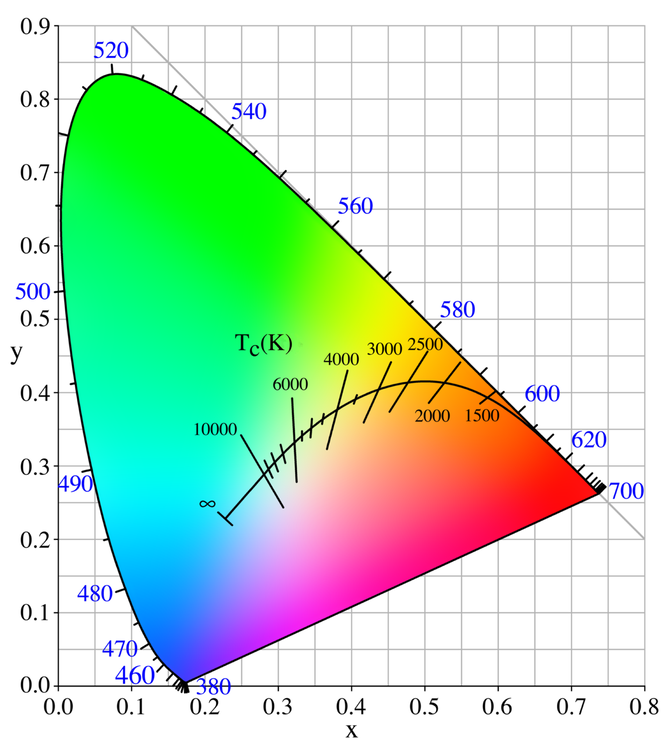
The X Y color chart is harder to use than RGB because it's not as intuitive in terms of numbers vs colors.
-
I'm actually going to study that more in depth. Eisy-ui shows more internal details about scenes that's very interesting, including what's done directly between devices vs done by the controller.
-
Yes, I used the 4th one down.
-
That's right, the ZMatter board ended up not having anything to do with Matter. It could have, but in the end, a border router turned out to be the way to get Thread functionality.
-
I'll eagerly await your follow-up on this.
-
Yes, and I've extensively used that, such as displaying a red, open shackled lock for unlocked, and a black, closed shackled lock when locked. Great feature! It would be great if we could create our own icons for this. The only current way is with a link to an image url. I'd like to create opened and closed garage door icons, for example.
-
Thanks for the detailed explanation. I'll certainly check that out. I like customization and this sounds interesting.
-
I'm interested in exploring this. Do you have an example of a REST command that does just that? I can't find any listing of the specific properties that would be added to a /rest/nodes/<node> command.
-
I agree with @Geddy here, 5.9.1 is probably the oldest release that you can still directly upgrade from...for now. Play it safe: do backups of IoX, zwave and anything else you have. And don't do an upgrade on a Friday night, where getting help from UDI would be more difficult for a few days.
-
Any progress or update on this?
-
Yes, now that you have the ability to reimage it. The new image also probably has it as a newer release to begin with, making any problem that much less likely.
-
It might be that if you upgraded the bootloader prematurely, that intermediate version upgrades might not be compatible. That kind of thing can happen.
-
Being of the "if it ain't broke, don't fix it" school of thought, I thought I'd wait a bit to see how this played out for the others trying it first. But thanks to @junkycosmos for taking the plunge and getting a discussion going on this previously overlooked subject. After seeing the discussion for a few days, I thought I'd take the plunge today. I have two of these ZMatter boards, one on my production eisy, and another one on one of my test Polisys. So I went ahead and did the test Polisy first. Both of my boards were originally installed as internal boards on Polisys, so I figured they would have the older firmware. Both have since been "donglized", so easy to upgrade. The ability to confirm it in the xray, DH controller screen showed they were both 7.32. A few notes about the upgrade process: for the virtual serial port I chose the "CP210x Windows Drivers" option (4th choice down), unzipped it to a new directory on my PC, and then opened that directory and ran "CP210xVCPInstaller_x64" on my Windows 11 PC. The program found my ZMatter dongle and confirmed it was 7.32. The upgrade choice was 7.45. I didn't get the intermediate version 7.35 others have seen. That went well. I then not only needed to reboot (unplug and replug the dongle) but also exit and reenter the upgrade program in order to detect the upgraded dongle again. That made for a few tense moments...) Then as suggested by the original poster, I had to upgrade the bootloader in order to finally upgrade to 7.46. I also clicked on the additional features link to enable the long range and faster communications options, and as @junkycosmos noted, the options aren't stilll checked as installed in the updater, though the options link show them as installed. That's not clear. After all that was done, I put the dongle back on the test Polisy and rebooted it. It worked 😊. And my existing devices were still there, both zwave and zigbee. Emboldened, I then proceeded to do the same with my eisy dongle, and everything worked the same way. PS I didn't know I could hold my breath for so long!
-
One question: did your existing Zwave network stay intact after doing these updates, or was a backup first needed then a restore? Also, any updates pertaining to zigbee?
-
Being at a version older than 5.9.1, you'll probably need UDI's help to upgrade, which means opening a support ticket.
-
Are all your devices zwave, or do you also have Insteon (especially in your initial list of "about 35 switches/dimmers, and probably 12 or so outlet plugins", and various battery sensors? If you have a mix of technologies, that might help in getting an idea if it's a communications issue or the controller itself. If you do have Insteon, are there any pending writes (little red wave icons beside some devices in admin console)? That can slow things down while updates are being attempted. Another Insteon communications issue hint is direct commands between devices, like scenes triggered from a switch or keypad. If those are sometimes slow, then there might be a problem there. If both insteon and zwave become slow at the same time, then it does sound more like a controller issue. A tight loop in a program can be hard to find.
-
Ugh...


