


Techman
Members
-
Joined
-
Last visited
Everything posted by Techman
-
The firmware versions you're showing are not the latest versions, once you get the access issue cleared up you should update your packages again as it's possible your update didn't complete. Are you on a Mac or a PC? If you're using a VPN disable it. Clear your Java cache again, be sure to check all 3 boxes, then download the IoX Launcher from here: https://isy.universal-devices.com/start.jnlp Also remove power from the eisy for 30 seconds and then allow it to reboot
-
You can also view the eisy version info at this link https://eisy.local:8443/WEB/sysconfig.txt Current eisy firmware version is 5.9.2_2 Current UDX is 3.9.1_3
-
In rhe program you posted, "Cooktop Off" your IF clause is using a variable "$Button1" to determine if the "IF" clause is true or false. That variable should be a STATE variable When you run the Cooktop off program in its current format the ELSE clause will run (red) rather than the THEN clause (green). Also take a look at the programing options in the eisy for the Zen32 scene buttons to see if a double tap can be used to turn off a scene.

-
Change your variables to STATE VARIABLES Integer variables cannot be used to trigger actions in any of your programs. However, state variables do trigger actions. Let me know if this resolved your issue
-
Are your variables STATE variables? Have you verified that the varable changes from 0 to 1 to 0 when you toggle the button(s)? Post a screenshot of a program that's controlled by the variable.
-
Can you post a screenshot of one of the programs or scenes that you're trying to turn off.
-
@DBC In addition to what @Guy Lavoie suggested, try removing power from the eisy for about 30 seconds
-
Try rebooting your computer, then clear your java cache amd download the launcher again https://isy.universal-devices.com/start.jnlp If that doesn't work then it's possible your firewall is blocking the launcher application. Take a look at these two links. Universal Devices, Inc. Wiki Universal Devices, Inc. Wiki
-
Right click on the IoX Launcher, then click on properties and post the data in the "target" field.
-
Verify that you have the latest Java version, 1.8.0_45 Try clearing your Java cache again, then download the IoX Launcher. The launcher should automatically open the Admin Console without having to ask you what program to use
-
@dronning Another option, if you want to use Zwave, is using two Zwave LR reange extenders, one at each location. They have a line of sight range of up to 400 feet Zooz 800 Series Z-Wave Plus Range Extender ZAC38 - The Smartest House
-
You can try using two plug in modules, either a lamplinc or on/off module,, one at each location. Mount them as high up as possible and as close to each other as possible. If they are within RF range then you should be able to control the Insteon modules in the shop from the house.
-
@JWBDolphins It's possible that during the migration some of the program data got corrupted. Open a program that isn't working correctly and change some of the data, save the program, then go back into the program and change the data back to what you want. Be sure to save the program, then make an eisy backup.
-
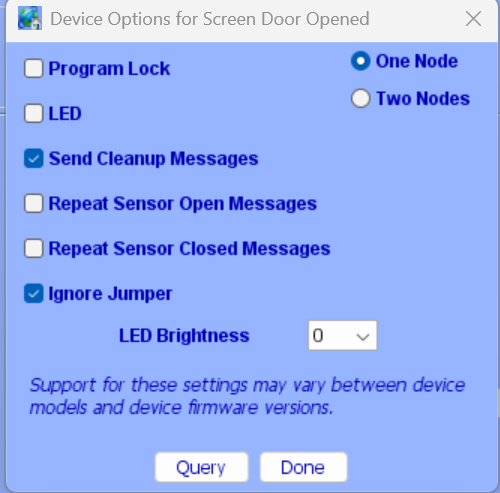
You really only need the two nodes, open and heartbeat. If the sensor isn't open then it's closed. However, in the eisy if you look at the options for the open close sensor you'll see the option for the close node (2 nodes). It's also possible that insteon, in the current sensor firmware, eliminated the close node.
-
@Ray95xxx Post a copy of your error log
-
In the IoX Finder, highlight the ISY you want to remove and then click on "delete"
-
I'm not familiar with Mobilelinc but it sounds like the button was added as a responder instead of a controller. Try deleting the button from Mobilelinc and then adding it back. as a controller
-
Glad you got it resolved. The theory for changing the IF clause is to save resources. The way you have it set up the timer program is running for 12 hours, the other way it would run only at the selected times.
-
Try changing your IF clause in your program to: In the THEN clause Use ADJUST SCENE to change the ON Level of the light in your scene Let me know if that works

-
Can you post screenshots of both your scene and your program
-
@GDavis01 Your problems may have been caused by using an older ISY backup that wasn't compatible with the EISY. Going forward it's a good idea to do a backup anytime you make changes. The current version of the backup program only takes a few seconds to complete.
-
@elite-rob You either have to put all the lights in a scene and have the "THEN" clause turn off the scene or, list each light in the THEN clause of your 2:00 am program A green bar to the left of the program would indicate that the "IF" clause was true and that "THEN" cause ran. A red line indicates that the "IF" clause was false and the "ELSE" clause ran. To test your program, right click on the program and run the "THEN" clause, do your lights turn off? Note: your "IF" clause will only be true exactly at 2:00 am
-
@GDavis01 Factory reset PLM Remove PLM from power, hold down the set button and continue to hold down the set button after plugging in, the PLM will beep, hold the set button in until the beeping stops ------------------------- Factory Reset EISY Click the button ten (10) times Please wait 5-10 minutes after factory reset before attempting to reconnect to system. If System is not found by IoX Launcher after the wait period please reboot system by clicking the button five (5) times and waiting two minutes for system to come online. Note: after a factory reset the user name and password reverts to admin/admin After you reset the EISY log in from the admin console and run update packages, don't touch anything until the update completes and you see a notice to reboot.
-
@johnjces If the keypad itself is located in a subfolder in your device tree you'll need to move it out of the subfolder. No need to touch any of your scenes. Sounds like the triac in the KPL got fried. Be sure to fix the light socket before you replace the KPL. After the replacement do a EISY backup
-
Yes, you can manually delete everything in the temp folder, first close all open programs then delete the folder contents. To make it easier, I put a shortcut to my temp folder on my desktop


