


Everything posted by Techman
-
I'm a Windows user, in windows you can hold down the control key when closing the window to set the size, not sure about the MAC As @Geddy suggested you should try to locate the .STATE files and delete them. The will rebuild the next time you open the launcher
-
-
It's best to open a support ticket My Tickets - Universal Devices - The Most Powerful Automation, Energy Management, and IoT Platform
-
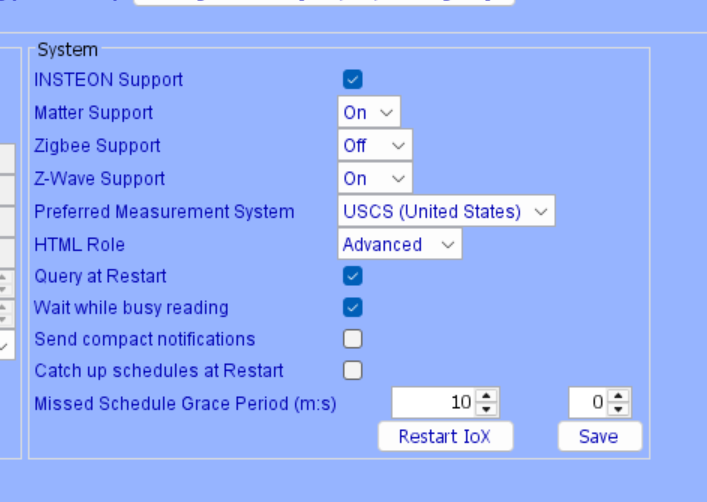
Under the configuration tab, is the zwave box set to ON
-
It's best to send an email with your question to: sales@universal-devices.com
-
Even though the Zwave/Matter board is Zwave LR certified it appears that the current software doesn't support LR. I have an open ticket and should know more next week and will post the results
-
It's possible that your Insteon mesh network is marginal, or that you have noise on your powerline that's interfering with the Insteon signals . How many dual band devices do you have in your system. If everything was working prior to moving over to the eisy try doing a restore device on the insteon devices that aren't working properly.
-
If the PLM was linked to another Hub then you will might have to factory reset it as the PLM contains the link tables of the previous hub and may not be compatible with the eisy Do you currently have a working, and populated eisy? The replace PLM instructions are attached. Replace PLM Procedure (EISY or POLISY).pdf
-
@NewB Scenes reside in the PLM and the devices. You could disconnect the ISY and the scenes will still work. It's possible that when you initially restored the new PLM the scene's links got corrupted. Take a scene that isn't working and do a restore device for each device in that scene. If that corrects the problem then you'll have to do it for each scene that isn't working correctly. If that doesn't correct the problem then you'll have to rebuild the scene
-
@NewB Assuming you have the ISY994, here is the replace PLM procedure Replace PLM (ISY994).pdf
-
-
Just upgraded to 1.0.2, All is good Thank you
-
¿Funcionaba tu eisy R2 después de migrar desde el ISY? Si su único problema es conectar el EISY R2 a Internet, el problema podría estar en el cable Ethernet o en su router. ¿Has probado a desconectar la alimentación del EISY R2 y luego reiniciarlo? ¿Puede comunicarse en inglés?
-
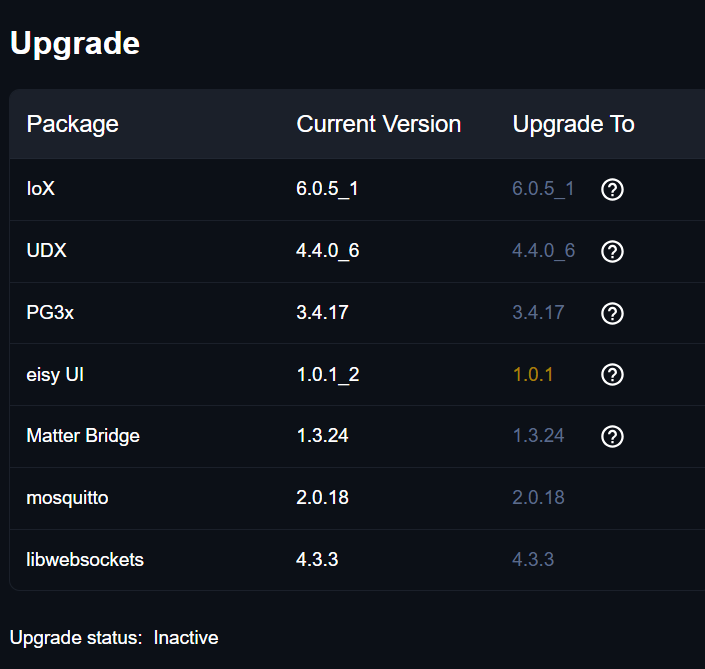
@bmercier I did an upgrade packages (twice) and I'm still on 1.0.1_2 UPDATE: I've tried several more updates and reboots, I'm still stuck on 1.0.1_2
-
When you swapped out the PLM did you follow the atached procedure ? Replace PLM Procedure (EISY or POLISY).pdf
-
Under select tool, when I select eisy-ui I get the following: File not found: eisy-ui-1.0.1-2/index.html
-
The UDI Zwave/Matter/Zigbee board is Zwave LR certified however the current eisy/polisy firmware appears not to support Zwave LR, only Zwave mesh The following is from the web: To include a Z-Wave Long Range (LR) device without using mesh, ensure your controller (700/800 series) has firmware that supports LR, set the controller region to "US-LR", and use SmartStart (scanning the QR code) to provision the device, specifically selecting the "Long Range" protocol instead of mesh. LR devices communicate directly with the hub, bypassing mesh routing.
-
Found this on the web: SmartStart Requirement: Z-Wave LR requires inclusion via SmartStart (scanning a QR code). If you added the device using the "classic" manual pairing method (pressing a button on the device), it was almost certainly added as a standard Mesh node.
-
To use Zwave LR the device must be included with S2 AUTHENTICATED security enabled. Unfortunately I haven't found a way to determine if a device was installed as Mesh or LR as the include process doesn't appear to offer that option
-
If a program doesn't have an IF clause then the THEN clause will always run
-
-
Update from 6.0.4 to 6.0.5 went smoothly. No issues.
-
If you are referring to the number after the plugin name, i.e. ELK(2), that's the slot that the plugin is installed in.
-
Under the Configuration tab make sure the "Insteon Support" box is checked
-
Scroll down to the bottom of the file which has the setup info GitHub - Panda88CO/udi-Blink: Blink Node Server fir udi · GitHub Once you have completed the setup, synchronize UD Mobile which will add the node server


