


Geddy
Administrators
-
Joined
-
Last visited
Everything posted by Geddy
-
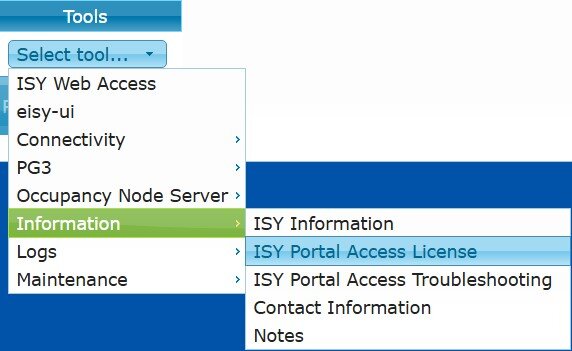
@carguy you renew on the UD Portal. If you have more than one device on your account you need to click "My Profile" in the top right and select the device you want to renew. Then under Tools -> Information -> ISY Portal Access License -> Renew License. Be sure that the eisy UUID is displayed. Are you still using the portal with the ISY994? Otherwise, you might be able to migrate that portal license over to the eisy if it has more time remaining. But that might require a support ticket with UD. The other way is easy and automatic. If you're no longer using the ISY994 and do not need the portal on it be sure to cancel the portal and you can delete that device from your account by clicking the red "x" to the left of the device.
-
No need. You just pre-paid for another year. The current "free trial" doesn't expire until Sept 14, 2026. At that time your new licence will be active and run until Sept 14, 2027.
-
Try this: https://wiki.universal-devices.com/ISY-99i/ISY-26_INSTEON:Linking_a_KeypadLinc#KeypadLinc_Options Also, I think there might be something in the cookbook. Might be the same that's in the wiki though. Don't think there's been any update since they were introduced. What are you trying to do? Remember, after IoX 5.x you need to click the button next to the option to get it actually set to the device. (like backlight and on level) Not entirely sure what this means, but could be a corrupt link or data file for that device. Since 32FBC1 is probably the Insteon address for that keypadlinc. Is this a newly installed device or one you're just "playing" with all of a sudden? Either way, I'd make a backup of IoX before you proceed much further in case something becomes corrupt. Hopefully it isn't at this point, but have a backup handy to restore if something really goes goofy.
-
IF you can see the eisy in the IoX Finder Window list and you cannot login with the default do you think you ever changed the password? If it's up to date with firwmare or has IoX 6.x installed then you woudl need to use your portal credentials unless you're manually adding the local connection address. The login popup box should indicicate what credentials are needed. If it doesn and you have older than 5.9.1 installed then open a support ticket to get the device updated and regain access. https://www.universal-devices.com/my-tickets With the eisy connected to your network try this page in a browser: eisy.local:8443/WEB/sysconfig.txt (This is a local site so it is okay to accept any security warnings and continue to the "site".) If using eisy.local does not work you might need to use the IP address of your eisy. If you do not know that you can usually find that in the router settings for connected devices. What do you see at the top? Also, look for an IoX Version in the resulting text. It seems that there could be an SD card issue like @Guy Lavoie is mentioning. Use a SOFT eraser and gently wipe the connector tabs of the SD card. Be sure there is no residue from the eraser. Be sure the ISY994 is powered off (unplugged) before removing the SD card. One thing that just came to mind - are you using the start.jnlp file from the UD site? Maybe clear the java cache again (still...checking all 3 boxes in this process). Then download the admin.jnlp from the device directly and see if that changes what you see. I believe the way to get it directly from the device is using a web browser and go to: http://ip.of.isy/web/admin.jnlp (be sure to change "ip.of.isy" to the actual IP for the ISY994).
-
@Riggins44 If you haven't resolved this please open a ticket with UD to review. https://www.universal-devices.com/my-tickets @EWhite I would suggest opening a ticket since there had not been an update here in over a week. Please update here with what is learned.
-
@LFMc the best way to share a program in the forums is to right click on the program and select "Copy to Clipboard". Then paste as text in your topic. This will give an easy to read format and make it easy for anybody helping to edit the program without too much typing. Looks like the post above you used "export". Be sure you select the last option of "COPY to clipboard". Screenshots aren't much help because people will have to retype a lot of stuff or try to describe what to do based on the picture. Also, the text becomes searchable on the forums if you should ever need to refresh your memory or have a similar issue you can find the "old" post based on the program information.
-
Not really….if the eisy hasn’t been setup how do you plan on setting it up? As a new system or migrating the ISY994 information to the eisy? If starting over then it might help, but most wont be willing to start over. I’m not familiar with the OADR part of the firmware in your picture. Do you have your device connected to your power company? Since the ISY994 is not longer supported by UD the forums are the best bet to getting that working again. Maybe others have an idea about that firmware and how to get the admin console to see the programs tab.
-
@AGoldreich welcome to the UD Forums. The issue of not being able to see the programs indicates the UI and Firmware of your system do not match. This is common in the ISY994 line. When you're in the admin console look at Help -> About and confirm that the Firmware and UI match. If they do not then you'll need to clear the java cache - be sure you check ALL THREE boxes in this process. Then download a fresh start.jnlp from the UD site (on the homepage click on "My ISY" and save the start.jnlp locally). Then run start.jnlp and accept any Java alerts. If still having issues please let us know what firmware you are using. Please list the number you see in the "Help -> About" menu. When did you receive the eisy? If this is recent then it should accept these for login. Would need to have it connected to your network before IoX Finder (start.jnlp) will find the location. If it's an older device that you're just now setting up you might want/need to open a support ticket with UD to get it updated as some updates have bricked older devices that people have not kept up to date or updated since receiving. Let's fix one thing at a time so be sure you can get into the ISY994 first and see programs again. Then be sure you run a backup.
-
@PeteEaston you might be better off opening a support ticket with UD to get into specifics. Do you happen to know what IoX version you were running before the update? It's possible that it might have been longer than a few "months" and your system might have been just old enough that the update didn't take to some other underlying system. https://www.universal-devices.com/my-tickets But, yes, as @Guy Lavoie suggests sometimes trying to run the updates from the Java Admin Console again can complete an update process. Can you try to get to this web page (it's local so it's okay to hit continue to site if you get a security alert): https://polisy.local:8443/WEB/sysconfig.txt (you might need to replace "polisy.local" with the IP address of the device. If you do not know the IP address the you can usually find it in connected devices on your router (assuming it's booting up and connecting to the network).
-
just as a precaution I'd suggest making a (text) backup of all your programs. This way if you do delete them and any programs that had the old device in it becomes corrupt you can find the program and be sure to repair it or recreate it as needed. To make a copy of your programs: Right click the root folder (usually) "My Programs" "Copy Folder to Clipboard" - be sure you use "COPY" Open TEXT editor (for Windows I suggest Notepad) - Do not use a "word processing app"! Paste into a TEXT document SAVE the file You should now have a TEXT copy of all your programs. This will be easy for you to use to search for device names and/or program names should you need to recreate them. You now have all the data for the programs that you can easily read and use to recreate programs rather than having to do it from memory of when you setup the program many moons ago. But I think @Guy Lavoie's comment about performing a "restore device" on each one might help. Are the devices battery or powerline? Are they near other devices? Since this seemed to stem from a power issue could that have been damaged and not working properly?
-
I never knew that Mobilinc pro had a subscription to it. I use it and it's no subscription for what I have/use. Must be their cloud connection option. I'd cancel it real quick and see about getting a refund if there was no warning that you were going to be charged again. While the local Mobilinc Pro app does mostly work with eisy it only handles the basics of Insteon and maybe some z-wave (I don't use z-wave so cannot confirm those work or not). I'm not a big mobile app user for my "automation" so just have it in case I am away and can use the UD Portal connection in the app to control things back home. I also have UD Mobile and just have it connected (never spent the time to setup favorites). but @hart2hart is right that Moblinc had a cloud connection and it was completely separate from anything UD offers. Most will say, "Mobilinc doesn't work with eisy", but I can 100% say that it does work...just not for most items that are connected with plugins. For me that doesn't matter. Mobilinc HD was a one-time charge over 10 years ago that has more than paid for itself. I don't think it's even available in the Android store anymore. Not sure about on the Apple app store, but the pro version hasn't been updated for 7 years there. Good luck getting recurring charges stopped.
-
@johnstonf yeah, seems that Android might be a little more complicated than the iOS settings. At least the iOS settings work (again). They had been shown as deprecated, but they've been working recently. This just came up recently: https://forum.universal-devices.com/topic/46595-ud-mobile-suggestion-to-open-to-favorites/
-
@JCox have you attempted to power cycle the ISY994? Since you don't use Elk it probably wouldn't harm things. Did you attempt to generate a Topology and this triggered something with Elk? What Firmware are you running on the ISY994 (it should show on the launcher window before you log in if you're not able to access the system and operate it).
-
@SMonk with this and other questions you've had about programming it might be something you need to see some history of. There was a really old link I used when I started with the ISY994 that helped with some of the nuances of how programs worked - https://forum.universal-devices.com/topic/5070-detailed-write-up-of-a-programming-example/ Another thing that helped was the ISY Cookbook. Sure, it's written for the old Firmware, but most of it still applies, and I think 99.9% of it would apply to programming. These might be worth checking out to learn more before going too far in random directions for what you're trying to do. While I enjoy programs I do not get as technical and involved as what you're attempting and what others have done. But it is neat to see all the conversations about it and just what others focus on for how to monitor and run their systems.
-
This can be also found in the wiki: https://wiki.universal-devices.com/UD_Mobile#Show_Favorites_at_launch
-
@RLandsborough is setting a variable even needed? I guess that Z-wave would be able to use the temp as an address node. Just have your program text you when temp exceeds 95° and include the temp from the device itself. I know with YoLink sensors I can copy the temp variable from the plugin and just use that. Example: At ${sys.time12} the Greenhouse Air was ${sys.node.n008_8b4c01xxxx89r80.CLITEMP}.This would be my simple suggestion not to add the step of the variable unless you're using it elsewhere. Also, know that this will trigger an alert every time the temp bounces over 95°. You might want to trigger a cooldown as sending text via email has been considered spam and could cause the sending service to be seen/reported/labeled as a spammer. I would suggest NOT using the UD default mail server for this as not only are cell companies trying to limit email to text, using the UD default server could have a negative impact on other users if you have a lot of texts sent. The current suggested way to send notifications is using the notifications plugin and UD Mobile or another notification app (i.e. Pushover). With Pushover you can setup critical alerts that you could receive even if the phone is in a do not disturb state. Lastly, when posting programs to the forum please right click the program and select "Copy to Clipboard", then paste the text into the thread (be sure you use the COPY option). That makes it easier for people to help edit the program. Posting a screenshot means a lot of typing and explaining which could be easier with a copy/paste.
-
That's an odd folder for it to be in. Have you run the cleanup tool from Java? https://www.java.com/en/download/uninstalltool.jsp You said you ran the uninstaller, but was it this tool or just windows uninstaller? Sounds like it could be a deeper issues since you seemed to have it installed in an odd location. You might have some registry stuff that's goofy. I never like suggesting messing with the registry. Mine is in "C:\Program Files (x86)\Common Files\Oracle\Java\java8path\java.exe", but I'm running windows 10 at the moment. Strange that it's installed in the "x86" location and must not be running as 64-bit. But we all know how stupid and dumb java is! How hard would it be to reset the computer? Win11 seems to be fairly easy to reset stuff without losing files, but sometimes maybe installed apps/programs are messy to get installed again if they're old. I've reset a few Win11 computers in the past, but it's been a minute. Probably my last ditch effort if you want to keep it easy to use the computer near the eisy. I'd look for registry edits first then consider the Win11 reset process. https://support.microsoft.com/en-us/windows/reset-your-pc-0ef73740-b927-549b-b7c9-e6f2b48d275e#id0edd=windows_11
-
@IndyUDIuser assuming you're on a Windows machine. Open command prompt and type: where.exe java What's the result? If you get more than one found you'll need to use the java cleaner/remover to remove old versions. (https://www.java.com/en/download/uninstalltool.jsp) Lastly, be sure you're just using the simple java that is downloaded from the java.com site (https://www.java.com/en/download/). Don't get fancy versions or types. Admin Console always works best with the "generic" and current release. Some people have installed special versions of java and reported having a lot of issues. Usually people think there's a different version number that's higher and it will work better, but it's just different and meant for other purposes. Thankfully the long awaited java alternative (now eisy_ui) is in development. Sadly, it's still lacking full functionality so many changes rely on the admin console to fully control IoX. But there's at least hope on the horizon. If installing Java continues to fail...I'd just use the other computer that it works on. Honestly, how often is admin console needed that it would be a hassle to only use one computer? Sometimes I can go months without opening admin console. Most of the time I wouldn't need to open it except to try to help others here. I'm a set it and forget it type of user. I don't tinker/change things once I have them setup the way that works for our lifestyle.
-
Are you leaving admin console open 24/7? Don't! It's not meant to be open all the time. Open only when you need to adjust something then close it. The Red "!" means communication is lost to the device. Could indicate PLM issues. Be sure if you're trying to add it back that you have the correct address or use the auto linking process. Sometimes B/8 D/0 and S/5 can look alike. Try operating the device in UD Mobile or even in Admin Console (and/or even in eisy_UI). More than likely you're having some noise issues if this just randomly started happening if the PLM is new.
-
no. I have programs that set on levels that work just fine. Are you doing this in a program? If so, please post the program (Right click on the program and select the last menu option of "COPY to Clipboard" then paste the text in your reply - Be sure you're using the "COPY to clipboard" option- Not "export"!). What kind of device are you setting this to? Is it battery or wired device?
-
No. This is not correct. "Control" is only if a device is PHYSICALLY operated. If a program might say at 2:30pm turn off a device and another program says if the device is "controlled"/switched "OFF" then do another step. If the program turns off that device the other step is not performed. Just tested this with devices in my office. If I manually turned off the device then the next program would run. What you're looking for there is to either put another line in the "THEN" to call on the "then" of the 2nd program or change the second program to a "Status" so if the status of "device x" changes to "OFF" then the second program would run. The second program would have two "IF" statements of "if switched (controlled) off" or "if status IS off". As @hart2hart points out the device can be in the state already and physically controlled to that state it will trigger the program. If the lights are off and you press the switch to off again the program would trigger. Lastly, for your multiple posts about questions it will help if you can give a program you're working on by including in your post rather than lengthy descriptions. Try a program. If it doesn't work as you expect then posting the program here gives us an idea of what you're attempting and might lead to suggestions of what to alter. Just be sure you post the program as text and NOT a screenshot! Text programs are many times easier to alter/edit to help you along the path. Right click on the program and select the last menu option of "COPY to Clipboard" then paste as text in your thread.
-
@SMonk this could become an issue with a looping program. I'd suggest something like @dbwarner5 has or even a status check. "device" Status is not "Off" Then you could also have a: "device" Status is not "On" The loop comes into play for your other program. What are you trying to do when this device status changes? You might be creating more problems than it's worth. Remember that "Control" = "Switched" = physical operation of the device (i.e. not a program or controller operating the device). If you're going for something for only when the device is physically adjusted then you would need to use the control option and you would potentially need to account for each control option. Otherwise, you would be able to use status and could use the "ON" or "Off" status and then the "Not" "on"/"off" or even < > options. Just depends on what you're ultimately trying to accomplish with the other side of this program. What have you attempted so far (that might not be working)? Please share the programs - RIGHT CLICK on the program and select "COPY to Clipboard" (last menu option - be sure you select "COPY to clipboard" - NOT export!) then paste as text into your reply.
-
@Guy Lavoie odd. Again, didn't try it. I only used it for a very limited time in a program. Never tried it on touch/operation. Glad it seems to have gone away with a reset and adding new. Never restore that switch!
-
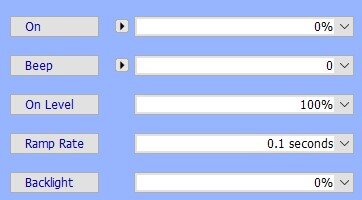
@Guy Lavoie there used to be a beep function. It wasn't very loud and I'm not sure how many used it. Did they take it away? No, I just looked in my eisy (6.0.5) and it's still there. Like the "Backlight" and "Ramp Rate" setting you have to press the label next to the setting to write it to the device. I didn't test it (don't want to goof up my working device(s). It's an annoying little beep/chirp if I recall. I used it for a while on one program and my kid made fun of how wimpy it sounded that you had to be right next to it if there was any other sound in the room to hear it. So I turned it off.
-
Clear the Java Cache (check all 3 boxes!) Download new start.jnlp from UD site (https://www.universal-devices.com/ - click on "My ISY") Run start.jnlp Remember to use the local user/pass you'll probably need to add the local connection in IoX Finder window. Add "https://eisy.local:8433/desc" (without the quotes). It will prompt you for the "device" user/pass. Otherwise, it will ask for portal user/pass. Personal preference. I'd think not since you're using the eisy already. It's more or less that the eisy r2 was a different configuration that UD went with for availability. They've even come out with the "eisy | lite" that is a cheaper unit due to the rising costs of memory and storage. Since the standard eisy sits between the two I'd think it would be safe to say it should carry the workload most need and will be updated by UD as long as "eisy" is their primary line of products.


