


JimTurner
Members
-
Joined
-
Last visited
Everything posted by JimTurner
-
Thansk! I did the straight upgrade from the AC when I did the move to 6.1, then added the 6.1.1 release on top of that. i will attempt again shortly.
-
I think you have to rebuild it...
-
This is a super imposed water mark over the web page display. What do I need to do?
-
Some here may not like this, but I bought one of these https://a.co/d/048nO7yN from Amazon. I can do a power off / on remotely if absolutely necessary. $23
-
One other oddity I have noticed is trying to view the error log from the AC. It seemingly hangs and never returns (log file too big??). I can download the error log from the eisy.local and it has nearly 200k lines in it. I am assuming this is the same log???? (Trying to chase down an issue unrelated to this thread, but the error log not loading started with this upgrade...) ~jim
-
That's what I saw, but I didn't hit the go button...
-
My UD Mobile and AC are both reporting a new version as of this morning (8/22). I upgraded a few days ago. @Javi Is this for the fixes you mentioned above? ~jim
-
My test has 2 simple programs: 1 for backlight off and 1 for backlight on (based on switch status). They work flawlessly. My device is actually a dimmer (2477D), but I just tested the same thing in a switch (2477S). TestSwitch - [ID 0063][Parent 0001][Enabled] If 'Office Light' Status is Off Then Set 'Office Light' Backlight 0% Else - No Actions - (To add one, press 'Action')
-
An observation: While I was patient waiting for the upgrade to occur, it did not appear that a reboot request was pushed to the user (me). I had to find it... (Not a big deal but something I noticed).
-
Took the plunge. About 45 minutes - but checked UD Mobile for firmware and it said reboot needed. So I did, and voila! Can you run the AC from the Finder Java App? How can I get that option back? duh...
-
Can you paste your program?
-
Because I can: here is a ChatGPT summary so far: 🤓 I reviewed the thread through the comment you linked. The reports are fairly mixed: 3 clearly successful, 4 with significant issues, and 2 successful upgrades with warnings/secondary issues. IoX 6.1.1 upgrade resultsUser Upgrade result Status Issues / warnings reported MWasson Successful 🟢 Successful Admin Console, eisy-ui, programs, UD Mobile Sync, and Home Assistant automations all working. Cleared Java files/apps beforehand. UUniversal Devices Forum mmb Successful 🟢 Successful Explicitly reported: “Upgrade went well, no issues.” UUniversal Devices Forum aeroRC Successful 🟡 Successful + warnings Insteon/Z-Wave/Zigbee/PG3 and eisy-ui worked. Initially Admin Console showed a 6.0.4 incompatibility, fixed by deleting Java files/apps. UD Mobile sync subsequently showed Insteon parameter-name errors, although the nodes remained functional. UUniversal Devices Forum Greg P. Upgrade completed 🟡 Successful + warning Upgrade itself was smooth, but the customized eisy-ui Home Page disappeared after reboot. UUniversal Devices Forum RRalston Upgrade completed 🔴 Issues Nearly every program in eisy-ui displayed “Error loading data,” although the same programs worked correctly in Admin Console. Ticket submitted. UUniversal Devices Forum RP_NY Problem during upgrade 🔴 Issues / possibly didn't start UD Mobile remained at “Upgrade in Progress” for 2½ hours. Later suspected the upgrade never actually started because the expected “Initializing” notification wasn't seen. UUniversal Devices Forum steveng57 Partial upgrade 🔴 Major issues Firmware/Admin Console appeared to reach 6.1.1, but eisy-ui disappeared, PG3 reported it wasn't connected, and my.isy.io showed the eisy offline. UUniversal Devices Forum JPizzo Upgrade/reboot completed 🔴 Major issues Admin Console appeared locked for >1 hour; after restarting eisy, Admin Console worked, but eisy-ui didn't and ISY Portal showed offline. UUniversal Devices Forum BlackSheep Upgrade completed 🔴 Major issue Lost access through both eisy.local and Admin Console; support ticket submitted. UUniversal Devices Forum At-a-glanceCategory Users Count 🟢 No issues reported MWasson, mmb 2 🟡 Basically successful, but warning/cleanup needed aeroRC, Greg P. 2 🔴 Significant problems RRalston, RP_NY, steveng57, JPizzo, BlackSheep 5 Total users who reported an upgrade attempt 9 My takeaway: At the point captured by this thread, only 2 of 9 users reported a completely clean upgrade. Another 2 got through successfully but encountered UI/UD Mobile issues. 5 had substantial problems, including several losing eisy-ui, portal connectivity, or Admin Console access. UUniversal Devices Forum One important caveat: this is a snapshot of the thread at the time you linked, not necessarily the final outcome of each incident. For example, some of the problems may subsequently have been resolved through support. Also, the thread's author clarifies an important upgrade precaution: perform the upgrade locally from Admin Console, on the same LAN, with physical access to the eisy so it can be power-cycled if necessary.
-
I added those lines trying to test what was a disabled program. Just did the same and it works.
-
Weird. I didn't test with an I3 device, just a regular switch... It responded almost instantly.
-
Instructions clearly state update from AC. The EISYUI upgrade path is not mentioned... Back up your Z-Wave network, if applicable (Z-Wave | Backup) Back up your IoX (File | Backup IoX) Back up your PG3 Click Upgrade Packages in Admin Console | Configuration tab Did you close the app and relaunch (forcing it to reconnect to the EISY)?
-
I'm ready to do this, but don't want to be the first. Yeah, call me chicken but ask me why! 😁
-
Not sure about the I3 (haven't needed to dive in there yet), but my other older insteon switches have a "Backlight" option on the set command. I THINK this may be what you are looking for. Program would require 2 "Set" commands: 1) turn on the light and 2) set backlight to 100% (or whatever floats your boat). Off program would be the inverse. That said, I just tested it. It no worky. While I can set the program to set the backlight level, nothing happens. I CAN however, change the backlight on the device itself on the Main tab in the AC. So, you would assume that setting the backlight in a program would work since it's there but what do I know?? ~jim EDIT: Doh! I keep a test program that I try stuff like this with, and did not notice it was DISABLED! This actually works. TestSwitch - [ID 0063][Parent 0001] If 'Office Light' Status is Off Then Set 'Office Light' Backlight 0% Wait 2 seconds Set 'Office Light' Write Changes Else - No Actions - (To add one, press 'Action')
-
UPDATE: it seems that an "Run at Startup" selection messes with the next scheduled run. Example: I have outside lights that are supposed to come on at sunset. Here is the sequence: Saturday - Last Run Time is Saturday 8:06PM, Next Scheduled Run is Sunday @ 8:05 PM <-- THIS IS CORRECT Sunday - System auto power cycles @ 12:05 AM which now reports the next line: Last Run Time is Sunday @ 12:06 AM, Next Scheduled Run is Monday @ 8:04 PM <-- THIS IS INCORRECT I would NOT expect running a program between scheduled times would affect the schedule... I turned off the "Run at Startup" and tested again. The schedules now report correctly.
-
The "turn on" is actually 2 programs: the second is run with no conditions but executed from the "Run Then" in the first (which is scheduled). I used a "Repeat 3 times" in the second as some of my devices didn't respond correctly / consistently. That solved it. (may be overkill, but it worked). There are no other folder conditions. The governing triggers are the generator switch and the sunset time - 20 minutes. It's the first program that shows the messed up times in the screen snippet above (new snippet attached showing complete line...). I would have expected that the next run should have been Sunset on SUNDAY not Sunset on MONDAY... First Program (controlling): NighttimeLightsOnAtSunset - [ID 0054][Parent 0026] If $GeneratorInUse is 0 And Time is Sunset - 20 minutes Then Run Program 'NighttimeLightsOn' (Then Path) Else - No Actions - (To add one, press 'Action') Second Program (does the work): NighttimeLightsOn - [ID 0053][Parent 0026] If - No Conditions - (To add one, press 'Schedule' or 'Condition') Then Repeat 3 times Set 'ButterflyLamp' On Wait 2 seconds Set 'Dining Room Chandelier' On 35% Wait 2 seconds Set 'Front Porch' On Wait 2 seconds Set 'Front Porch Plug Top' On Wait 2 seconds Set 'Front Up Lights' On Wait 2 seconds Set 'Garage Outside Lights' On Wait 2 seconds Set 'Kitchen Und Cab Fridge' On Wait 2 seconds Set 'Kitchen Und Cab Stove' On Wait 2 seconds Set 'Living Room Floor Lamp' On 50% Wait 2 seconds Set 'Media Room inner wall' On 50% Wait 2 seconds Set 'Media Room outer wall' On 50% Wait 2 seconds Set 'Shop Front Lights' On Wait 2 seconds Set 'Shop Side Lights' On Wait 2 seconds Set 'Virtual Device Controller / GoodNightControl' On Else - No Actions - (To add one, press 'Action') Uploading Attachment...

-
Hi - Dug through the forum posts and did not find my issue. I have an EISY with a device that cycles the power 1/week on Sunday at 12:05 AM - off, and 12:10 - on (currently - can be scheduled). I have a program that turns lights on at Sundown - 20 minutes The program was set to run at startup, so it ran at at 12:12 AM,, then set the next run time at Monday at 8:05 PM. This SKIPPED the Sunday 8:5-ish run and my lights didn't turn on. Call me puzzled. Thoughts from the experts?

-
Ticket submitted...
-
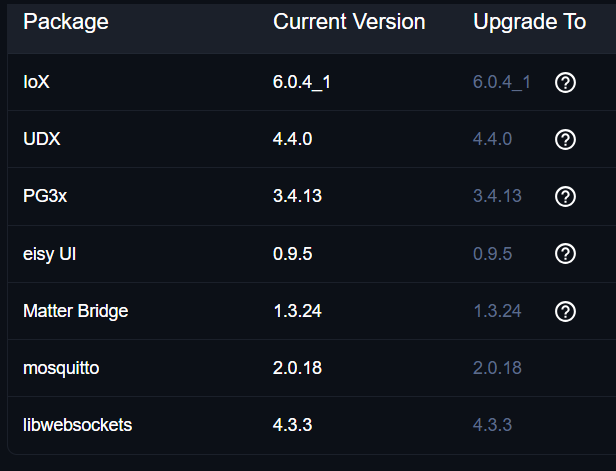
Hi all. This has happened more than once. UD Mobile won't read status of any nodes - even though it says connected from the admin section a. It cycles on the "home screen" saying disconnected - attempting to reconnect b. Testing the local connection reports "Cached firmware version may be incorrect *6.0.4), try pressing the search icon next to the Local IP..." Doing that changes the IP to EISY.LOCAL but the issue remains... (The "Cached firmware... " message remains even after clearing the main problem for nodes) c. Testing the remote connection works fine e. Same behavior on 2 different IOS devices (iPhone and iPad) Admin Console works fine eisy.local web access works fine I've tried rebooting from eisy.local, Admin Console, UD Mobile, Pulling the plug and waiting for 2 minutes seems the only way to clear this. HELP! ~jimt
-
I have a ZOOZ Range Extender https://www.thesmartesthouse.com/collections/zooz/products/zooz-800-series-z-wave-plus-range-extender-zac38 that reports power loss. It connects via z-wave and has a battery backup. Maybe something like that connected to the grid side of your power?
-
Not sure if this is intended behavior, but version 1.4.7 of the app only opens favorites on App Launch. It USED to go back to favorites when you toggled back to the app from somewhere else. Restarting phone does not help. Running this on an iPhone.
-
Success! One thing to note: when you add the original eisy URL (with port 8443) to the ISY Finder, you will use that one to sign on with the original credentials. Hitting the same URL WITHOUT the port will require you to use your Portal credentials.


