


Guy Lavoie
Members
-
Joined
-
Last visited
Everything posted by Guy Lavoie
-
I also have two of my test Polisys up to 6.1.2_10 as of this morning. There is a known issue with the backups not working, giving an Error 500.
-
Interesting. So UDI has determined that migrating from ZMatter to Aeotec is currently problematic, and hopefully will be reviewed. It reminds me of the similar issue going from the original Zooz dongle to ZMatter, which I never got to work. Btw, what originally had you thinking the ZMatter board was bad (in case someone else comes across a similar problem)?
-
Well I believe the ZMatter dongle itself is 700 series, so it won't do any 800 stuff. But zwave is designed to be backwards compatible, so I'd presume any 800 series modules would work, communicating perhaps more slowly. Both LR and mesh can coexist.
-
If you're changing the setting every day, then that might indeed "wear out" the memory cells.
-
Yes, but you'll need to do it manually, using ssh to access it. Once in: sudo repo.util sudo pkg upgrade isy udx eisyui pg3x Once that finishes: sudo reboot
-
How old are these switches? Unless you're changing the backlight setting repeatedly through a program, the eeprom shouldn't be losing settings like that.
-
The second most common suggestion is to try another power supply. Sometimes it will still measure 12v with a meter, but not work.
-
The usual first suggestion has been to turn off the power, take out the memory card, and clean the contacts with an eraser.
-
He means the beta build for eisy-ui. If you activate the beta repository and upgrade, you'll get it. This will probably also upgrade IoX to something like 6.1.2_9.
-
Whatever works for you. I copy files back and forth from my PC using the scp command. The syntax takes a bit of getting used to, but I like the command line convenience. The format is similar to using ssh, along with path names. No harm in using chmod to make directory access easier.
-
Are you looking for an older version of a program that still exists on your controller, or it was deleted? There might be a way, though it would be quite involved, going in by ssh, using scp to copy one or more files from your PC to the eisy, etc. If it was deleted, then you'd have to figure out what the program ID number was, by looking for text program name through the program files using grep, etc. Then create a dummy program to have a program known ID that you could then overwrite with the restored file. Not fun, and not guaranteed to work.
-
Can you access the plugins dashboard from Admin Console?
-
Ok, I played around with scenes a bit. It's very well done, though not fully intuitive the first time. You bring up the scene, and you'll get the list on the right, with the controller(s) at the top and the responders below, and controller/responders below that. You try clicking on the items and nothing happens... What you're seeing is a summary of the scene, not an item select list. You need to click on the little ">" to the left of the controller line, which will expand the list to a series of boxes where you can then select and edit each individual item. You click on a box and you'll get an edit screen for On level, ramp rate, etc. One done, click on the "v" of the controller to collapse the list again. The listing of "Shared Comnmands", "No Conflict Commands" are an excellent addition, telling which commands will work for everything in your scene, vs which ones will only be meaningful for some devices. So a color change command won't do anything to a non-color device, etc. The link type shown is also a great improvement. Admin Console would show it, but no real explanations. Not something you'll usually need to mess with, but now you can make changes if needed. Hover your mouse pointer over the circled "i" for information. "Native" links are the ones where IoX "knows" that these device communicate directly, such as Insteon commands between linked devices. Default links are those where IoX knows it need to send a command to make something happen, such as send an On command to a zwave device in an otherwise Insteon triggered scene. Very well done!
-
Start by doing: sudo sh and enter the admin password. This puts you in superuser mode, and can go anywhere.
-
You access the main menu items by clicking on the three little lines at the top left corner. In the list, scroll down to Protocols -> Insteon. There you'll get a screen where you'll find all the options for configuring Insteon devices. I'm seeing this in eisy-ui 1.3.11-1
-
32 GB. A 64 GB will also work.
-
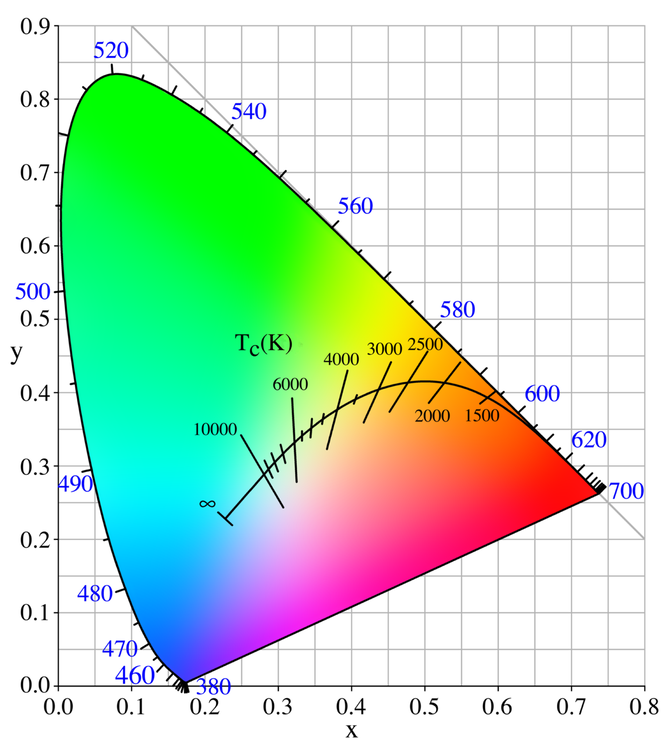
The X Y color chart is harder to use than RGB because it's not as intuitive in terms of numbers vs colors.
-
I'm actually going to study that more in depth. Eisy-ui shows more internal details about scenes that's very interesting, including what's done directly between devices vs done by the controller.
-
Yes, I used the 4th one down.
-
That's right, the ZMatter board ended up not having anything to do with Matter. It could have, but in the end, a border router turned out to be the way to get Thread functionality.
-
I'll eagerly await your follow-up on this.
-
Yes, and I've extensively used that, such as displaying a red, open shackled lock for unlocked, and a black, closed shackled lock when locked. Great feature! It would be great if we could create our own icons for this. The only current way is with a link to an image url. I'd like to create opened and closed garage door icons, for example.
-
Thanks for the detailed explanation. I'll certainly check that out. I like customization and this sounds interesting.
-
I'm interested in exploring this. Do you have an example of a REST command that does just that? I can't find any listing of the specific properties that would be added to a /rest/nodes/<node> command.
-
I agree with @Geddy here, 5.9.1 is probably the oldest release that you can still directly upgrade from...for now. Play it safe: do backups of IoX, zwave and anything else you have. And don't do an upgrade on a Friday night, where getting help from UDI would be more difficult for a few days.

