Javi
Employees
-
Joined
-
Last visited
-
Currently
Viewing Topic: How to copy the program txt from web ui ?
Everything posted by Javi
-
Thanks @Techman and @DNewkirk , I have repliacted added issue ID: /eisy-ui/issues/71 For the other Items @IndyMike is correct. The only values reported are in the property boxes at the top. Anything in a command is just default, although sometimes defaults are linked to a property value (init). This is one of the reason in 6.1.1 ( and in UD Mobile) the commands are grouped together without displaying a default until issuing a command. This prevents confusion with current state.
-
Can you please attach a screen shot showing in AC and missing from eisy-ui. Then right click the node in the list > Configuration > NodeInfo (requires eisy-ui beta), similar in Admin Console.
-
Are you using firmware 6.1.1 or greter?
-
The name is just an edit text in program edit (IF/Then/Else screen)
-
If reboot did not correct please open a ticket with UUID and I'll take a look.
-
Does the root Program Folder exist on open. Does reboot correct? The error looks like another client is or was in the process of changing something related to programs, but never sent the "I'm Done" message. Clients can lock out other clients while changing programs to prevent race conditions. It also looks like the root folder was not created for some reason, it should be created by the UI if it does not exist. Should be an easy fix if that is the issue.
-
Ok, it could also be that the program cache on server and/or ui is not reloaded when a node is deleted.
-
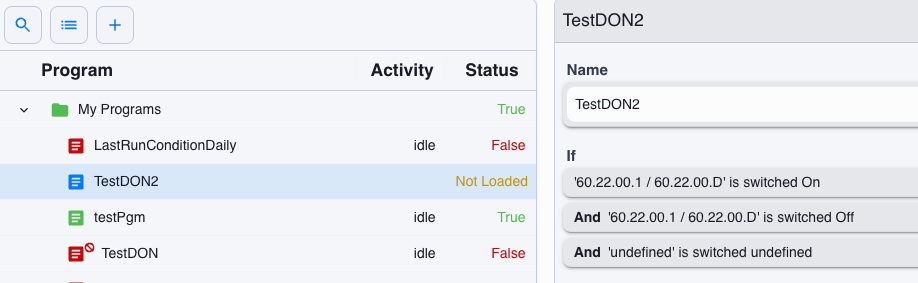
I don't think there is currently, at least for variables, as they are index based and firmware does not appear to show any errors. I could not replicate on the Admin Console. eisy-ui should show errors for nodes:
-
I think a similar question was address separately. "I would like to hover my cursor over a device name in the "IF clause" of a program and see the current value that is being tested" The issue with this is state vs event and (last) evaluation. Something may not be "tested" yet if the evaluation finishes (false/else) before reaching the condition. Showing the current state of a node/var/etc is very possible Thanks for the clarification. Fix: added uom formatting to commands with variable substitution ID: /eisy-ui/pull/62
-
This is in production, there is a status column for programs, also indicated by the icon color or icon (running). Device Level configuration is Beta Already in production, if not shown then the UOM does not have a suffix (name). Suffixes (names) are listed in rest/profiles in the UOM list.
-
Some of is beta. see https://forum.universal-devices.com/topic/47042-eisy-ui-is-getting-there-heres-where-we-stand/
-
go to my.isy.io and reset the password.
-
Plugins/PG3?
-
Should be there?
-
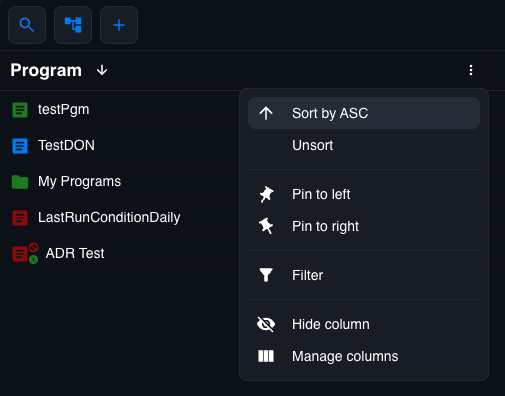
Sort order is remembered by store, sort from the column header from any column.
-
Maybe better phrased as disable line (condition / Action)
-
Already exists, firmware determines condition true/false and is already calculated (status) and shown as red/green in the icon (although the color can be improved). Also there are conditions that are triggers (commands/schedule) that are only evaluated when triggered, so the last evaluated status is shown. May cause confusion, Also there are conditions that are triggers (commands/schedule) that are only evaluated when triggered. Added investigation for implementation ID: /eisy-ui/issues/61
-
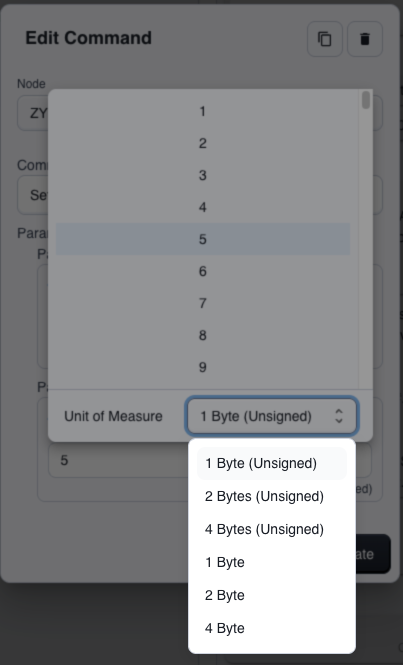
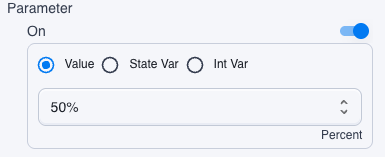
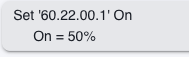
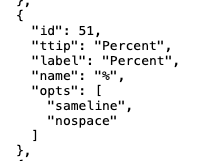
Yes, on TODO: https://forum.universal-devices.com/topic/47042-eisy-ui-is-getting-there-heres-where-we-stand/ How about below the current program with priority over program content which remains/becomes scrollable? This will work both Desktop and mobile. This should already exist, however some UOMS may not have a "name" see rest/nodes "uoms" : []. The "name is the prefix suffix based on "opts" formatting. "label" is shown during command Parameter selection, or when multiple UOMs are available 1 Byte in image below. e.g UOM: 51 (Percent UOM "name (%) Shown as a prefix suffix (depending on opts) UOM "Label" ("Percent") Under in command Parameter selection: Also for commands that accept multiple UOMs, Labels in UOM select. Right Click Node > Configuration This is a firmware restriction, added issue for investigation. ID: /udi/issues/18

-
Public roadmap: https://forum.universal-devices.com/topic/47042-eisy-ui-is-getting-there-heres-where-we-stand/ Please take a quick look at the roadmap above. If it's already listed, we're already on it.
-
This comment is my own and not that of UD: IMHO matter has it's place but not in lighting or sensors. It should be limited to complex devices that already run independently such as thermostats, sprinkler controllers, etc. These devices usually cost more and have a better matter implementation, and the MFG is unlikely to make a Z-Wave/Zigbee product. Many of the devices we tested, especially the low cost ( less than $50) had issues eventually, in many cases you get what you pay for. Also many consumer WiFi routers are not setup to handle a large amount of devices and start to drop connections. So if planning to have more than a handful of matter devices a user needs a high-end router. The next issue is routers. What happens when you replace your router? Be prepared to reset all your matter devices. This is fine for a few devices (a thermostat and a sprinkler controller) but spending a day trying to get my light switches/bulbs back online is not something on my TODO list. Does your router force the same SSID for 2.4 and 5GHz networks? Some Matter devices try to connect to a network that is not supported so may cycle between connected and disconnected, so you need to run 2 independent networks. There is another issue with most devices, who is the admin and how is network connectivity established? Some devices are self administrators (e.g. nest) so you can manage other admins and network connectivity from the device itself. Other devices require an administrator to setup admin and network, when having network issues or changing routers this is a huge obstacle ofter requiring a factory reset.
-
This is in Beta repo. Upgrade to beta or wait until released to production.
-
Try adding from eisy-ui, inclusion has been drastically improved.
-
We've been hearing from a lot of you — questions about what's ready, what's coming, and what still needs Admin Console. Rather than answer the same questions one at a time, we wanted to create a single place you can always come back to for the latest picture. This is that page. We'll keep it updated as things move forward. We've been working hard to bring every Admin Console feature into eisy-ui, our modern browser-based interface. We want to be transparent about where things are today — what's ready, what's coming, and what's still on the list. If you're on an older firmware, you may already see an early version of eisy-ui — but it may be missing key features, including backup. Upgrading to IoX 6.1.2_10 is required to use eisy-ui for day-to-day management — but check back often, as updates are moving quickly. If you're currently on a version lower than 6.0.0, please open a support ticket for personalized upgrade instructions before proceeding. eisy-ui can receive incremental updates independently of firmware, so this document tracks eisy-ui versions specifically — not firmware versions. Why this is important nowSee https://forum.universal-devices.com/topic/47002-bye-bye-admin-console-java/#comment-406740 A Note on Firmware UpgradesIf you're currently on a version lower than 6.0.0, please open a support ticket for personalized upgrade instructions before proceeding. If on a version less than 6.1.0 upgrade from the Admin Console > Configuration > upgrade packages. If on version 6.1.0 or greater Upgrade from eisy-ui Menu > System. Access eisy-ui at eisy.local or the numerical IP Address. Getting to IoX 6.1.1 may have had some bumps. We know. Many of the issues users experienced during earlier firmware upgrades have been resolved in 6.1.1 itself — and once you're there, those problems should not come back. From 6.1.1 forward, all backups, restores, and firmware upgrades should be done directly from eisy-ui. No Admin Console required. After upgrading to 6.1.2 or greater, please only use eisy-ui as Admin Console is deprecated, some things may not longer work in admin console, so it should be a last resort. What's Available Noweisy-ui 1.4.4 This is the stable release. It covers the core of what most users do every day. Full node control — manage and control all your devices from the browser. Variables — add, edit, and remove variables without touching Admin Console. Programs — create, edit, and delete programs entirely in the browser. Groups / Scenes — full add, edit, and remove support. Insteon device management — full add, edit, and configure support. Z-Wave device management — full add, edit, and configure support. Zigbee device management — full add, edit, and configure support. Matter device management — full add, edit, and configure support. Network Resources Email Groups (as legacy) Plugins Management (both PG3/legacy and eisy-ui plugins. What's in BetaCheck the tooltips in eisy-ui > menu > System > Upgrade > Beta What's in Staging Almost ready. These features are in final validation before release. Check the tooltips in eisy-ui > menu > System > Upgrade > Staging What's in Internal TestingThese are features we're actively working through before they reach staging. Bug fixes and improvements. On Our To-Do ListWe want to be honest about what's not there yet. These are known gaps we're actively working to close. Favorites Page Enhancements — Use a Grid Like pattern similar to UD Mobile. Pending writes notification for disabled nodes — we'll be removing the false-positive pending writes indicator that shows up for disabled nodes. Node error propagation — errors currently only appear on the parent node. We're adding support to surface errors on child nodes as well. Hidden properties in Program Edit — some hidden properties may not be appearing in the program editor. We're tracking this down and will have a fix in an upcoming release. Color Enhancements — changing contrast for some red/yellow colors. Possibly allowing color themes. Generate Topology missing Description Not Provided Retain Search Box Filters on Navigation Retain Search box filter states on navigation when leaving device/program/var pages then returning #98 And much more This is a living roadmap. We'll keep it updated as features move through the pipeline. We're genuinely excited about where eisy-ui is headed — and we can't wait for you to have the full experience in your hands. Thank you for your patience and your feedback. Frequently Asked QuestionsHow do I access eisy-ui? When connected to your local network, open a browser and go to eisy.local or the local IP address of your eisy unit or use the remote access option (below). Why is eisy.local is not working? Some routers/PCs/Mobile-Phones may not recognize a .local address on the local network. Try using the numerical IP Address. If using ISY Portal (my.isy.io) and eisy is online, the numerical UP can be found in Select Tools > Information > ISY Information > Internal IP. Why do I get a browser warning when using the local connection? Certificate cannot be issued for local network addresses, in most cases it is safe to contiue assuming you trust the local network. Use the remote access method (below) for https access. How do I access from a remote location? Using ISY Portal (my.isy.io) > Select Tool (next to UUID) > eisy-ui. Or the direct method https://{uuid-no-colon}.isy.io How do I upgrade firmware or check my current version? Menu (top left) > System > System Upgrade tab. Your current version is displayed there, and you can trigger an upgrade from the same screen. Some Commands are missing, like user codes for locks or LED adjustments for switches? Right click the node on the Nodes Page > Configuration. After firmware upgraded some screens say API does not exist, API not available, or Hey Developer? Reboot eisy. Eisy is not online? Go to my.isy.io. Add your UUID if not already listed. Next to the UUID there is an indicator which is red/yellow/green/white hover over this indicator to see the eisy's status. If there is a red triangle next to eisy's UUID hover over the triangle for more information. How to enabled the included 1 year trial of remote access? Go to my.isy.io. Add your UUID if not already listed. Select Tool > Information > ISY Portal Access License. How do I get the Beta or Staging build? Menu (top left) > System > System Upgrade tab. From there, select the Beta or Staging repository. One important note: upgrades are one-way. We strongly discourage installing a lower version — for example, going from Beta back to Production. You can return to Production once it reaches or exceeds your current version. How do I report an issue or request a missing feature? Please open a support ticket — but before you do, take a quick look at the roadmap above. If it's already listed, we're already on it. What is my username and password? eisy-ui users your portal (my.isy.io) credentials for both local and remote connections. How do I edit Programs? Click the Menu (top right) > Automations > Programs. Program Edits required firmware 6.1.1 or greater How do I add new Devices? Click the Menu (top right) > Protocols Section. How do I edit Scenes/Groups? See: https://wiki.universal-devices.com/Eisy-ui#Groups_/_Scenes What is the difference between a Group and a Scene? See: https://wiki.universal-devices.com/Eisy-ui#Groups_/_Scenes Why are you not supporting ISY994 with the new web interface? ISY994 does not have the hardware needed to run the eisy-ui web server. Why are you discontinuing support for ISY994? ISY994 firmware updates have been discontinued for almost 5 years. We are not changing anything with the hardware/software, and we have no way to push firmware upgrades as our current firmware, which contains the new web interface, will not run on ISY994. Your ISY994 will continue to function, we are simply discontinuing updates/support for one method of accessing isy/polisy/eisy, which is the Admin Console, due to lack of Java support from on MacOS and some Windows devices. If you have an eisy/Polisy please upgrade to use the new web interface instead. If using ISY-994 everything will continue to work, however the Admin Console may break at some point do to PC operating system change out of our control, this has already started to happen if using the beta versions of MacOS. If you choose not to upgrade we recommend creating a backup just in case your PC fails to launch the Admin Console in the future. All APIs, and apps that work with ISY994, including portal access, continue to function. What is the duration of the included Remote Access trial? A new eisy currently includes a 1 year free subscription to ISY Portal no credit card required. Why do you charge a fee for an ISY Portal Remote Access Subscription? This service is needed for network security, your eisy calls to the server to establish a connection. Without the server component your home network would need to be exposed to anyone on the internet to allow an app/website/service to call into your home (instead of eisy calling out to a server). Direct call in, is possible with eisy, but not recommended unless you are very competent with network security. It is also not something for which we offer support as this is highly discouraged by any security professional. We understand some other companies offer "free" remote access services, but as the saying goes nothing is free. Many other companies sell your data and/or required advertisements, we do neither. So we charge a modest yearly fee for the remote access service. Why is UD Mobile not synchronizing or Why does UD Mobile have errors when synchronizing? See: https://forum.universal-devices.com/topic/46771-new-version-just-downloaded-on-ios-sync-errors/#findComment-406912 Why is there no firmware upgrade for Polisy? We no longer test firmware upgrades against Polisy so all firmware updates are unofficial https://www.universal-devices.com/polisy-entering-a-maintenance-phase/ however if you are on OS 14 upgrades to 6.1.x will likely succeed. See https://forum.universal-devices.com/topic/47009-bye-bye-admin-console-polisy-implications/ . How to check for OS version, go to http://eisy.local:8080/WEB/sysconfig.txt (eisy.local can be replaced with the IP Address) Look for FreeBSD polisy XX.X-RELEASE If XX should be 13 or 14. Upgrading from 13 will likely fail and may require flash to restore. I updated Polisy but eisy-ui is not updated? Manually update eisy-ui: ssh > sudo pkg upgrade eisyui What software supports older firmware versions? UD Mobile Android supports versions from 5.0.16 or greater. UD Mobile iOS supports version from 5.0.16 or greater through a proxy (e..g my.isy.io), due to a network bug direct connection may not work unless running 6.1.1 or greater. Direct access via the legacy web console http://<ipAddress>:8080/WEB/udajax.htm or http://<ipAddress>/WEB/udajax.htm. There are also third party apps like https://forum.universal-devices.com/topic/47048-web-console-for-iox/#comment-407948 or Mobilinc may also work but have not been tested by Universal Devices. Does eisy support Matter? Yes, but all matter devices are created alike. Some work better than others. See my personal view of matter here: https://forum.universal-devices.com/topic/47040-does-matter-work-on-eisy/#findComment-407050
-
There should be no reason to be in legacy mode unless something is not synchronizing. But I think all of these issue are resolved (the new method is the same method used by eisy-ui)
-
Yes, already in our master so likely nest beta. From Portal: