


Geddy
Administrators
-
Joined
-
Last visited
Everything posted by Geddy
-
@JLevy02 I wouldn't worry about it for now. There are too many places/ways to log into the system at this moment (IMO) and it's not worth trying to change or make the same. I would suggest you stop/avoid using the http://eisy.local:3000 route to log into polyglot as with the release of eisy_ui this changed how plugins are managed and could cause an issue. It's been posted elsewhere that UD is suggesting this in support tickets when people find they have plugins restarting or not showing connected when they log into the Polyglot dashboard through the :3000 port process. eisy_ui is accessed at https://eisy.local and is the suggested route to get to plugins now. Due to how the plugins are managed with eisy_ui this is the "cleanest" way to currently access Polyglot (Plugins). Since the eisy_ui is not fully function with all things IoX it's more a "look here doesn't this look pretty" screen (IMO). Java Admin Console - if you just use the current quick found address and log in it will prompt you for "Portal" credentials - thankfully they've added a comment for which credentials are needed to log in. This is acceptable, but as you found has some bugs that are not going to be fixed. Java Admin Console with eisy.local:8443/desc access currently uses the local credentials - this is the "old" process of getting into the IoX admin console locally and will eventually go away once eisy_ui is fully functional. I wouldn't spend time trying to change any logins currently. If you're wanting to standardize one then just make sure you know your portal credentials. Make sure they're strong safety wise since they are an online connected service. To change the portal credentials you'll need to go to my.isy.io and change them on that site. Click on "My Profile" once logged in and you can change your password.
-
This is how it's designed - currently. There's nothing to change. I'm not sure I understand what you're trying to change. Since UD is moving away from the java admin console access with eisy_ui being developed to handle all the IoX and Polyglot setup you'll have a single sign on function.
-
@JLevy02 it might be best to address this directly with UD through their support ticket. They can check if you inadvertently purchased twice and work out a refund if you did. https://www.universal-devices.com/my-tickets If you click on the "Details" button of the plugin you should then have a configuration option. Since both the Elk and Notification show to have nodes currently something has been setup.
-
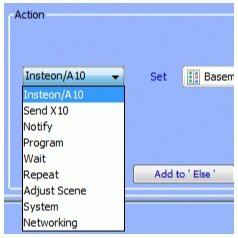
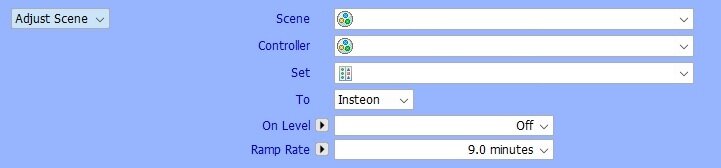
I'm not sure when it changed, but do you think you remember it like this: I found this image in the ISY Cookbook. My guess is that since the cookbook was written in the ISY 4.x firmware generation that it was older and perhaps even prior to ISY 4.x firmware options. I currently see this as the option: My expection is that "Your Devices" replaced the Insteon/A10 option a long time ago. If you're thinking/looking somewhere else the only other place I see "Insteon" still mentioned is in Adjust Scene in the first dropdown then "Insteon" is in the body of the options. I think what you are trying to do is adjust scene then activate the scene. It looks like you can do that in the "Adjust Scene" option. I've never attemped to do this kind of adjustment, but perhaps this is where you're looking for "Insteon" to be able to control a device brightness over time. If it's not a scene you're trying to change then it might be possible with "Your Devices" and have to set a brightness level and a ramp rate then a command to dim or brighten. Maybe some of the program gurus can chime in on that process if you're still having issues.

-
Nothing mentioned lately by UD. Make sure that your license hasn’t expired by logging in on the web.
-
There was a BIG change in how scenes were handled from 4.x to 5.x. So much so there was this portion added to the wiki: It's been a long time since I updated from 4.x to 5.x on the ISY994 and I don't use a lot of scenes so I can't really give you the details about it. But I think for the most part the scene should at least migrate over correctly, but the biggest issue was if you have programs that use "adjust scene" they would need to be re-worked. I strongly suggest you make a digital text backup of all your programs before doing anything! Right click on the root folder in the programs tab (usually called "My Programs"). Select "Copy Folder to Clipboard" - BE SURE YOU USE COPY Paste into a TEXT editor (for Windows use Notepad) - don't use a word processing app - you want to keep the formatting and text as raw text! SAVE this file somewhere you'll know where it is. Doing this will save a text copy of all your programs. After you migrate if you have any broken programs you can search the text file to find what nodes were being referenced and/or what your settings were. Easier to do this from a text file than from memory. Trust me! If you used to setup scenes with "copy" option know that process was removed in 5.x due to how z-wave certification needed to be handled. This is the biggest change many have complained about going away in the 4.x to 5.x upgrade. It's suggested if you have to create scenes now to add all the responders and setup their properties then add the controllers. I'm not familiar enough with the process to know what this achieves, but I've seen it commented on here previously.
-
"The immediate physical differences between the 2 boards is that the 300 series card has a blue light in the back of the isy while the 500 does not." (Source) https://wiki.universal-devices.com/ISY_Portal_Installation_Instructions The UD Portal has long been what UD offered for remote access as well as Amazon/Google connection for 3rd party voice commands. You can learn more about it on the wiki link (above). There's also mention of it on the UD Website (look for "Cloud"). I think going to 4.9.0 would be okay. I'm not 100% sure if there is a good migration option from 4.7.3, but it might work okay. How many total devices (Insteon & Z-Wave) do you think you have? Are all your Insteon devices "easy" to access? (i.e. no devices that are in sealed off walls or very high locations that you don't feel comfortable reaching?). Do you have any/many Insteon battery devices? If the answer to total number of devices is relatively small then it might just be "easy" to setup up as a new system. If you've got a lot of programs that you can't live without then that will need to be addressed differently. The biggest issue is you're going from 4.x system to 6.x system. There were MAJOR changes in the 5.x firmware line that will still potentially impact your system/setup. Those will be around how scenes are made and controlled (too much to really go into here...go find posts about the upgrades/changes in 4.x to 5.x and possibly review scenes on the wiki). I'm not familiar with AXIS devices and doesn't appear that there's a plugin. So doubtful that you would get to add that back into the system unless you could find a developer to make a plugin for those devices (if it's even possible). "better option" is in the eye of the user. I like UD Mobile and can use it, but I have not gotten deeply entrenched with how you can set it up. Mostly because I don't use a mobile app for my home "automation". I don't need to know (monitor) when lights come on or go off and don't need to turn things on/off while I'm away (most times). For simple tasks like that I rely on Mobilinc more than I do UD Mobile because it's what I used in my ISY994 days and it just works simple enough and quick enough for a simple task of turning an Insteon device on/off.
-
Actually you can still use Mobilinc as long as you're using a direct connection to the eisy or through the UD Portal. I use Mobilinc Pro and it works just fine. I never did their connection method, but the app itself will connect and show anything that is showing on the ISY. The main things that DO NOT work with Mobilinc will be anything you add to the system through a plugin. You'll see them (possibly), but more than likely will not be able to control them. If you never setup Mobilinc to use the UD Portal you can follow the directions in the wiki: https://wiki.universal-devices.com/ISY_Portal_MobiLinc_Configuration. It's not required to have an active portal license/subscription to run the eisy, but it does provide you the easier (more secure) method of connecting to the device while remote. Otherwise, you have to open a port on your home router and that's a possible security vulnerability. I don't run any z-wave or zigbee devices that I need to control with an app so I'm not 100% sure if/how Mobilinc works with those on eisy. I know my Insteon devices 100% work with Mobilinc and eisy. For any plugins you end up running you'll want to get UD Mobile from UDI. That's being developed to work better with the eisy and plugins and requires UD Portal license/subscription for remote access.
-
@oamber a few questions to follow up - even though you seemed to have resolved from this time it could mean you've got underlying issues. How long was the power out? If it was just a brief/blink outage then it could indicate PLM issues. If it was a longer outage be sure that your eisy is updated to at least 6.0.4. There were some issues in earlier versions about not booting correctly and connecting to the PLM following a power outage. I think UD fixed that process in a recent update (there haven't been any posts about it happening lately). Were all your devices missing or only the one you showed in the screenshot? If only one device then it could be a communication issue to that device. If all devices were not showing then could be a failing PLM. Do you have any idea how old your PLM is? There should be a tag on the back (wall side) with a version and date code. If you're willing to unplug it again to check the date it might be good to know that. Although now that the system seems to be working I would just leave it alone for now. Just if it happens again make note of the version and date code on the back.
-
@JLevy02 be sure you’re adding that address in IoX finder. It’s not the website. Adding this address in IoX finder allows you to use the local admin credentials and should then allow you to remove customizations.
-
@JLevy02 welcome to the UD forums. Looks like might be a known issue. Take a look at this recent post for a work around.
-
@JBartmess welcome to the UD Forums. In updating the eisy to 6.0.x the default method of logging in on the admin console now uses your UD portal credientials (email address and password). Try using those to log in. If you want to use the local credientials then add this line to the IoX finder window: https://eisy.local:8443/desc You would then have 2 lines on the finder window. You might want to hit "save" and save the list locally in case the one you just added doesn't display in the future you can "load" that file and continue to use the local credientials without having to add the line manually. If this is your only device and you are always local to it then you can also downlad the admin.jnlp directly from the device and it. To do that use this link: http://eisy.local:8080/admin.jnlp (or replace "eisy.local" with the IP of your device). Save the admin.jnlp file locally and run it each time to access admin console directly (bypassing IoX Launcher/Finder process). I think this would always use the local credeitnals you have made.
-
If you had the portal on your old device there is a migration process. Please see the wiki: https://wiki.universal-devices.com/ISY_Portal_Migrate_configurations_to_a_new_ISY
-
@johnmsch I will often suggest people make a full backup of your programs in a text file. You can then use the text file to easily search for a device and recreate programs from that rather than memory. It's simple to make a backup for the programs. Programs Tab -> Details Right click on the root folder (usually "My Programs") Select "Copy folder to Clipboard" Open a text editor (not a word processing program/app) so it keeps any formatting basic and as text Paste in new text file NOTES: Be sure you use "COPY" function - NOT export! - this will copy all the programs in a clear "easy to read" format when you paste into your text file. Save the text file somewhere you might keep your IoX backups for future reference. Maybe make note to do this often if you tend to change/update programs throughout the year(s). This file helps remind you of the programs you have and is key in helping to repair any programs that might break if/when you replace items. Good luck with the changes!
-
As others have said above that you've already got eisy_ui you just probably haven't tried using it yet. And since you're on 6.0.3 it would be a good idea to at least update to 6.0.4 just to stay current and not drop behind. I believe the suggested route (according to other posts here) is that UD is suggesting that you begin running updates in eisy_ui rather than the java admin console. I don't know for sure if one is better than the other, but some have posted here that it's been suggested to them through support tickets. In a browser go to: http://eisy.local/ and use your portal credentials to log in. (Note: you don't have to have an active portal "subscription"/license, but you do need a portal account - that's been necessary from the start of eisy (and maybe later in the Polisy days). Once logged in you'll want to hit the 3 bars on the top left of the screen to open the menu and select the last item "System". Then select "Upgrade Packages" on that screen. I think it might be in a different place in 6.0.3, but it should be similar to this or at least a "settings" option in that menu that might have the "Upgrade Packages" option. Either way in 6.0.4 it's how I describe it. There have been other minor updates pushed out recently (since 6.0.3) that are good to get as UD develops eisy_ui and continue to improve other underlying systems in their more advanced days.
-
Yeah, that's why the wiki changed in 2022. Google finally phased out the simple password, but if users had already changed over to 2FA and the app password it has always worked that way. Nothing in that standing changed after 2022 or 2025. I've had mine setup using Gmail since I started with ISY994 in 2016+/- and aside from a few times can't recall there being a large issue with how the setup worked. The steps to setup (but also same to change) the app password are in the UD wiki, but it basically used the Google support steps to direct users where to go to setup/change the app password. But if you go the route of the support ticket please post back what troubleshooting finds and if there's a larger issue that is being addressed or might need to be corrected in the setup and ultimately in the UD wiki instructions. But since they work for some/most something else has to be the root for some accounts getting this error. What do you mean? All they did was copy/paste the UD Wiki information. The wiki has had this info (updated) since 2022 - and prior to that worked for how Gmail used to work. As for instructions about the migration they're in the wiki as well, but probably not the most easy to follow. They're simple and written for when Polisy and eisy were first released.
-
THIS! 100% THIS! Many will forget this step and claim it doesn't work just to find out the device was in a folder. Great reminder @paulbates!
-
@Ross another thing I might suggest is if you don't log in there often then you should probably reset/change the app password and make it new. What I don't understand is how can several be having this issue, but at the same time others (myself included) haven't had issues. I have even setup a daily email now just to be sure it triggers daily. Since Feb 27th it hasn't missed a beat. One thing to check is at the sending side do (did) you see recent messages in the sent? I wonder if they are being sent, but where you are sending them is blocking them (for some reason). I send from @gmail.com to @outlook.com. I know this doesn't mean anything if there's an error on send, but wondering if some messages are indeed being sent. Perhaps @Michel Kohanim is right that something in Gmail has changed again and old ISY994 firmware isn't able to meet the change. Not sure if UD changed how it's handled in the settings for Polisy/eisy since it seems to work just fine there with the same settings I've had since the ISY994 days. I'm guessing there is some underlying safety/security "handshake" stuff going on. Perhaps this is another indication that the Notification Plugin might be the best option for alerts/notifications going forward. Certainly for eisy users.
-
UD had to change how the "default" operated. I think that broke it for older ISY firmware versions. I know somebody reported recently that 4.9 had a working default server. I can't confirm it will work for everybody though. My ISY994 was 5.3.4 before I moved to Polisy then eisy. Perhaps your version is one that's broken when you try the "default" option. What is your timeout set to? (when using the gmail server settings) Be sure it's over 5,000. Try 10,000 and see if you still have an issue. Have you actively used the google account you're trying to send from in the last 24 months? Other than just auto sending emails from it. Google does require that you log in (I think once a year) to keep the account active. It's possible some accounts are "throw away" accounts and you're not actually logging into them and Google might flag them as inactive and suddenly blocking the ability to send. If the settings worked on the ISY994 or Polisy (whatever you migrated from) they should work on eisy. The wki settings still work (as of last attempt) if you need a refresher.
-
@shawnv not sure of a limit, but if you're not able to get more recognized you can install the plugin into another slot and see if that will recognize the other devices. That might be a workaround if there is a limit. Perhaps @Jimbo.Automates can chime in to advise if there's a limit.
-
What device are you using and what is your IoX firmware version? As this is not widely reported as an issue doubtful there's a "resolution". My notifications continue to work as normal. Tests and random program runs trigger email notifications just fine.
-
Yes. Thanks. Please post what support steps are completed to correct this issue, if you can. This is strange that it's unable to be deleted. How many customizations do you have? Since you mentioned you migrated from ISY994 to eisy would you also try clicking/opening each one (slowly). Then hitting save. Just close IoX Admin Console (don't reboot the device). Then log back into IoX Admin Console and try deleting again. It's a long shot, but I know that Network Resources needed to be opened and saved in the migration steps. I wonder if it might help/work on the customizations as well.
-
@larryllix I'm not sure what links you've been following in the past, but I'm fairly certain the wiki links haven't changed in ages (mostly because the old pages the links to start.jnlp haven't been updated in years - in fact I just looked it up - wiki link hasn't changed since 2018.). But more than that UD has always hade the "My ISY" link on the top of their home page that links to start.jnlp. I don't think that's changed in at least 5 years and probably even more than that. At least since they changed to the IoX Launcher method (using start.jnlp rather than admin.jnlp). Fairly certain this has been the link for YEARS https://isy.universal-devices.com/start.jnlp But what's funny is the link @dbwarner5 suggested (http://192.168.68.76:8080/admin.jnlp) has been around since the ISY994 days. It's been the method since browser quit supporting the java web method. And I'll echo what @apostolakisl says...if it wasn't for Java updates and having to clear the Java cache and reloading start.jnlp the java admin console method has been flawless for my use case for as long as I've been an ISY user. I can count perhaps ONE time that UD had to update the start.jnlp file due to an error that somehow got introduced. But that was when a "not found" issue popped up and they had to change the code in the start.jnlp file. That issue lead to my usual suggestion of downloading a fresh start.jnlp each time it was needed. Just in case it happened again, but there haven't been reports of really needing to do that recently.
-
@leadfoot interesting. I just created a new customization and reloaded IoX Java Admin Console and it deleted just fine. It's an outside shot, but I might clear java cache (be sure to check all 3 boxes) and download a fresh start.jnlp file (delete any old start.jnlp or admin.jnlp files). I wonder if it's a random cache/visualization bug - that has happened in the past. What IoX version are you currently running? (Please give actual number, not just "latest/current"). What Computer OS are you using? Make sure you are logged out of any PG3 or eisy_ui web interfaces while in Java Admin Console.
-
I might have suggested migrating the portal license from eisy1 to eisy2 then getting a new license for eisy1 when you set it up at the other property. I'm not sure if this would have migrated the plugin licenses (I think it does, but at least did in the past), but would have migrated all the Alexa controls. https://wiki.universal-devices.com/ISY_Portal_Migrate_configurations_to_a_new_ISY The rest looks fine. I'm sure it's fairly simple with the way backups are used now. The only risky thing would be PLM related, but that should be handled with the IoX restore.


