


Javi
Employees
-
Joined
-
Last visited
Everything posted by Javi
-
P.S. This is not intended to replace formatted value, it was implemented for strings to enhance the trigger that are single use. For example the last image from a doorbell camera, a detailed error message with a error property, a url for stream or images.
-
Usually related to Android Killing the UDM service before UDM had time to close itself.
-
Yes, Thanks this confirms what i expected, the text is not being sent to eisy-ui. I will need to investigate. So for now formatted text relies on the use of NLS (XML) or editor.names (JSON) from profiles Property XML (node status query response): <property id="ST" value="42" formatted="42 %" uom="51"> <text>Eco Mode</text> </property> Subscription event stream: <Event ...> <control>ST</control><action uom='51' prec='0'>42</action><node>addr</node> <eventInfo>...</eventInfo> <fmtAct>42 %</fmtAct> <text>Eco Mode</text> </Event> Created issue: '''eisy-ui missing "text" param/key in node update events.''' Id: /eisy-ui/issues/152. Currently at least 1-2 weeks out.
-
Not Possible, LR requires the QR Code. The pin will get you secure paring only. There may be issues in some browsers, chrome and safari should work, Firefox has known issues. Also taking a clear picture of the QR then uploading instead of scan may work better than some PC cameras.
-
Yes, please reboot sometime after any update. While not always required there may be catches in the UI that are not cleared so some things may not automatically appear due to the cache. For the PLM links, please verify you are on the latest beta release, This fix is only a few weeks out, not sure if it is in production.
-
If not in the admin console then this would be a feature request/investigation. Without precedent I'm not sure of the reason it was not implemented It could be config was tested and did not work, caused other issues, or was simply missed.
-
Setup another favorite with another variable does the issue persist?
-
UD Mobile customizations. If the value is shown without opening the variables dashboard in the variable list in UD Mobile. Then something is blocking showing the value.
-
The UOM value comes from one of two places, in priority order: The database — on node init, updateDrivers() loads previously saved driver values (including uom) from the PG3 database via poly.dbgetNodeDrivers(address). If a saved value exists, it overwrites the class default. The class-level drivers list — the uom you defined statically on your node class, e.g.: drivers = [ {'driver': 'ST', 'value': 0, 'uom': 51} ] This is the fallback if no database record exists yet. So in practice, the uom reported to ISY will be whatever was last saved for that driver (or your class default on first run). Unless included in setDriver self.setDriver(driver, value, report=true, forceReport=false, uom=None, text=None). The text, I'm not sure, I'll need to investigate. Do you happen to have a screenshot of the event showing the update? If not I'll need to create an example to test so it may be a few days.
-
Thinking about this again, do you have customizations for this variable. It could be overwriting value
-
It has not been implemented in UDM, exists in eisy-ui which has remote access: https://forum.universal-devices.com/topic/47042-eisy-ui-is-getting-there-heres-where-we-stand/
-
Requires IoX update for dismiss signal. Required IoX version 6.1.2_14 or greater.
-
Yes, if something is incorrect please let me know.
-
Need to see the editor to diagnose. The formatted value does not come from eisy-ui it is formatted in eisy, and has always been. The event Viewer (search for the node id) will have the whole property update event with the formatted value, just refresh the page before viewing. This will also show the UOM provided in the property update. My best guess is either the editor (NLS) has incorrect values or the property is being submitted with the boolean UOM.
-
Everything looks good, Do both of these return without errors? /rest/vars/get/1 /rest/vars/get/2
-
fix is in IoX 6.1.2_14 Are there any other issues?
-
We need to UDM Favorite Editor that has the issue
-
This is purely UI, did you reboot after upgrade?
-
The Edit page for the variable
-
Please show the favorite edit page, we cannot replicate.
-
Current suggestion would be the same, wait for next update for bug fixes for known issues.
-
No rollbacks, but you can switch back to production updates will not work until a higher version is available.
-
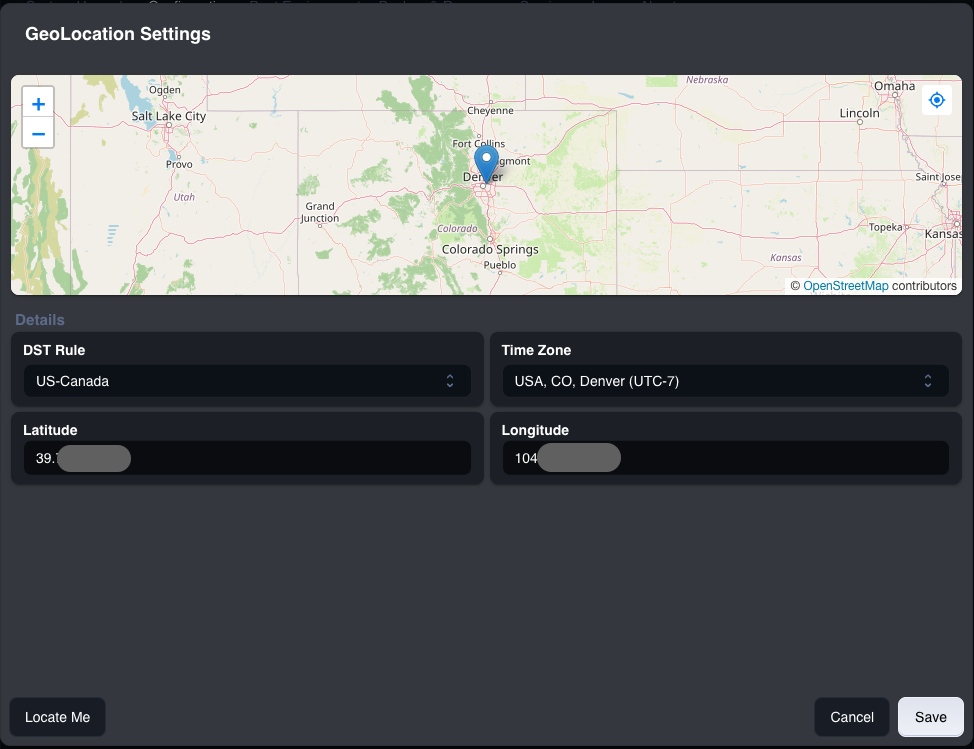
We are looking into the issue with AB. Must update firmware if Time Zone Offset is shown. FYI (after firmware update): If moving the TimeZone does not stick try moving the location pin slightly outside of the city, if the lat/long match the timzone setting exactly it will reset itself.
-
There is a bug in the Admin Console for offset, please use eisy-ui on the latest firmware. Let us know if issues still exist after changing timezone/DST settings when the options look like they do in the image below.
-
I tested and cannot replicate. With setting off, no status at startup, with setting on status is shown at startup. Before any other debugging options, I recommend restarting both the phone and eisy. We have no other reports of this being an issue, so not sure of any possible causes.

