


Guy Lavoie
Members
-
Joined
-
Last visited
Everything posted by Guy Lavoie
-
I'm in the eastern time zone and the times in the log file are two hours earlier. Same thing with other time zones?
-
Yup, ticket time. That's really unusual.
-
For those trying to figure out how to get this done (it's not very intuitive) here are the steps I wnt through with my Windows 11 PC: Use the link provided to download the Zsniffer tool and select the Windows folder, and download the Win32 version (there is no 64 bit version), then unzip it in a directory on your PC, browse to it, and run ZMERadioTools, the very last file at the bottom. You'll get a text window and the Advanced Radio Toolkit Screen, which you'll work in. at the bottom, click on the "+" button to add a port. You'll get a generic port line, named dev00. Now click in the box under "Serial", which will bring up a down arrow on the right. click on the arrow to see a select list, and choose the virtual serial port that you used to upgrade the ZMatter device firmware. I had to click on "Protocol" and choose PTI, and selected the baudrate 115200. Then click on the button with the little "i" at the right of the list. If everything is ok, you'll see the UUID of your dongle and a popup screen showing the features enabled, and that will also update the features that you had previously enabled (long range and ultra uart). Exit the Zsniffer program and go back to the link to start the controller tools, and now you'll see the features enabled and checkboxes telling you that, as explained by @junkycosmos
-
Just for fun, I upgraded to eisy-ui 1.4.2 minutes ago, and my memory usage shows 97%, but the line is blue. I don't know if it's just a change they made to make it feel more normal, or if there's a meaning to the color.
-
I don't really have any other suggestions. Hopefully others have suggestions.
-
So nothing out of the ordinary. The screenshot in your original post seems to indicate a possible hardware issue with the controller's built-in storage controller. mmcsd0 is normally the primary flash storage. It's as if it was not responding and timed out. Hardware failures are rare, but not impossible. If it was a driver issue (from an update) I would think that others would have reported it. Is your eisy in a confined space? Does it get very hot?
-
There are some overnight tasks that might have used up some of the available memory. 90%+ memory usage is what everyone pretty well sees on a running system. A Polisy or a eisy-lite only has 4 GB of RAM and get along just fine. As for the lock ups, do you have any particular plugins or other programming that sets your controller apart?
-
It should be recoverable, I'd think. It could also be the power supply. I've seen that happen.
-
So the Polisy will fall farther behind.
-
Try checking it every few hours, to see if there is a progression. The lockups are unusual. Seems we'd hear other reports if it was an issue with a release.
-
Thanks for figuring that out!
-
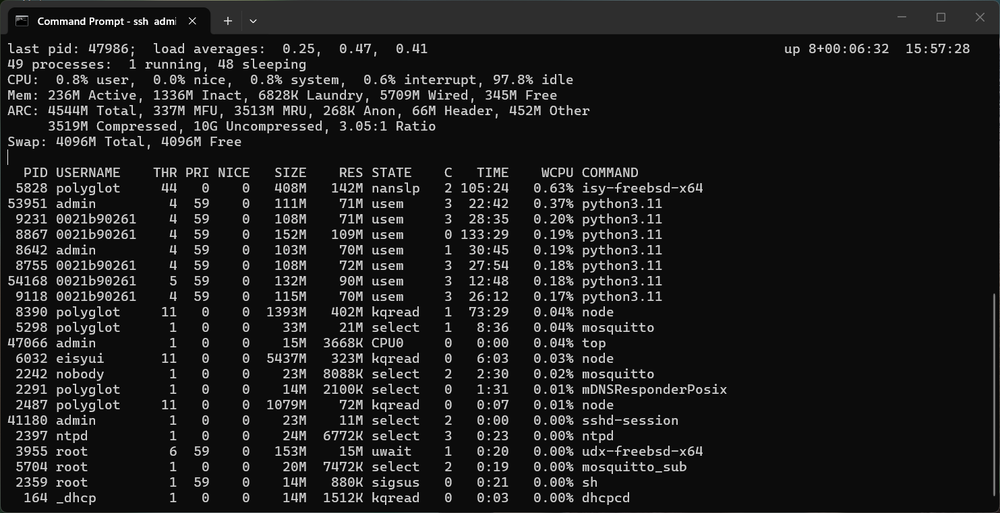
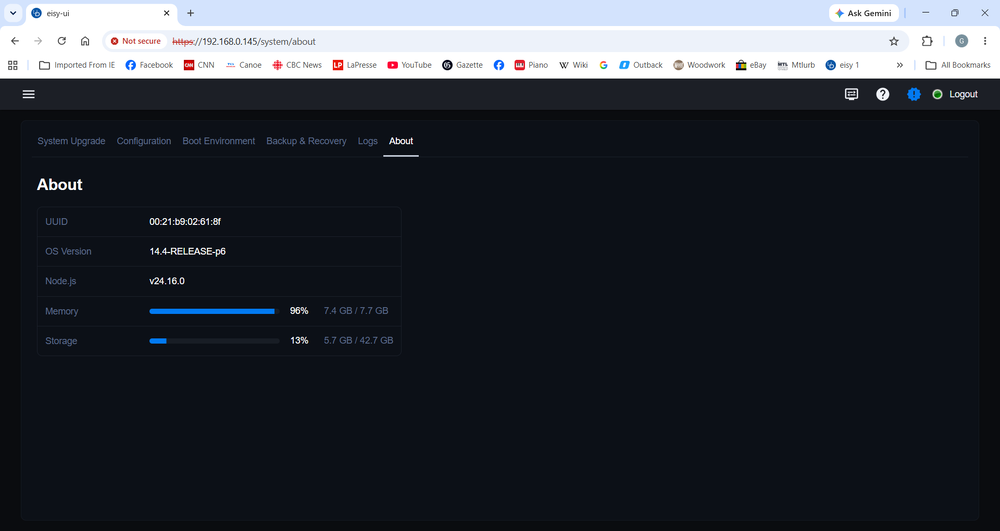
The "high memory usage" is a bit of a myth. What's happening is that eisy-ui is only looking at the "Free" (ie: never used) memory. Unix is a memory paging system and uses disk caching (buffers) for speed, so it will use almost all available memory for caching if it's not needed for actual tasks. So memory useage will always appear high. This is my eisy below. Look at the "Mem:" line: the 6828K "Laundry" usage is caching, buffers that ultimately get written out. The memory actually available is usually considered to be "Free" + "Inact"(ive). The screen below that is the "About" screen, reflecting only the 345M as being free.
-
I concur, the Polisy upgrade through eisy-ui is back! UDI is to be commended for that. 🙂
-
These days, updates are occurring almost daily. To see where they're at, just switch to the production repo and then back to staging, to see an updated list of the latest versions. Click on the circled question mark to see the release notes.
-
Yup, that's fine. No harm in requesting an upgrade if the version is already up to date, it just ignores it.
-
Yes, upgrade all 4 (isy, udx, eisyui, pg3x) through ssh commands. If it upgrades udx to 5.0.0_7, then you might need to upgrade that way again the next time too.
-
Others might be interested in yours as spares.
-
I had only about 8 or 9 zwave devices that I had to re-include when I switched from the Zooz dongle to ZMatter, so I understand the trepidation. Then there's updating all the program references to the new nodes. Ugh. I guess the watchword is: get a spare dongle of the same type you're using, if available!
-
Actually another minor update will be needed before that works.
-
I'd have no worries.
-
Maybe the available upgrade notification is telling you about just the PG3x update. Yes, 6.1.2_10 is a staging version. If you remain in the production repository, no worries, it should only update PG3x if you launch an upgrade.
-
That's a funny one. Are you actually already running 6.1.2? There have been several iterations of 6.1.2, currently sitting at 6.1.2_10. Maybe it's just a messed up message trying to tell you that.
-
Yes, if you plan on not updating at all, then nothing changes.
-
The Java based admin console is what is being replaced by eisy-ui. Portal access is remaining the way it is.
-
You'll need to do that one by ssh: sudo repo.staging sudo pkg upgrade udx eisyui sudo reboot Then you'll be able to use eisyui for updates


