


tazman
Members
-
Joined
-
Last visited
Everything posted by tazman
-
The main one I switched over so far was Virtual and I had to basically touch everything it was involved with to get it working.
-
There was a devfile on my configuration page and things seemed to clear up after deleting that. I worry about trying the migration again, maybe I will give it a try when I have more time. Thanks for all you do sjenkins!
-
I did the upgrade and it seems there is a problem according to the log file but it seems to me like things are still working. I don't know if this is because I'm still using the old config where I list them within PG3 instead of uploading a file to eisy. 2026-10-17 20:25:05.756 Thread-761 (poll) udi_interface ERROR Controller:poll: Node not ready yet, exiting 2026-10-17 20:25:08.757 Thread-762 (poll) udi_interface ERROR Controller:poll: Node not ready yet, exiting 2026-10-17 20:25:11.758 Thread-763 (poll) udi_interface ERROR Controller:poll: Node not ready yet, exiting 2026-10-17 20:25:14.545 Command udi_interface INFO VirtualSwitch:DOF_cmd: 1:switch 1, {'address': '1', 'cmd': 'DOF', 'query': {}} 2026-10-17 20:25:14.545 Command udi_interface.custom INFO custom:_save: Sending data customdata to Polyglot. 2026-10-17 20:25:14.597 MQTT udi_interface.interface INFO interface:_message: Successfully set 1 :: ST to 0 UOM 25 2026-10-17 20:25:14.638 MQTT udi_interface.interface INFO interface:_message: Successfully set key = customdata 2026-10-17 20:25:14.761 Thread-765 (poll) udi_interface ERROR Controller:poll: Node not ready yet, exiting 2026-10-17 20:25:17.764 Thread-766 (poll) udi_interface ERROR Controller:poll: Node not ready yet, exiting 2026-10-17 20:25:20.764 Thread-767 (poll) udi_interface ERROR Controller:poll: Node not ready yet, exiting 2026-10-17 20:25:22.770 Command udi_interface INFO VirtualSwitch:DON_cmd: 1:switch 1, {'address': '1', 'cmd': 'DON', 'query': {}} 2026-10-17 20:25:22.770 Command udi_interface.custom INFO custom:_save: Sending data customdata to Polyglot. 2026-10-17 20:25:22.816 MQTT udi_interface.interface INFO interface:_message: Successfully set 1 :: ST to 1 UOM 25 2026-10-17 20:25:22.858 MQTT udi_interface.interface INFO interface:_message: Successfully set key = customdata 2026-10-17 20:25:23.794 Thread-769 (poll) udi_interface ERROR Controller:poll: Node not ready yet, exiting 2026-10-17 20:25:26.767 Thread-770 (poll) udi_interface ERROR Controller:poll: Node not ready yet, exiting 2026-10-17 20:25:29.772 Thread-771 (poll) udi_interface ERROR Controller:poll: Node not ready yet, exiting I also tried migrating the plugin to eisy and the temperature nodes did not work so I migrated back to PG3
-
I just wanted to say thanks to all for the information! I updated mine and everything went well I only had one timeout on my update path to the 7.46. My network is performing fine although I only have about 6 older zwave devices. I worry about not updating and losing the ability where the steps become difficult for the software.
-
I never performed this action but from what I've read there should be a replace modem when you plug in a different modem. If that is not present search for the procedure @Brian H post all the time.
-
UD Mobile has where you can see the history of devices so you could look in there but I don't know if it is available to use in programs yet. I hope it will be coming to eisy ui eventually and that might open thigs up more in the future.
-
I was having trouble with a sunset program also so I just set it for a specific time.
-
I was able to update without any problems!
-
Maybe write the program to toggle the chime at 10 if the value is 0. It might be a limitation that it does not have an on command it just accepts a toggle command.
-
It kind of sucks but you have to look at it from the developer's perspective when they have to rework the programming because the api keeps changing to try to lock the 3rd party developer's out. I guess you have to decide what is important to you and if you don't want to pay then consider using homeassistant.
-
If you ever setup the wifi then it is still in there and it will obtain multiple ip addresses. It used to be you press the multi function button 4 times to reset the wifi. You should be able to see in your router what kind of connection an ip address is using so I think this is going to take some investigation on your end to see exactly what is happening.
-
Is there a chance eisy is switching between wired and wireless or do you have a mesh system where eisy is changing acces points?
-
@DIYguy after you reset the device you restore not delete it then that will put it back to it's state that eisy thinks it was at before. If you are having communication problems trying to restore then you either have a failing device or noise on the power lines.
-
Did you try resetting the device before you do the restore?
-
Thanks for the update I think that is spelled out very well now to make it more clear. I look forward to getting things back to normal when it is all straightened out.
-
I read over the Github pages and the way I understand it the Homekit plugin is going to act as an Apple hub so it will be OK that I do not have any Apple devices and this will still work?
-
Same problem here also.
-
I followed the AI further which says that Bhyve/HA was using APIC virtualization which is causing the crash. I put hw.vmm.intel.apicv_active="0" hw.vmm.x2apic_wr_msr_exit="1" into /boot/loader.conf and restarted then verified it was disabled. Now I just have to wait and see if the random reboots are gone.
-
Good point I forgot to add I was seeing an average core temp of 50c which seemed OK but I put a computer fan on top of it that dropped the core Temps to about 41c
-
I have had Eisy rebooting about once a week sometimes twice in a row for a couple of months now. I have the added storage with HA running on Eisy and HA reboots so I know it is a complete system reboot. I finally tried to look into things but not getting far with my abilities. I have activated the core dump and on the last restart I got some information but not sure what it means. Dump header from device: /dev/gpt/swap0 Architecture: amd64 Architecture Version: 2 Dump Length: 1192792064 Blocksize: 512 Compression: none Dumptime: 2026-02-20 23:06:11 -0700 Hostname: eisy Magic: FreeBSD Kernel Dump Version String: FreeBSD 14.3-RELEASE-p5 #5 releng/14.3-n271450-382f54740ee4-dirty: Tue Oct 28 19:30:07 PDT 2025 root@bsdev143.isy.io:/usr/obj/usr/src/amd64.amd64/sys/eisy Panic String: ISR and isrvec_stk out of sync Dump Parity: 1684056904 Bounds: 0 Dump Status: good Last lines before reboot. panic: ISR and isrvec_stk out of sync cpuid = 2 time = 1771653971 KDB: stack backtrace: #0 0xffffffff80a1a3ed at kdb_backtrace+0x5d #1 0xffffffff809cbee1 at vpanic+0x161 #2 0xffffffff809cbd73 at panic+0x43 #3 0xffffffff82c114ac at vlapic_update_ppr+0xec #4 0xffffffff82c12769 at vlapic_pending_intr+0x19 #5 0xffffffff82c02f29 at vm_run+0xa99 #6 0xffffffff82c0657c at vmmdev_ioctl+0x95c #7 0xffffffff8085798b at devfs_ioctl+0xcb #8 0xffffffff80ac9ed8 at vn_ioctl+0xc8 #9 0xffffffff80857ffe at devfs_ioctl_f+0x1e #10 0xffffffff80a3b635 at kern_ioctl+0x255 #11 0xffffffff80a3b381 at sys_ioctl+0x101 #12 0xffffffff80e13847 at amd64_syscall+0x117 #13 0xffffffff80deb9ab at fast_syscall_common+0xf8 Timeout initializing vt_vga Uptime: 1h25m43s Dumping 1137 out of 7903 MB:..2%..12%..22%..31%..41%..51%..61%..71%..81%..91% This is the main thing that I found that shows an error with the ISR and isrvec_stk out of sync but when I try to go deeper with AI telling me what to look for it does not shed any light on the picture for me. [admin@eisy /var/crash]$ (cat /var/log/messages; bzcat /var/log/messages.*.bz2) | grep -i "panic" Feb 20 23:06:48 eisy kernel: panic: ISR and isrvec_stk out of sync Feb 20 23:06:48 eisy kernel: #1 0xffffffff809cbee1 at vpanic+0x161 Feb 20 23:06:48 eisy kernel: #2 0xffffffff809cbd73 at panic+0x43 Feb 20 23:06:48 eisy savecore[1638]: reboot after panic: ISR and isrvec_stk out of sync [admin@eisy /var/crash]$ dmesg | grep -i "panic" panic: ISR and isrvec_stk out of sync #1 0xffffffff809cbee1 at vpanic+0x161 #2 0xffffffff809cbd73 at panic+0x43 [admin@eisy /var/crash]$ dumpon -l gpt/swap0 So if anyone sees something that I can investigate further I would appreciate some guidance otherwise I will open a ticket to see what the UDI people think. Thanks for any help that can be offered! Tom
-
Thank you @sjenkins for all you do for the community!
-
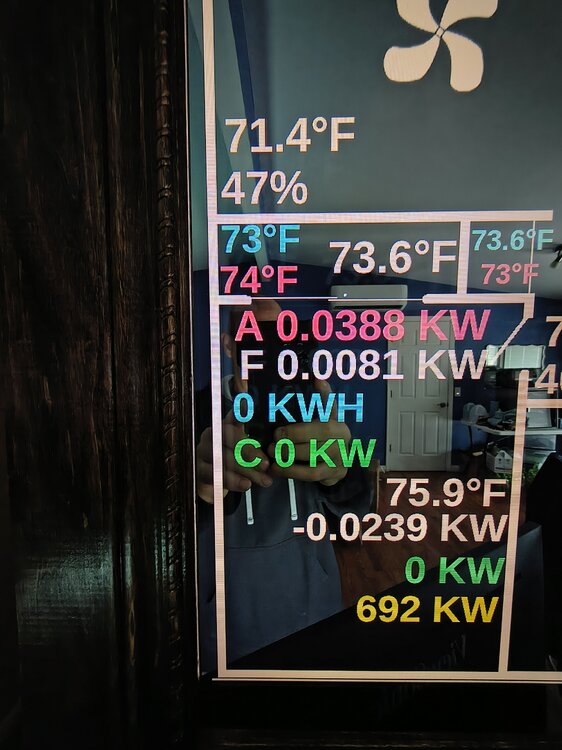
@sjenkins thank you for considering this the more I think of it my needs are very basic that I just need to pass a variable number to a GV number where the designation of that number is not really important. Right now I'm using the temperature node and showing previous reading which is a GV value. To give you some context I will attach a picture of some of my mirror display which has information that is there so I don't have to open an app all the time and is also there for my household to see. If there are no other people with use for this I'm ok keeping the workaround in place that I found. I hope you had a good vacation and again thank you for the consideration!
-
Well I guess this ended up not working so don't worry about it. One of the temperature nodes would work since it just displays as a number value in House Panel and I can add text before or after the values but unfortunately House Panel does not recognize the current "ST" value but it can see the "GV" values. So unless you would be able to have the current show up as one of the GV numbers with the temperature nodes that would work for me.
-
@sjenkins I use House Panel to create a Magic Mirror type display and I would like to pull some values from Home Assistant to Eisy to put on my display. The values I'm looking for would be KWH and KW. I use the old list way of setting up the plugin and maybe with the JSON string this would already be possible I just don't know how to use it. So basically I'm looking for a temperature type node that I can pull the value from a variable and have it display as power KW or KWH. Thank you!
-
Well mine started working again on it's own but I don't want to restart it to see if everything is good. @Guy Lavoie you can try and see if it will retrieve your devices now.


