


Geddy
Administrators
-
Joined
-
Last visited
Everything posted by Geddy
-
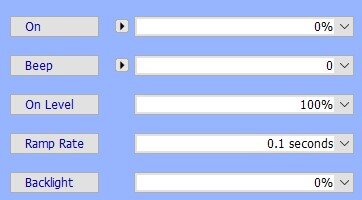
@Guy Lavoie there used to be a beep function. It wasn't very loud and I'm not sure how many used it. Did they take it away? No, I just looked in my eisy (6.0.5) and it's still there. Like the "Backlight" and "Ramp Rate" setting you have to press the label next to the setting to write it to the device. I didn't test it (don't want to goof up my working device(s). It's an annoying little beep/chirp if I recall. I used it for a while on one program and my kid made fun of how wimpy it sounded that you had to be right next to it if there was any other sound in the room to hear it. So I turned it off.
-
Clear the Java Cache (check all 3 boxes!) Download new start.jnlp from UD site (https://www.universal-devices.com/ - click on "My ISY") Run start.jnlp Remember to use the local user/pass you'll probably need to add the local connection in IoX Finder window. Add "https://eisy.local:8433/desc" (without the quotes). It will prompt you for the "device" user/pass. Otherwise, it will ask for portal user/pass. Personal preference. I'd think not since you're using the eisy already. It's more or less that the eisy r2 was a different configuration that UD went with for availability. They've even come out with the "eisy | lite" that is a cheaper unit due to the rising costs of memory and storage. Since the standard eisy sits between the two I'd think it would be safe to say it should carry the workload most need and will be updated by UD as long as "eisy" is their primary line of products.
-
Have you restarted the plugin then pushed the button on the hue hub within a little while (few seconds) of the plugin starting? It's as though it's not making that connection. You might want to put the log status for the plugin into "debug" mode and restart and let it settle. Then check the log for lines around when you restart the plugin to make sure it's connecting to the hue hub. Otherwise, there might be errors suggesting it cannot find it at a certain IP address. Make sure you do all this with the java admin console CLOSED. I'm not 100% sure, but if you delete and reinstall and it does connect and you keep admin console closed then it could bring back the bulbs in the same nodes and might not dissrupt your programs. Although, I would strongly suggest you make a backup of your programs: in the Java Admin Console right click on the "My Programs" folder (or whatever you might have named the "ROOT" folder in the program detail tab) select "COPY folder to Clipboard" (be sure you use "COPY" - should be last item in the menu) PASTE that text into a text editor (not a word processing app - for Windows I suggest Notepad) Save that text file - you now have a text represnentation of ALL your programs. You'll be able to search for names and repair the programs easier if they are broken from removing and reinstalling the plugin. I've not had experiance having to remove and reinstall the plugin (at least not recently). It coudl work. Mostly the issue is the plugin is not properly reconnecting with the hub. You probably need the IP address and then perform the pairing again for it to properly connect. It's odd that you said the node listing went away when you tried this before and came back when you removed it. You might be best off trying a support ticket with UD at this time. I know @xKing is shown as the developer for this plugin so maybe there are some other tricks to try, but I'd say we've pretty much exhausted the typical fixes that we've known from helping others here and experienced ourselves. I'm sure in the end it will be something simple and probably related to your network setup.
-
Sounds like @Guy Lavoie might have it right. If you see the nodes in the dashboard side then restarting admin console should pull them into that view. Honestly, I don't really use/rely on the Hue plugin or IoX to control the hue other than a timer to turn them on off so not sure how well it works or doesn't work otherwise. What version Hue Hub do you have? I honestly don't know all the versions they have, but know if it's the pro or a more recent hub that might not work with the older plugin and might need to get the newer one. I just run 0.1.11 since that worked when I first setup the eisy and my hue hub. I haven't tried with the newer version.
-
@PeterP you'll probably need to tell the plugin where to find the Hue hub. In the configuration area add a custom parameter: bridges Then the IP should be in this format: ["10.0.1.1","10.0.2.1"] Be sure you include the brackets [ ] and the quotes around the IP addresses of the bridges! From the plugin setup information: Since the plugin isn't looking for the hub to move you've got to tell it where to look and perhaps re-link it. To re-link just restart the plugin then press the top button on the Hue Hub within a few moments of pressing restart (if you have the old style hue hub it should only one button - I think. I don't have new hubs and haven't looked at them to see if they're different).
-
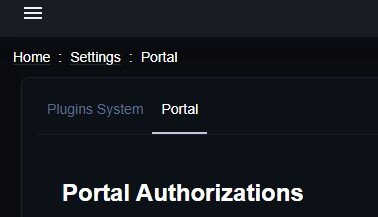
This is correct and has been this way since day one for Polisy and eisy devices. UD made the change post 5.x firmware on ISY994 to not allow to set a static IP address on the device due to the number of issues it created and support tickets that were created when people had static IPs set and replaced network equipment. What do you see if you're logged into eisy_ui and click the three bars on the top left? Go to settings then what do you see? Should see similar to this: If not, then I might agree about an update issue and you should have UD focus on that issue. Strange that @someguy is having IPv6 issues. Hopefully support is able to get those sorted out and make sure others don't suddenly have the same issue. I know UD made a comment when eisy_ui was in the early days that it did take over portal authorizations so you cannot confirm those in admin console anymore. Did either of you have the device only connected via wifi before the update? I wonder if you connected with a wire if that would resolve any issues.
-
@johnstonf for the issue about time to respond (even though 10 seconds isn't that long) you would want to look to see if you have anything set in the memory usage for the java process. Take a look here: https://wiki.universal-devices.com/Main_Page#Admin_Console_is_very_slow_or_hangs (note this was written a long time ago so the number can be increased depending on how much system memory you have. Java is not a friendly memory user and usually uses just enough it thinks to run. If you set a minimum level it could help your response time, but not guaranteed. For the "out of memory" usually this would indicate two possible issues. 1) Firmware and UI mismatch. Go to Help -> About and make sure Firmware and UI match versions. (Since you didn't mention what version are you running? With z-wave also need to know what version z-wave controller you have 2) Have you deleted devices recently or are some devices not connected/communicating with the ISY994? The program will have a broken line and just needs to have the device reselected then SAVE the program(s). You can right click on one of the lines that says "Out of Memory" and then "Edit" to go directly to that program. Check that all devices show up in the program. You might have some "//" comment lines if the device is missing. If you're not able to select the device then you have bigger issues and need to re-add the device. Then you can come back and fix the program. Since you haven't been updating the eisy once you have the errors fixed in the ISY994 you should (must) open a support ticket with UD (https://www.universal-devices.com/my-tickets) to get help bringing the system up to current status. There have been a lot of updates and several have bricked older devices that have not been updated along the way. Let's focus on fixing the ISY994 issues here. Then you can work with UD to bring the eisy up to date then work on the migration.
-
@oamber you'll need to find the .sate files for UD. Depending on your computer OS. Referenced in the wiki. Look for these and delete them all (make sure admin console and finder are closed before you delete these files). https://wiki.universal-devices.com/Main_Page#Admin_Console_Minimized/Invisible_and_Cannot_be_Restored (In macOS it looks like they might be in /var/folders (try typing open $TMPDIR in Terminal) - I don't know macOS, but Google told me that) Then if you're on Windows to right click on IoX Launcher shortcut and make sure the "Run:" option is "Normal Window"
-
The tab is a little stronger than you think. I've only had to perform an air gap reset on a few devices and surprised at how it really takes a little effort to pull the thing out. Of course as @hart2hart says a tiny screw driver really helps. What bugs me is having to hold it in until the beeping stops. That's the hard part. On the IoX side of things in theory when you link a device to IoX it has the option to "remove existing links". While that's not a true factory reset of the device it should overwrite any device links, but many have commented it can still leave ghost links so the air gap method is the best way to reset it. Too far down the development road to expect Insteon to make a new/different way to reset a switch. But a great suggestion to maybe take to their tech support!
-
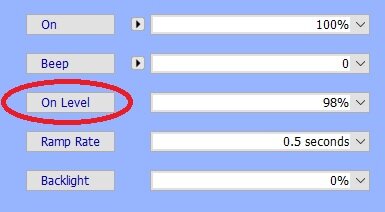
This is a longstanding "bug" (UI difference) that started in IoX 5.x many years ago. After you set the percent you need to hit the button NEXT to that value. This goes for most the options like on level, ramp rate, and backlight. Write changes is not doing what you think it should (I think it's mostly for battery devices). I don't ever click "write changes". There's also a UI issue that sometimes might not always show what the level you have set will be. That usually is for the backlight setting though (if I recall correctly). Also, please update your system. It will help keep things current and fix any unexpected issues otherwise. See the information in the current release area: https://forum.universal-devices.com/topic/46475-updated-software-available/
-
@JohnC I've given up trying to make this work with Apple. It was hopeful and I think I got it to work for a bit, but the plugin keeps expiring and it's not something I use enough to try to make it work right. Out of 40+ Insteon nodes I have maybe 10 worked as expected and those were just on/off switches. I couldn't get fans, dual or dimmer outlets to work. Having to set this up multiple times and knowing that so many didn't work I'd end up having to skip programming them and it was too time consuming to try to get things setup or not setup to mess with it. So the last time the plugin quit working (maybe a month ago) I just haven't done anything about trying to get it reset. Thankfully my Alexa setup still works as expected so I really don't need the Apple connection. Though it was nice to have the watch turn stuff on/off rather than having to "yell" at Alexa.
-
I would suggest a program to set the on level for the different times of day. From "x" time to "y" time be "w%" on value. I think I had something like this before, but not with a motion sensor. Just having lights to turn on less bright at times in the middle of the night so not to blind or wake people. Night-MWC - If From 11:30:00PM To Sunrise + 1 hour (next day) Then Set 'MWC' On Level 30% Else Set 'MWC' On Level 100% This is only for overnight and it will be 100% the rest of the time. You would want a different program for each on % you wanted to use during the day.
-
https://wiki.universal-devices.com/UD_Mobile#Show_Favorites_at_launch This used to be available. I'm not sure if Android is different now or not. I guess Apple doesn't work like it once did, but I just checked and the part that is crossed out saying deprecated did work (iOS 26.4.2 / UD Mobile 1.4.23) and would launch me to favorites. I haven't tried the shortcut method mentioned in the wiki. I 100% wish this was possible. And to have them setup their own favorite screen so things would just be a big remote and just have tiles to press to turn things on/off.
-
I would suggest opening a ticket with UD - https://www.universal-devices.com/my-tickets Since OP posted in ISY994 area I thought it more likely to be a license issue. I've tried Alexa to turn things on/off and it works fine. Might be localized, but nothing on Amazon's AWS status page to indicate issues in the US. Maybe UD can dig into it from their side to see if they have issues with AWS or see something device specific. @LVaden01 I wouldn't mention Mobilinc in the ticket since it is not "supported" with the eisy. But I use it and it still connected and could sync and control devices while remote. Agreed. This is odd if both are indeed not working. I'd open a ticket as well.
-
@lgilsenberg thanks. Yeah, just happened to look at that up. Apparently went to a paid part of Echo+Ring "Alexa Emergency Assist". Just what I'd want is to PAY to have Amazon listening for issues inside my house.
-
@SHM I noticed that sync got "slower" a while back, but it's never failed for me. I've probably got 40-45 nodes and 20 programs. iOS 26.4.2 UD Mobile 1.4.23 Sync took about 42 seconds running on the same network. Sync took about 1 minute 10 seconds on cell network at the same location. (I'll admit I live in a data challenged area) It seemed to stick on Nodeserver (running 8) and Matter (no devices). I don't see/know of any logs for the sync so I'd suggest opening a support ticket with UD (https://www.universal-devices.com/my-tickets) if it happens more often than not that you get errors.
-
Oh my goodness. Thanks for catching this and sharing. Yet another thing that Echo developers seem to think people would want/need to automatically have in their "smart" home. Sometimes it baffles me what the mega corporations change without any thought to the impact. Or if they had given thought to the impact they just don't care and do it anyway. Is there not a way to disable guard?
-
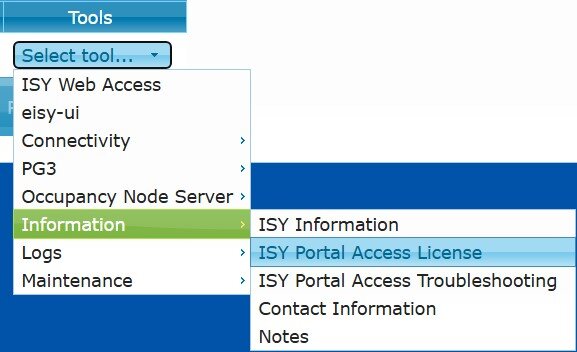
@Yoda since you say you can log into the portal you'll want to check that your license is still active. Log into the portal then under "Tools" check "Information" then "USY Portal Access License". Make sure it is current. If not there should be a button to renew. After you confirm the license is active make sure you're using the proper Alexa Skill (https://wiki.universal-devices.com/ISY_Portal_Amazon_Echo_Integration_V3). You might need to re-link the skill in the Alexa app. For a support are you using: https://www.universal-devices.com/my-tickets/ ? It requires Portal Login. Be sure you turn off any VPN or popup blockers for the browser. Use a different browser (perhaps a different browser on a different device - like phone or tablet). Try in private/incognito mode.
-
@SHM split this post out from a 3 month old thread that seemed to have been resolved. Plus, the old thread was for status updates. Your post seems to indicate sync issues (different issue than the thread you posted in). Are you local or remote to the system(s) when trying to sync? How large are the systems you are syncing with? (roughly how many nodes, programs, scenes?) What phone OS are you running? (is it updated?)
-
@aLf I don’t think MyQ works with eisy any more. There used to be a plugin, but MyQ closed their system to 3rd party API access. Many have moved to other options. You might find some suggestions in the “old” MyQ area: https://forum.universal-devices.com/forum/328-myq/ PS: edited subject to be more with what you posted so you might get more help.
-
@Papa C for this I would only focus on using admin console. It seems that it’s not working correctly so that’s why it returns when you sync on the app. It’s just downloading what’s in IoX. Be sure the devices are powered (and maybe on) when you try to remove them. Sometimes if they’re in lamps they are not reachable if the lamp is powered off or a switch is off to them. How large is your Zigbee network? You might need to find a way to reset the Zigbee network then factory reset all the bulbs. I might suggest you open a support ticket to get more ideas for this. Doesn’t seem to be many doing this…at least not many posts about it here.
-
I've never tried adding a hue bulb via Zigbee, but I've had other devices that I have removed successfully. If you right click on the device does it offer a Zigbee menu item with a > next to it? Click that and then choose "Remove from Zigbee Network". Then right click the device again and select "Delete". Then be sure you reset the bulb (turn it on/off 5 or 6 times - used to it was like on for 8 seconds, off for 2 seconds each time). The bulb should flash when reset is successful. Then I'd reboot the eisy (maybe just reload IoX admin console first, but a reboot should also clear things up). I think somebody else had posted some information about how to control colors for directly connected bulbs. Again, since I haven't done that I haven't kept up with that information. I prefer to keep the Hue Hub running and use the plugin to bring the bulbs into the IoX world. I don't change colors of my lights so not something I fiddle with.

-
A ticket is probably your best bet. Power cycle and running another update are the top troubleshooting tips to try. The only other issue would be a local network situation. Make sure the device is shown connected to your router. If wireless connection is being used try to change to wired if possible. Reboot modem and router (if separate devices). Let the modem bootup and connected before turning on the router. Are you running any special network situations (Firewalls or VLANs)? It's not "typical" for the eisy to just not reconnect. There are basically only two things that would keep it from connecting and that's network issue or hung update. I'd say more often than not it's a hung update. UD is better able to tell you what to look for in logs or other specific commands to attempt. Random (ssh) commands are not something I would expect users to suggest and certainly not something I'd randomly attempt if suggested as it could cause more problems. Also, if it was a simple update and something failed to complete this gives UD a data point for potentially what happened, what failed, and what they could change in a future update so it doesn't impact other users. Please post back once you've got it up and running with the Portal.
-
Don't try to go directly to that URL. Be sure you're logging into the eisy_ui first then click the menu and then settings then there is a portal portion you can click from there. There could be a hung update. Have you confirmed through my.isy.io that the device is not connected to the portal? If it's not connected then I would perform a power cycle (press and hold the power button until it turns red. Then unplug for 20-30 seconds. Then plug in and press power button (should turn blue). Wait 3-5 minutes for the device to fully boot and connect. If it's not reconnecting just by power cycling then I would use Admin Console and run update packages again. Allow it to run and should tell you to reboot, but might not. I'd let it run at most 20 minutes. If no changes or alerts then hit "reboot" in admin console. If it's not connecting after that then I would open a support ticket with UD. Do you happen to know what IoX version you were running before you did this update?
-
It's in the same spot as it is for the ISY994: https://forum.universal-devices.com/forum/339-current-release-announcements/ There has been a lot more moving parts for the eisy to update so UD is not posting as many update notices when minor updates are being released, but for most of the bigger updates it will certainly be posted there. I would suggest you hit the "Follow" button near the top right of the forum and setup alerts so you'll get emails and/or forum alerts when new posts are made. This way you will be able to keep the device updated as things progress. I believe the future plans for eisy_ui will be to see if an update is available within that system, but it is not as user friendly as it could be at the moment (IMO). Learn more about the plugins through the wiki: https://wiki.universal-devices.com/Eisy:User_Guide#Plugins_Store_Menu Although I think the wiki hasn't been updated to point you to the PG3 dashboard through eisy_ui, but the basics are the same. Log into https://eisy.local (use the portal credentials to log in) then go to the "store" under Plugins (press the 3 bars on the top left of the screen). Find the plugin you want to use and click on it. You can then purchase/install the plugin. Also on that page is usually a "more information" link that will take you to the github that would have a readme to help you with the setup. If you have specific questions about that plugin you can post them in that area of the forum (https://forum.universal-devices.com/forum/439-hunter-douglas/). I know @sjenkins does a great job of supporting people using his plugins. You should review some of the posts already there to help you along the setup journey. Glad the ISY994 -> eisy conversion went well. Great tips on the Schlage process. There's been many posts about people having issues with older locks and the eisy+ZMatter dongle.


